Syslog: php.exe in Notification Command is Not Working

Hi,

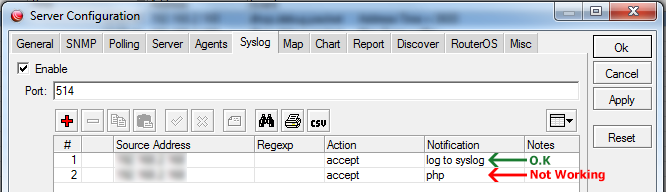
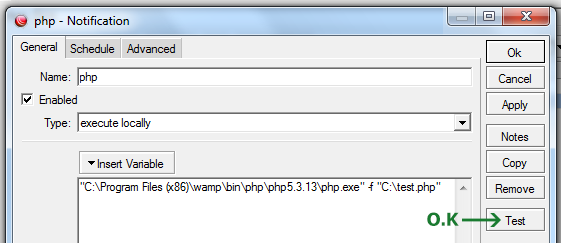
I want to run a PHP file when somone connects to MikroTik HotSpot. So I configure The Dude v4b3 and MikroTik. I can see the result in The Dude Syslog but when I configure new notification with the command below and the “execute locally” type, although the Test button is working o.k. but the real log is not working (my PHP file is not executed):
01.png
02.png
What is wrong here?

don’t enter a path there. only the “exe” name. this “exe” must be in a windows registered path.
to test if it will run, enter it’s name in your windows “RUN” dialog. if it doesn’t work there, it will not be executed in Dude

so you probably need to register the PHP folder path in the Windows environmental variables
http://www.computerhope.com/issues/ch000549.htm

Thank you for the quick reply normis,

The command below is working in CMD and with The Dude Test button:

"C:\Program Files (x86)\wamp\bin\php\php5.3.13\php.exe" -f "C:\test.php"

Why the full-path is not working in The Dude? (For my information)

I’ve just added it to path variable. So the command below is working in CMD too:

php -f "C:\test.php"

But now The Dude Test button is not working and it crashes in the real log:

4.0beta3 ACCESS VIOLATION at: 75639f40 
eip=75639f40 eflags=10216 
edi=22a0000 esi=22a1c68 ebp=28ad38 esp=28ad30 
eax=2244790 ebx=2244790 ecx=3ffe8aca edx=0 
log: 
cw: 1407 41a420 
sm: 51a17d 
sm: 430ede 
sm: 430ede 
backtrace: 
5e7413 
44396c
...

What am I supposed to do?

try to put the file next to php exe and don’t use path for it, or quotes. experiment with different ways

as you know, Dude has not seen updates for years, and crashing in certain situations is a known bug. there is nothing I can do. we are still planning a Dude 5 with a complete rewrite, so hope is not lost :slight_smile:
Unfortunately is not working.

So… Would you please suggest me a good Syslog that works with MikroTik?
I prefer something light like The Dude.

Thank you in Advance.

since RouterOS uses standard syslog format, I guess anything that you can find with google is fine:
http://blog.profitbricks.com/top-47-log-management-tools/

Thank you for your information normis.