TCP performance

Hello,

I’ve been seeing this topic repeated several times on the forum with no sufficciently good explanation or solution, so don’t blame me for reposting, I just want this working.

The problem is the TCP performance over various mikrotik routers.

I’ve already been solving this once, when I saw that our rb1100’s can’t really support TCP connection faster than around 5Mbit (UDP went well), it got solved by enabling the correct interface queueing method, as seen here: http://forum.mikrotik.com/t/tcp-performance-over-mikrotik/56922/1

Some other is here: http://forum.mikrotik.com/t/tcp-performance-behind-2-or-3-p2p-bridge/54687/1

Our problem is that the same is now happening on slower/simpler machines, especially rb711’s and rb433(AHs), where the fix with queue limits doesn’t work or even apply (as there’s no multiqueue).

For example, we have this setup:

rb433AH ~cable~ rb711 ~wifi~ rb711 ~cable~ rb433AH

UDP bandwidth test between the rb433s measures around 80Mbit (matches the actual wifi performance), single-connection TCP stays at around 15Mbit.

I wanted to rule out the problem with CPU on the bandwidth-measuring machine going 100%, so I connected:

linux box ~cable~ rb711 ~wifi~ rb711 ~cable~ linux box

and again measured only around 15Mbit of single-connection TCP.
I also successfully recreated the problem without any actual WiFi in the way (only a rb433AH forwarding the stuff). Also noticed that when more routers are added to the chain, performance gradually decreases to around 4Mbit.

Fixing and setting the Interface Queues to either sane or anyhow extreme values doesn’t help in this case, no matter how it helped with rb1100’s and similars.

For the questions:

  • Is there some good way to have good TCP single-connection performance on such routers?
    Does it look like a regression in v5 only for me, or others also see similar thing?
    Is there any good explanation of what is happening that the TCP congestion mechanisms get triggered?
    Is there any good debug info I can provide so this can finally get solved&closed&buried?

Thanks
-exa

EDIT: ofcourse everything that would hog CPU is turned off, no bridge, no firewall, no conntrack. No queues except for interface queues. No other traffic. Low route count (only those necessary for testing).
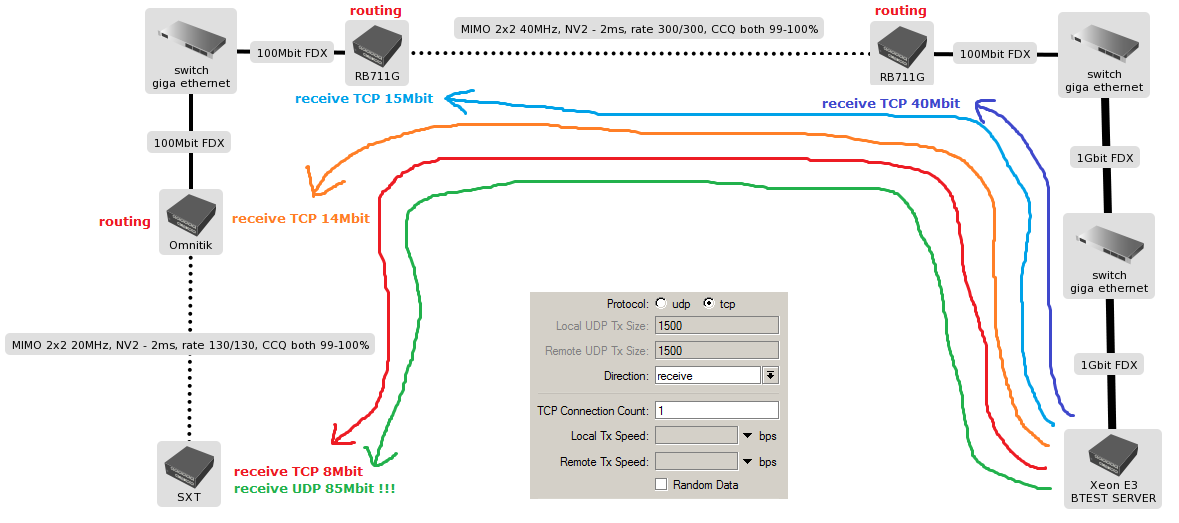
same problem.

no firewall, no conntrack.

Real Internet downloads has similar results. Please mikrotik to comment on the issue. This is a big problem.

Thanks for image, hapi!

The similarity between your and my measured speeds is actually striking me.

I can only add that NV2 doesn’t make the problem, it’s the same with whichever variant of 802.11a/b/g/n and/or nstreme.

Yes, I’m surprised that we have the same results. It is not a coincidence.

I fully agree. It makes no difference.

I am curious if it is only problem of v5 ROS, or it is also in lower versions…

If Mikrotik wont take care of serious problems, people find alternative which in a few months will be ubnt edgerouter with fully functional debian inside and possibilities of installing what you want - and is in linux enviroment…

Hello,

I´ve got same problem as MT users above… :confused:
Question for MT support: Could you help with this issue?

I have the same problem with 7 mtik on x86 machine in chain all are P4 single and some are dual core processors and PTP links in it to the end of tha chain. All are on N standards with nstream enabled and. ccq are around 100% and links are not longer than 5km each…

I have the same problem with 7 mtik on x86 machine in chain all are P4 single and some are dual core processors and PTP links in it to the end of tha chain. All are on N standards with nstream enabled and. ccq are around 100% and links are not longer than 5km each…

Same problem …

where is MK support? .. Help.. !!

Me too …

Your problem is the first wireless link. First RB711 get only 40mbps because you tested with internal btest so cpu max out. The problme is 15mbps in the first link. Did you tested with internal btest also? Btest is not very reliable, especialy if it run’s on windows. Solve first wireless link. And why do you test with only one TCP connection? It’s like you forced your car to work with just one cylinder. Event a simple web page have more than one connection…

Do you get these results in both directions?

I have similar returned value in more connected places usualy resolved by only 1 TCP connection (like downloading ex. from web) This result aren’t only BT, but in real downloading.

Hmm, but exa have same results on this: linux box ~cable~ rb711 ~wifi~ rb711 ~cable~ linux box
Problem is in 1 TCP connestion. Thats uses speedtests or downloads.
we tested it on 40HMhz 802.11N Duplex line with the UDP throughput in approximately 210Mbps, but 1 TCP only 15-20Mbps (the same speedtest on non-shaped line)

Try this for testing TCP connection between PC on windows station maybee more usefull for TPC than Bandwidth test MT. On Gigabit ethernet get more throughput than BT on PC.

http://www.roadkil.net/program.php/P5/CommTest

Is the radio link in the diagram above configured as nstreme dual? If not then it is a half duplex link which will potentially interact with TCP’s ACK timing window.

If nstreme dual has not been tried it might be interesting to see if it can affect the 40/15 Mbps differential above.

Yes, there’s practically no difference (test lab setup is symmetrical anyway.)

no, no, you mistake. 14Mbit test is normal? no!!!

Please mikrotik to comment on the issue.

Real downloading from the Internet is identical to btest.

Each piece of this network is affected. Not only for me.

UDP: over 80Mbit
TCP: under 10Mbit
This is not good. This is a disaster. Customers calling them is slow downloads.

Good day to everyone. Today I made following setup to investigate this issue:
linux box <-cable-> SXT5HPnD <----wi-fi—> SXT5HPnD <-cable-> linux box
I used RouterOS 5.21 with new bootloader. Between SXTs was just few meters. I used nstreme as wireless protocol. FTP download and TCP BTest (both in one tcp connection) showed nearly 80Mbit/s bandwidth. Maybe this issue is affected by hardware revisions in conjunction with ROS version or something?