Hello All,
This is my first time posting on the MT forums, I am Jorne from the Netherlands. I have been using Mikrotik for a little over 1 year now and have taken the MTCNA training.
I would like some help with bandwidth shaping on the Mikrotik. I hope some here can give me some insights to help solve this problem.
We have problems with the upload speed of all the 50/50 Mbits lines of 1 ISP, download is fine.
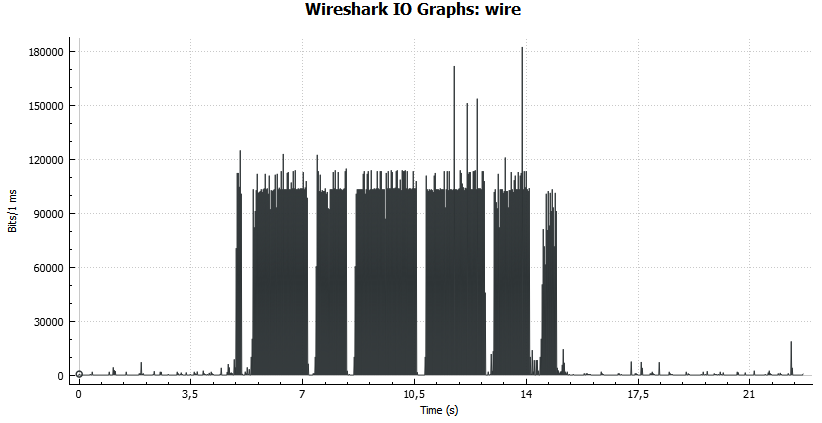
After talks with the ISP and analyzing the packet captures, we discovered that there is TCP congestion. Please see the image attached called TCP_SAW_50_50.
The ISP gave us a config example of a Cisco config with policing, while we already tried to shape with a Mikrotik we could not attain the line speeds so we leaned toward a different cause than no/bad shaping.
We used this example and the speeds are reached what we are supposed to reach.
This is the example they gave us, we changed it to 47Mbits/47Mbits.
policy-map custom-shaper-10000kbps
 class class-default
  shape average 9400000
policy-map custom-shaper-20000kbps
 class class-default
  shape average 18800000
So we once again looked at the Mikrotik way of shaping, and tried all the pre configured ones and a custom queue :
add disabled=yes limit-at=47M/47M max-limit=47M/47M name=queue_test1 \
    packet-marks=PACKET_MARK queue=pcq-upload-default/pcq-download-default \
    target=pppoe-out
And
add disabled=yes limit-at=47M/47M max-limit=47M/47M name=queue_test1 \
    packet-marks=PACKET_MARK target=pppoe-out
And
add kind=pfifo name=5050TEST pfifo-limit=1
add disabled=yes limit-at=47M/47M max-limit=47M/47M name=queue_test1 \
    packet-marks=PACKET_MARK queue=5050TEST/5050TEST target=pppoe-out
We tried the last one because of the very insightful guide:
https://wiki.mikrotik.com/wiki/NetworkPro_on_Quality_of_Service#TCP_Sawtooth_and_TCP_Synchronization
We also tried to set the bandwith at the Ether 1 (PPPoE port) to 47MBits.
This also did not help and we cannot seem to solve this problemen on a Mikrotik. We see the data going trough the queue, we see the queue maxing out. But the upload line speed stays at about 2/3 (36 Mbits).
Can anyone give any insight in what is different on how a Cisco shapes the traffic versus a Mikrotik, and how we can best configure the speed limitation on a Mikrotik to avoid the TCP Sawtooth problem visible in the attachments?
On a side note. A Mikrotik with PPPoE on the lines that are giving problems does attain the correct speed when testing with the builtin MT BW tester. It needs a moment to get stable but then it stays at 47 M TCP upload stream. We are using Mikrotiks 2011 and 3011 with 6.39.3 Bugfix.
Thanks again.
Please let me know if there is anything I share to make this clearer.
Kind regards,
Jorne
Netherlands