Hi tehre!
I’ve stet up SSH and Telnet ports on different ports.
How can I access via winbox to an an alternate ssh or telnet port (example 9091)?
Thanks!
Hi tehre!
I’ve stet up SSH and Telnet ports on different ports.
How can I access via winbox to an an alternate ssh or telnet port (example 9091)?
Thanks!
You need to access the router with winbox via the selected winbox port in /ip service
Or am I misunderstanding?
Yes!
I’ve configured alternative ports and I want to use them via another winbox session
For example if you are using winbox port 9900 then in the address box in winbox you would put 1.2.3.4:9900
thanks for your answer.
I will explain it again. It was my fault. Here is what’s my situation:
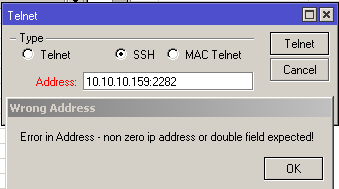
Thanks, this is a cosmetic bug. To achieve the same result, open the “new terminal” and type “/system ssh” command. There you will be able to enter the port, and result will be the same (because the Telnet → SSH window opens Terminal anyway)
Here is my results:
[admin@rb] > /system ssh
address: 10.10.10.159:2282
connect failed: Connection timed out

Welcome back!
[admin@rb] > /system ssh
address: 10.10.10.159:2282

SSH error
interrupted
           while resolving ip6: name does not exist
I can ping the destintation:
HOST                                     SIZE TTL TIME  STATUS
10.10.10.159                               56  63 103ms
10.10.10.159                               56  63 114ms
10.10.10.159                               56  63 118ms
10.10.10.159                               56  63 102ms
10.10.10.159                               56  63 105ms
    sent=5 received=5 packet-loss=0% min-rtt=102ms avg-rtt=108ms max-rtt=118ms
I’m using GrooveA-2Hn with RouterOS 5.17
what about when you try it this way?
/system ssh address=10.10.10.159 port=2282
thank you! 
PS: It’s working fine!