Hello!
There is a NAT rule for viewing IPTV from the provider’s UDP-to-HTTP server from outside the provider’s network (ie from the Internet):
;;; iptv for remote clients
      chain=dstnat action=dst-nat to-addresses="IP of the UDP-to-HTTP provider server" to-ports=4022
      protocol=tcp in-interface=ether1 dst-port=4321
ether1 is the interface to which the Internet and iptv come.
In the first case, everything works without problems. Users from the outside quite normally view IPTV using a modified playlist for the above rule.
Example address from a modified playlist: http://somehostname:4321/udp/238.1.1.4:1234
But there is a second case, with the second provider, which has absolutely the same scheme for providing IPTV to its users (via a UDP-to-HTTP server), but when using the same rule as described above, something goes wrong, namely, when a modified playlist is loaded , you will be asked to enter your login and password (which is not observed when viewing IPTV within the network).
The second provider does not have a visible restriction on the number of simultaneously viewed channels from one host or something similar.
Tell me, please, how to overcome the problem with the second provider?
It seems that I found out what the problem is, but I have not yet figured out how to circumvent it in a universal way.
The essence of the problem is as follows:
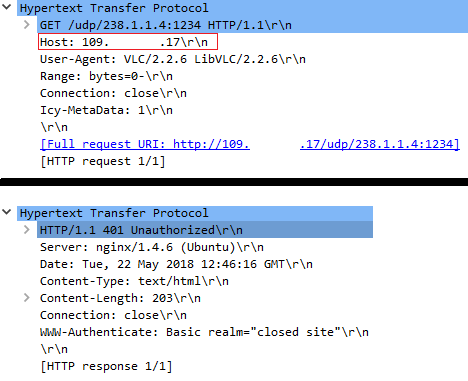
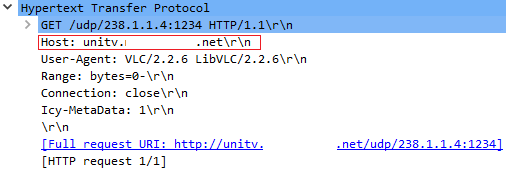
The second provider, with whom I thought the NAT rule did not work (and it worked quite correctly), uses for broadcasting IPTV software Astra, which does not like in the request from, for example VLC, in the Host field, the IP address, rather than the FQDN .
The image of failure (I sketched the IP address):
Successful query with the FQDN, after which the stream is work fine (the name is drawn):
Does anyone have any idea how to get around this disgrace without manipulating dns?
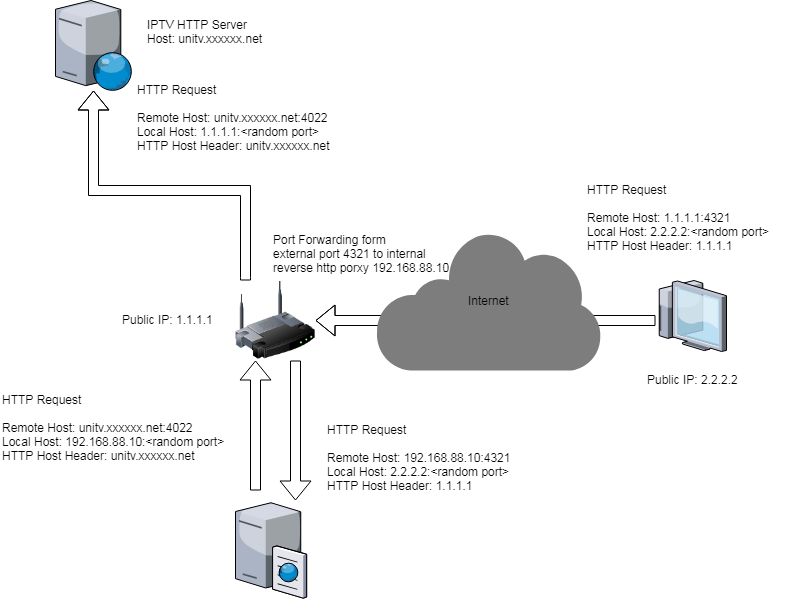
The Cleint sends his HTTP reqeust to your router, with the worng host header. The router forwards the request to the http reverse proxy. The proxy rewrites the host header and sends a reqeust to the iptv provider.
I used nginx a couple of time as a reverse proxy. Just google “nginx reverse proxy rewrite host header”, there are lots of articles out there.
Probably, the scheme is working (I did not check it), but it requires using an external server with a proxy. Is there a way to make the mikrotik as a reverse proxy (without external server)?