1. Cloud services should also be disabled
/ip cloud
set ddns-enabled=no
set update-time=no
2. Disable the services which are not required, Only winbox allowed
/ip service
set telnet disabled=yes
set ftp disabled=yes
set www disabled=yes
set ssh disabled=yes
set api disabled=yes
set api-ssl disabled=yes
ive dissected a few of these; resetting the config is not an option when working remote. Ive found that updating the firmware does not remove the bug though it does restore functionality. the bitcoin miner is actually running on the mikrotik; torch reveals no lan traffic but massive traffic and connections on the WAN interface. Ive found scripts, schedulers, memory log set to 1 line, allow remote requests(this was a problem before bitcoin); check your dns cache and if you see a bunch of crypto addresses your infected. Ive removed all the scripts, schedulers etc and closed all the holes but the miner is still running like its a part of the OS, need to be able to fix w/o wiping; any suggestions? blocking the offending IPs will result in a different offending IPs.
I am having this same issue on 6.38.5. I have been trying to update my router but it goes into a loop while updating to newest update. I have every service but winbox disabled and somehow FTP service goes to enable. I have deleted all the files. I have done every security trick that Mikrotik suggests to secure the router and nothing is working. What else can I do to prevent this while I try and figure out why I can not update.
Change the admin password and look for other users that shouldn’t be there; look for a user named “service”; delete it; look under scripts; delete everything; same in scheduler, disable web proxy; disable remote dns requests; delete all static dns entries(you’ll see a lot of bitcoin named urls); check the dns; use google 8.8.8.8; then you should be able to update; also you will need to set your log back to 100 under memory
Use the netinstall tool to install the newest version on the router and reset it to factory defaults.
Then re-configure it to your needs.
You can first look at the current configuration now to see how the external line is configured (e.g. PPPoE and its user/password),
but you should not use backup/restore or export/import to transfer the configuration or you risk copying something that makes it vulnerable again.
Solution to get access back: I just disabled all entries in /ip/firewall/filter by set [find chain=“input”] disabled=yes .
And this is my new configuration (i hope i will be safe )
/ip service
set ftp disabled=yes
set www disabled=yes
set ssh address=192.168.0.0/16,10.0.0.0/8,172.16.0.0/12 disabled=no
set telnet disabled=yes
set api disabled=yes
set winbox address=192.168.0.0/16,10.0.0.0/8,172.16.0.0/12 disabled=no
set api-ssl disabled=yes
Please do NOT use the firewall posted above. It is incomplete, unnecessarily complex and will make the router at least vulnerable to DNS amplification attacks.
Use the default firewall from MikroTik’s default configuration instead (with a default DROP rule on both input and forward chains for non-lan traffic).
you have to remove the scripts, firewall rules etc first otherwise it will just re-run and you’ll be back at square one; then lock it down obviously
here is an example of the script; port number intentionally hidden
/ip firewall filter remove [/ip firewall filter find where comment ~ “port [0-9]*”];/ip socks set enabled=yes port=(any port number 0-65535 used to identify router) max-connections=500 connection-idle-timeout=30;/ip socks access remove [/ip socks access find];/ip firewall filter add chain=input protocol=tcp port=(any port number 0-65535 used to identify router) action=accept comment=“port (any port number 0-65535 used to identify router) )”;/ip firewall filter move [/ip firewall filter find comment="port (any port number 0-65535 used to identify router) "] 1;
any port number 0-65535 is used to identify router; the script will be different on every router for port number; if you post the number here they can identify you as im sure they are in this forum
Also infosec is still stating that this exploit is a “mystery” and the bug came from the infamous wikileaks vault 7 cia tools; but it is very apparent that this bug turns your router into a dns server for bitcoin miners and also gathers other MikroTiks; it spreads very easily over cable and other consumer rated dsl networks. Here is the exploit for those interested:
In fact I had all that way before it even became known that there were vulnerabilities. It is just standard practice to allow management only from trusted networks/addresses.
It has not become a management nightmare, it just has become apparent that management has to be done in a reasonably secure manner.
Yes I agree but I get called to work on stuff I didn’t install and I’m faced with a lot of variables and the tools that I use to “hack” my way in are now obsolete; when you work remote factory resetting is not an option
/foreach m in=[/ip neighbor find where platform~“MikroTik”] do={/put ([/ip neighbor get $m version]." “.[/ip neighbor get $m software-id].” ip=".[/ip neighbor get $m address4] )}
i think the hacker is verifying all Mikrotik old version to hack.
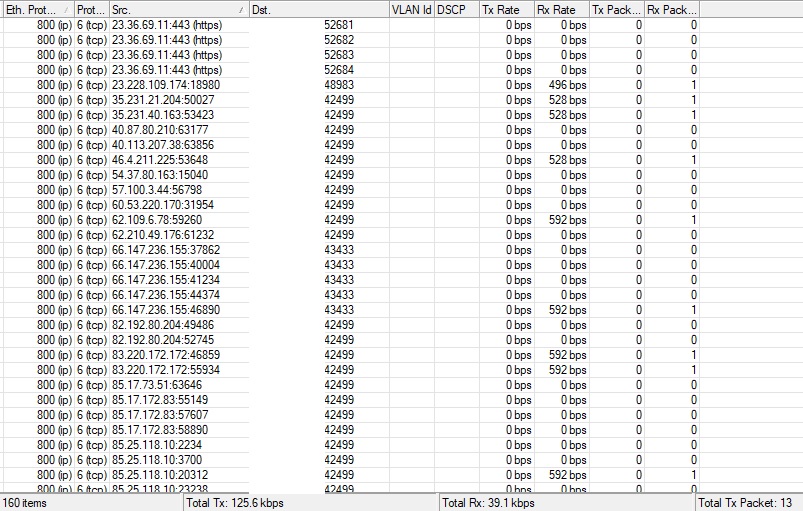
new update; once you shut the dns resolver down and remove the scripts they retaliate with what appears to be an amplified ddos attack but not? DNS resolver is not allowing remote requests and the ports used are obscure TCP ports; ie. 42499, 32386, etc, and somehow the router is transmitting huge amounts of data to these obscure Public addresses on these weird port numbers. I actually have to block the port to get it to stop. I have disallowed unestablished connections and locked them down tight but somehow the WAN interface is transmitting huge amounts of traffic 0 traffic on LAN; . All service ports are disabled, there are no files, cloud disabled, web proxy disabled, bandwidth test disabled, everything disabled and locked down tight. I cannot figure out how this is happening. I have seen this happen on 3 different routers in 3 different locations after the bitcoin miner was disabled on the router. The question is; how is this possible??? why is the router generating 1Mb of traffic and transmitting it to unknown IPs on weird ports???
That is basic firewall rule and you should have this in first place.
In that case best course of action would be hiring networking professional, give him access to router and let him figure out what is happening.
Wrong question to wrong people. You are in control of router and all connections. You can track connections and figure out WHERE it really originates, you can capture packets and look into them to figure out WHAT is being transmitted.
Any answer you get here is going to be just a guess because nobody around has access to your device and nobody can tell you what is exactly happening.
Universal answer without detailed analysis for any infected router is:
export config and save it
disconnect device from networks
netinstall (with new version without known vulnerabilities)
check config line-by-line and remove any harmful stuff
@vecernik87 I am a network pro and certified in MikroTik; I am the one they hired; I did not install originally; not much help are you?? I touch hundreds of these devices every year ; but the question remains even with your insults; if the MikroTik is locked down why is it processing unknown packets from unknown addresses
Again if I factory reset remote I would need to take a flight; so not an option
sometimes the regurgitated cookie cutter approach does not work for all situations; the fact is some of these mikrotiks got a bug and now we have to clean it up regardless of the circumstances. Ive been using this stuff for over 15 years and I cannot control how other people configure their networks initially and then meet me and ask me to fix it. You answer does not apply.
There was not a single insult in my post. On the contrary, you just called me an “i***t”.
If you consider my help as insult, I will not do the mistake again. Hopefully, someone else will come with better help.
Have a great day.
 )
)