The attachment is a picture of my mikrotik graph analysis of the two interface. From my understand of the graph, the LAN is requesting a lot from the WAN, but the WAN is replying the LAN with lesser bandwidth, as a result, my clients are receiving very small amount of bandwidth, which make their browsing to be very slow. I get a lot of complains, I have tried everything I could, but the result remain the same. I called my ISP, they replied and said everything is good from their end. This is really affecting me. I suspect there is a virus on the network that my updated anti-virus can not detect. I have done everything (Reformatted all client computers, changed clients LAN cards) but nothing has worked. The simple queue list shows that, some client computers are requesting a lot, even when they are not been used. I know there is something wrong with the network, but I don’t know what to do to remedy the situation. I don’t have enough knowledge with mikrotik, I’m just a basic user. Please HELP me. What will you do if you’re faced with this type of problem? Your response will be very much appreciated. Thanks
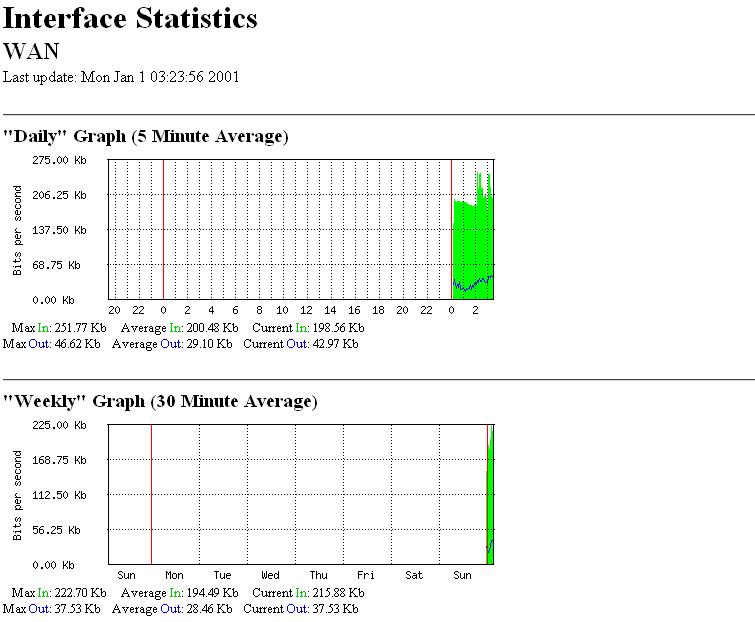
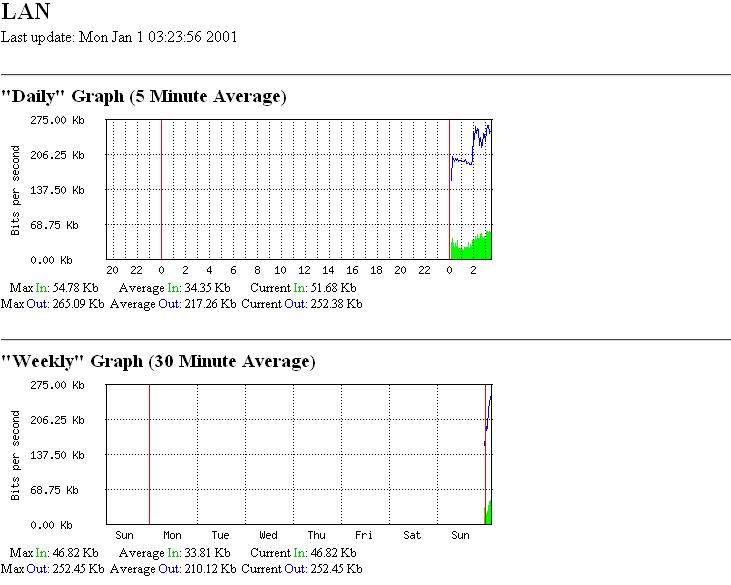
The simple queue list shows that, some client computers are requesting a lot, even when they are not been used.
Are the computers running? If they are not turned off (powered down), they will request stuff on their own, especially Microsoft Windows products. They don’t need you, HU-MAN! Or as the Crystal Entities on Star Trek called us “ugly bags of mostly water”.
There are Microsoft updates that must be downloaded, and if you are a responsible IT, then the Microsoft computers have anti-virus software, and that software will request updates without user intervention. And mine has HP printers, and they request updates, and my Logitech mouse does too…
Yes. But I have always been using the same computers, with the same software(anti-virus or microsoft products), things just changed recently. What did you noticed from the graph?
I notice nothing unusual. But my network is pretty busy all the time. I have no idea how many computers are online on your system. If there is just one, then that may be excessive. If there are a 100, then that is really slow.
As I recall, your WAN interface will report all traffic on the interface, whether it is traffic for your router or not. The traffic not bound for your router does not go through.
30 system
Then that is about right. See my edit above about your WAN connection. It will show all traffic on the interface as I recall. Only local traffic should get through.
I was errant in my response. I omitted a very important thing. Insure your firewall is set up correctly. See the docs on the firewall. Near the bottom is an example section called something like “Protect your Router” and “Protect your Customer”. At least use the “Protect your Router” entries. That traffic could be a brute force hack attempt on your router.
EDIT: Take a look at your log. If you have entries like this:
06:38:04 system,error,critical login failure for user admin from xxx.xxx.xxx.xxx via ssh
where the ip address is not yours, then that is a problem.
EDIT2: Actually, the edit above is not exactly true. In that case, you have a challenge. If you see this:
06:38:09 system,info,account user admin logged in from xxx.xxx.xxx.xxx via ssh
where the ip address is not yours, THEN that is a problem! 
Thank you very much for your input. No such message from the log. At a point during my troubleshooting, i installed kaspersky anti-virus on some of the client computers, kaspersky always complain of a network attack from some computers on the network that also has kaspersky installed on them. Kaspersky didn’t seems to detect any virus on the individual computer, but always alert me about a network attack, until i removed it and installed avast. Didn’t you see any reason for that?
I don’t believe so. That would show on the localnet traffic, and there is not much of that for 30 users. If the router is performing a srcnat or masquerade (check “/ip firewall nat”), and you have no dstnat rules, then your computers should be safe from outside attacks.
I am not familiar with the particular anti-virus that you are using. How does it “complain” about attacks, and where is it reporting they are from? Localnet ips?
This is the print output i got from “ip firewall nat> print”: chain=srcnat out-interface=WAN action=masquerade.
The kaspersky anti-virus I’m using alert me by popping up a message box with the message "a network attack was prevented from 192.168.0.xx, a local network ip address. I saw this recently on the log “echo: system,error,critical login failure for user 3~ via local”
“via local”? That is the serial port.
Check the 192.168.0.xx computer carefully. You may have a Trojan or some other malware in it.
How can i disable SSH or remote login to my router?
This is a modified version of what I use. I edited this for security:
/ip firewall filter print
0 chain=input action=drop connection-state=invalid
1 chain=input action=accept connection-state=established
2 chain=input action=accept protocol=icmp
3 chain=input action=accept protocol=udp
4 chain=input action=accept src-address=xx.xx.xx.xx/yy
5 chain=input action=drop
Change xx.xx.xx.xx/yy to the ip or network that you want to access the router from. Your network. You can use multiple lines for that if you wish to access the router from more than one computer or network. Just insure they are before that last line. Order is important here.
Do not enter the last line (5) until you are certain all other lines are correct.
Thank you!
These is what I use, what need to be change?
0 ;;; Drop invalid connections
chain=input connection-state=invalid action=drop
1 ;;; Allow esatblished connections
chain=input connection-state=established action=accept
2 ;;; Allow related connections
chain=input connection-state=related action=accept
3 ;;; Allow UDP
chain=input protocol=udp action=accept
4 ;;; Allow ICMP
chain=input protocol=icmp action=accept
5 ;;; Allow connection to router from local network
chain=input in-interface=!WAN action=accept
6 ;;; Drop everything else
chain=input action=drop
Looks good to me, as long as everyone on all interfaces except WAN can be trusted.
I don’t trust all the systems on the LAN. For example, below is a RouterOS I just installed, I connect the LAN to the same network so that I can configure it. The LAN is already pulling traffic. The WAN is not connected yet, so where is it getting the traffic from? I think this is a bit weird. What did you think?
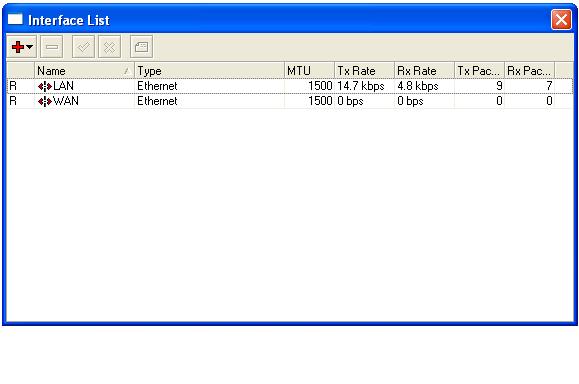
That is normal for the reasons I mentioned in my first response. The users on the LAN interface see your router as the gateway to the internet, so any traffic they have (updates, NTP, etc.) for other than localnet goes to the gateway (your router).
If you do not trust the LAN interface, add this rule:
/ip firewall filter
add chain=input action=drop interface=LAN place-before=5
That should block any attempts at establishing an input connection from the LAN interface with the router. Forward chains from the LAN interface are ok. That is how they get to the internet. Insure you do not gain access solely from the LAN interface. It will lock you out. Then it is null-modem-cable time.
Sir, the computers on the network are not configured to work with the new installed router yet, it is just a testing router, yet it is pulling traffic, I thought no computer on the network knows if it is a gateway or not, so won’t send request through it. Why is it still pulling traffic.
This are the rules for the new router I installed.
0 ;;; Drop invalid connections
chain=input connection-state=invalid action=drop
1 ;;; Allow esatblished connections
chain=input connection-state=established action=accept
2 ;;; Allow related connections
chain=input connection-state=related action=accept
3 ;;; Allow UDP
chain=input protocol=udp action=accept
4 ;;; Allow ICMP
chain=input protocol=icmp action=accept
5 ;;; Allow connections from 192.xx.xx.xx
chain=input src-address=192.xx.xx.xx action=accept
6 ;;; Drop connection from the LAN interface
chain=input in-interface=LAN action=drop
7 ;;; Drop everything else
chain=input action=drop
But still pulls traffic, How can I stop it from doing that. Sorry for the several questions.
Thanks for all your input.
Try using this to check:
/tool sniffer
set interface=LAN
start
(wait a bit)
stop
/tool sniffer packet
print
That should show you the traffic.
ADD: OMG! I forgot Yahoo messenger! And all the other messenger services. If you see a bunch of weird ports, don’t be too concerned.