As per the title, for the life of me I cannot use the mac address of the Virtual WLAN I have setup to access both the internet and router OFF the bridge so to speak.
Discover does not work either (probably related).
I can connect to the Virtual WLAN no problem and get internet access.
I can connect to the router and configure it via the LANIP of Virtual WLAN using IP/winboxPort and MT Iphone APP no problem.
I cannot connect to the the router and configure it via the MAC ADDRESS of the Virtual WLAN.  (
(
Is the vap part of the bridge under ports?
Of course not LOL.
Its for access OFF the bridge. 
But fair question seeing as I am guilty of not providing proof
testaccess is the name of the virtual WLAN I am using.
…
# dec/29/2021 23:49:07 by RouterOS 7.1
# model = RBcAPGi-5acD2nD
/interface bridge
add ingress-filtering=no name=bridgegym vlan-filtering=yes
/interface ethernet
set [ find default-name=ether2 ] name=emergaccess
/interface vlan
add interface=bridgegym name=cerv49 vlan-id=51
add interface=bridgegym name=homeVlan vlan-id=12
add interface=bridgegym name=mediaVlan vlan-id=40
/interface list
add name=manage
/interface wireless security-profiles
set [ find default=yes ] supplicant-identity=MikroTik
add authentication-types=wpa2-psk disable-pmkid=yes eap-methods="" \
    management-protection=allowed mode=dynamic-keys name=media_Security \
    supplicant-identity=""
add authentication-types=wpa2-psk disable-pmkid=yes eap-methods="" \
    management-protection=allowed mode=dynamic-keys name=home_Security \
    supplicant-identity=""
add authentication-types=wpa2-psk disable-pmkid=yes eap-methods="" \
    group-key-update=24m mode=dynamic-keys name=Cerv_key supplicant-identity=\
    ""
add authentication-types=wpa2-psk eap-methods="" mode=dynamic-keys name=\
    testprofile supplicant-identity=""
/interface wireless
set [ find default-name=wlan2 ] band=5ghz-onlyac channel-width=20/40mhz-Ce \
    country=canada disabled=no frequency=5500 mode=ap-bridge name=homeWLan \
    security-profile=home_Security skip-dfs-channels=all ssid=Home_Gym \
    wireless-protocol=802.11 wmm-support=enabled wps-mode=disabled
set [ find default-name=wlan1 ] band=2ghz-g/n basic-rates-b="" country=canada \
    disabled=no frequency=2437 mode=ap-bridge name=mediaWlan rate-set=\
    configured security-profile=media_Security skip-dfs-channels=all ssid=\
    Entertainment supported-rates-b=11Mbps wireless-protocol=802.11 \
    wmm-support=enabled wps-mode=disabled
add disabled=no keepalive-frames=disabled mac-address=.............. \
    master-interface=mediaWlan multicast-buffering=disabled name=testaccess \
    security-profile=testprofile ssid=testaccess wds-cost-range=0 \
    wds-default-cost=0 wmm-support=enabled wps-mode=disabled
add disabled=no keepalive-frames=disabled mac-address=.................. \
    master-interface=mediaWlan multicast-buffering=disabled name=HVAC_WLAN \
    security-profile=Cerv_key ssid=Cerv2 wds-cost-range=0 wds-default-cost=0 \
    wmm-support=enabled wps-mode=disabled
/interface bridge port
add bridge=bridgegym frame-types=admit-only-untagged-and-priority-tagged \
    interface=homeWLan pvid=12
add bridge=bridgegym ingress-filtering=no interface=ether1
add bridge=bridgegym frame-types=admit-only-untagged-and-priority-tagged \
    interface=HVAC_WLAN pvid=51
add bridge=bridgegym frame-types=admit-only-untagged-and-priority-tagged \
    interface=mediaWlan pvid=40
/ip neighbor discovery-settings
set discover-interface-list=manage
/interface bridge vlan
add bridge=bridgegym tagged=ether1,bridgegym untagged=homeWLan vlan-ids=12
add bridge=bridgegym tagged=ether1 untagged=mediaWlan vlan-ids=40
add bridge=bridgegym tagged=ether1 untagged=HVAC_WLAN vlan-ids=51
/interface detect-internet
set detect-interface-list=manage internet-interface-list=manage \
    lan-interface-list=manage
/interface list member
add interface=homeVlan list=manage
add interface=emergaccess list=manage
add interface=testaccess list=manage
/ip address
add address=192.168.1.71/24 interface=homeVlan network=192.168.1.0
add address=192.168.68.2 interface=emergaccess network=192.168.68.0
add address=192.168.6.1/24 interface=testaccess network=192.168.6.0
/ip dhcp-client
add interface=bridgegym
/ip dns
set allow-remote-requests=yes servers=192.168.1.1
/ip route
add disabled=no dst-address=0.0.0.0/0 gateway=192.168.1.1
/ip service
set telnet disabled=yes
set ftp disabled=yes
set www disabled=yes
set api disabled=yes
set winbox address=192.168.1.0/24,192.168.68.0/24,192.168.6.0/24 port=9091
set api-ssl disabled=yes
/system clock
set time-zone-name=America/Halifax
/system identity
set name=capac-gym
/system ntp client
set enabled=yes
/system ntp client servers
add address=192.168.1.1
/system routerboard settings
set cpu-frequency=auto
/tool mac-server
set allowed-interface-list=none
/tool mac-server mac-winbox
set allowed-interface-list=manage
I don’t see DHCP server running on testaccess interface … and I’m not sure if a modern IP-only device is willing to communicate over MAC if it doesn’t have IP address set? Or even if it does have APIPA address (self)set, I’m not sure if it would gladly accept traffic from device seemingly part of another IP subnet (even if the traffic is proper L2 unicast traffic).
Or are you setting IP address on wireless device by hand? BTW, it seems you might have similar issue with ether2, but it’s far more common to set IP address by hand on wired interfaces on a personal computer …
First off, I am not gonna read that export.
This is my question:
You are using the Tik App on an iPhone and wanna communicate with a Tik using MAC address?
If so…
/tool mac-server
/interface list
Is you VAP in a list that matches?
@ MKX,
No DHCP its strictly an AP switch approach no routing.
No firewall rules either and thus implicitly all is accepted.
First I am using the IPHONE with a manually set IP address of 192.168.5.5 to connect via the SSID to the virutal WLAN network.
This is successful and I can get internet and browse with no issues.
I then use the IPHONE MT App to connect to the AP itself for config purposes.
I can select the IP address of the VWLAN 192.168.6.1:9091 and with proper username and password gain entry and config the capac.
When I try to do the same just using the MAC ADDRESS of the VWLAN entry/connection is refused.
+++++++++++++++++++++++++++++++++++++++++++++++++++++++++++++++++++++++++++++
@ gotsprings, no worries, it wasnt long trust me!
In any case, the TOOLS /mac server/ winmac server is set to use interface “manage”
The two members of this interface are
homevlan (trusted) add interface=homeVlan list=manage
Virtual WLAN add interface=testaccess list=manage
The testaccess associated subnet is included in the winbox allowed addresses and the Users allowed addresses.
Just wondering … just leaving it as information
In my setups, I see 2 groups of MAC addresses for VAP’s. The first group is derived from the master WLAN and incremented. The second group starts with 02:00:00 (locally administered MAC address ???)
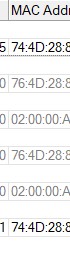
Those “locally administered MAC addresses” for WLAN did not work in one specific ROS release, they were on the “even” WLAN numbers. (Can’t find it back, years ago).
So just wondering if this might interfere or not.
EDIT: found it back … was ROS7.0beta8, not directly related, just gut feeling
http://forum.mikrotik.com/t/v7-0beta8-development-is-released/140169/1
Hi bpwl, anything is possible as I think my config is as good as it can get!
In my case…
Mac of AP C2:AF:44:48:B5:C4
Mac of parent WLAN C2:AF:44:48:B5:C6
Mac of virtual WLAN C4:AF:44:48:C7
Adjusted to protect the innocent but the colorations show the relative change from the AP itself.
Adjusted C2:AF to C4:AF ???  Or was it C4:AF to C6:AF what I expected.
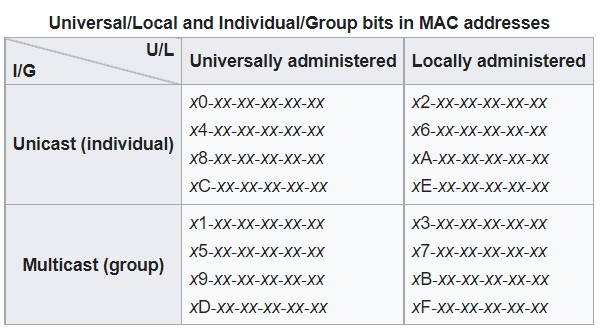
https://en.wikipedia.org/wiki/MAC_address
The representation of the numbers is not accurate to what I actually have on the devices.
What I did represent was the relative difference from the AP itself to the two WLANs.
Dont get hung up on the actual numbers.
The top unicast chart applies, all looks good, no weird numbers sorry for the confusion.
DHCP has little to do with routing, setting gateway address, DNS server address(es) is optional. Since your testaccess interface is actually not bridged to the rest of interfaces, it doesn’t really fall into general “no routing” category.
MAC access (telnet and winbox) is not governed by firewall, firewall is IP function.
Which particular SSID, testaccess? And where does 192.168.5.5 come from, it doesn’t correspond to any of IP subnets shown in configuration export.
I’ve got a feeling of a whack-a-mole … so describe exact use case and post some diagrams (does this sound familiar?) … I mean really, you’ve got a few SSIDs configured and the way you explained use case it doesn’t make much sense to me.
OK for the MAC addresses.
Is MAC access via WLAN possible at all ???
OK this does work, with the WLAN MAC and as it is bridged also with the bridges MAC address.
Disconnected WLAN1 from bridge. (no VLAN here). Set WLAN1 in LAN interface list. WLAN1 has no own IP address (was on bridge)
MAC address does NOT appear in WinBox neighbors ! But as I know the MAC address I can connect!
Changing bridge VLAN settings … no … this MT is in actual use on the other WLAN’s. Sorry.
???
Not clear what is really going on. What happens if part of the WLAN master is used in bridge VLAN filtering, can other VLAN on the interface still go standalone?
WLAN14/VLAN40 is not a clean config. (PVID 40 should not be there?)
What happens to the actual VLAN if the tagged interface is removed from the bridge (did not check “Current tagged”/“Current Untagged”)
???
This is not difficult people and Mkx  ,
,
The MEDIA WLAN is my 2ghz main wifi network on this capac with pvid of 40. (media vlan)
The HOME WLAN is my 5ghz main wifi network on this capac with pvid of 12.
The HOMEWLAN is also connected to the trusted VLAN on my entire network and thus the IP address of the CAPAC is on this subnet.
I have two Virtual WLANs running off the parent MEDIA WLAN,
One is for an HVAC device which has its own vlan pvid=12
One is for OFF bridge access to reach the router if the bridge config is not reachable/broken! (USE CASE FOR MKX)
and this virtual wlan is called “testaccess”
To complete the picture.
Ether1, both WLANS and the HVAC virtual WLAN are ON the bridge.
ETHER2 is OFF the bridge
VWLAN testaccess is OFF the bridge.
+++++++++++++++++++++++++++++++++++++++++++++++++++++++++++++++++++++
What more do you need ??
@anav: did you try to connect while statically setting wireless device an IP address from testaccess’ subnet? According to shown config it should be something like 192.168.6.x/24 … your use case description mentioned 192.168.5.5…
When you connect to testaccess, does the TikApp show cAP in the list of detected devices?
Beware that emergaccess interface IP address is set without subnet mask so you might have problems using it …