Hello, I just recently setup a business internet connection with my ISP and got a static IP. I have a Mikrotik hap ac2 running 6.46.8
A bit confused as to what is my actual static IP: whatismyip.com says my IP is 5.x.x.x, but RouterOS says it got 100.x.x.x from the cable modem (originally the cable modem was in router-mode, but after the ISP rebooted it remotely it now seems to be a dumb modem and gives me 100.x.x.x which is not a private IP). What is actually going on?
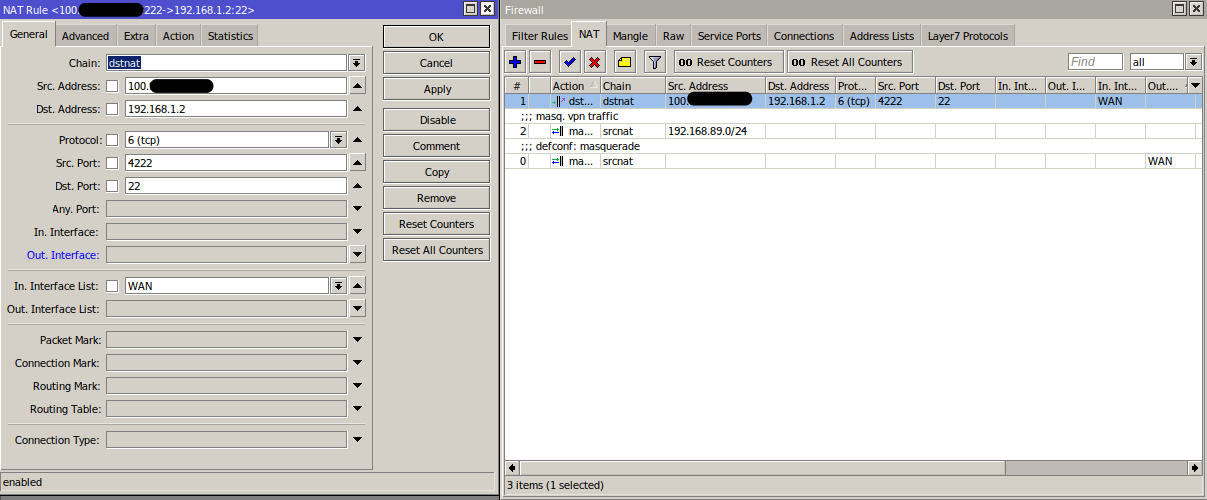
So I assume that 100.x.x.x is my real static IP, because the mynetname.net dynamic DNS resolves to this. However, I set up this simple ssh rule, and when I try to ssh in from a VPS, it just waits and waits for a long time. Also, when I click on the Statistics tab for the NAT Rule, I see no incoming packets. Haven’t I set it up correctly?
Also, when I ssh 100.x.x.x -p 4222 from my LAN, that doesn’t work - ssh says Connection refused. So I really have to use a VPS to test this. Why? (I must be missing some basic networking knowledge)
[public port]: the port that the remote computer will connect to
[public IP]: the public IP address that is allowed to connect via this port forward (if left behind, all public IP addresses can connect
[private port]: port that the service is running on
[private IP]: IP that the service is running on
Maybe one of the other Filter rules is blocking something? I have no idea what half of them do, I only setup basic iptables and forwarding once on Linux.
 0  D ;;; special dummy rule to show fasttrack counters
      chain=forward action=passthrough

 1    ;;; defconf: accept established,related,untracked
      chain=input action=accept connection-state=established,related,untracked

 2    ;;; allow IPsec NAT
      chain=input action=accept protocol=udp dst-port=4500

 3    ;;; allow IKE
      chain=input action=accept protocol=udp dst-port=500

 4    ;;; allow l2tp
      chain=input action=accept protocol=udp dst-port=1701

 5    ;;; allow pptp
      chain=input action=accept protocol=tcp dst-port=1723

 6    ;;; allow sstp
      chain=input action=accept protocol=tcp dst-port=443

 7    ;;; defconf: drop invalid
      chain=input action=drop connection-state=invalid

 8    ;;; defconf: accept ICMP
      chain=input action=accept protocol=icmp

 9    ;;; defconf: drop all not coming from LAN
      chain=input action=drop in-interface-list=!LAN

10    ;;; defconf: accept in ipsec policy
      chain=forward action=accept ipsec-policy=in,ipsec

11    ;;; defconf: accept out ipsec policy
      chain=forward action=accept ipsec-policy=out,ipsec

12    ;;; defconf: fasttrack
      chain=forward action=fasttrack-connection
      connection-state=established,related

13    ;;; defconf: accept established,related, untracked
      chain=forward action=accept
      connection-state=established,related,untracked

14    ;;; defconf: drop invalid
      chain=forward action=drop connection-state=invalid

15    ;;; defconf:  drop all from WAN not DSTNATed
      chain=forward action=drop connection-state=new
      connection-nat-state=!dstnat in-interface-list=WAN
Do you see any hits on the rule? Are port forwards supported by your ISP (especially because of the two IP addresses)?
In addition, you might want to test without the dst-address.
Generally speaking, NAT rules have properties of two kinds:
matching criteria … which define which packets such a rule will actually affect. Most properties are matching criteria
action properties … what exactly should NAT change. Only to-* properties are action properties (to-address, to-ports). These are applied depending on action. If action=dstnat, then to-* values will replace values from corresponding dst-* properties while if action=srcnat, to-* values will replace values from corresponding src-* properties (the to- means: change packet field value to …).
In case of DST-NAT, dst-address is matching against packet’s original destination and in your case it will be 10.x.y.z … which means DST-NAT rule won’t match. Same goes to src-port property which will match only if SSH client accidentally decided to use port 4222 on its side.
If you’re trying to use port 4222 on WAN side and forward it to standard SSH port on LAN server, then also dst-port property won’t match.
So the correct NAT rule would actually look like this:
What is totally weird is if I go to Quick Set and enable VPN Access, and switch my phone to 4G and try to use that VPN, it actually works! It looks like I’m browsing from home! But it seems to be set on a different subnet, 192.168.89.x instead of 192.168.1.x, which I will have to fix too. So maybe my ISP is doing something extra?
Thanks for the detailed critique. The wiki has a great explanation about hairpin NAT and why it doesn’t work by default. I knew about this issue for years but I had no idea how to actually figure out what was going on. How do people troubleshoot these kinds of things? How does the wiki article author actually confirm that it is the client on the LAN that rejects the response from the server? What are the Linux commands for this?
Run packet capture (i.e. wireshark) on linux client and try to establish ssh connection without hair pin NAT. You will likely see SYN packet directed towards WAN IP and SYNACK directly from LAN server. And that’s about how you can actually see what’s happening. The rest (SYNACK packet rejection by OS IP stack due to src address not belonging to any known connection regardless the state) can be deducted from knowledge about how IP stack works. If you configure iptables on linux client with some permissive rules you might actually see some counters (probably for invalid packets) increase.
It depends. Is X in 100.X.x.x between 64 and 127? If so, it’s CGNAT range and it’s not public either. Then your ability to forward ports would depend on ISP first forwarding ports to you from real public address.
You have to ask ISP. They may be able to give you public address directly. Or at least do NAT 1:1, so you wouldn’t really have it, but every packet to it would be forwarded to address on your router, so most things would work ok. If you are really unlucky, they may have no free addresses left. Whether it will cost extra or not, and how much, thats another thing that varies greatly.
In worst case, if ISP can’t help you, it’s possible to find some external third party that can provide at least few forwarded ports from their public address, by using some tunnel between you and them. But it’s far from ideal.
If ISP provides IPv6, it’s right way to go, but unfortunately it’s more long-term solution, you won’t be able to easily connect to it from IPv4-only networks, and there’s still too many of them.
a) They changed dhcp/pppoe (whatever you have) config and you now have public address on your router
b) They just forward ports from public address to your 100.x.x.x, i.e. NAT 1:1.
No no, I still have a CGNAT IP assigned by DHCP to my router. It’s just that there’s this additional, totally unrelated IP which has all ports forwarded to me. Or maybe it isn’t forwarded.
Either way, if they’re going to forward every port to me, aren’t they down by one IPv4 address? They could’ve just assigned me that second one instead.
If you have one public address for yourself, they “lose” it either way, it doesn’t matter if it’s on your router or theirs. Don’t count CGNAT address, there’s plenty of those, only public ones are scarce.
 that’s terrible, how can I get a proper public, static IP? As far as I know they haven’t assigned me a static IPv6… I’ll ask.