Hi,
I’m trying to setup a trunk port following this guide https://wiki.mikrotik.com/wiki/Vlans_on_Mikrotik_environment.
Using RouterOS 6.42.3
I’ve setup a bridge and added a vlan which I then added to the bridge port.
I also bound a dhcp server to the bridge:
/interface vlan
add interface=ether5 name=vlan200-guest vlan-id=200
/interface bridge
add name=bridge-guest
/interface bridge port
add bridge=bridge-guest interface=vlan200-guest
/ip pool
add name=pool-guest ranges=10.72.200.1-10.72.200.254
/ip dhcp-server
add address-pool=pool-guest disabled=no interface=bridge-guest lease-time=1d name=dhcp-guest
I’m also using this bridge for a wifi interface configured using capsman. When connecting to this wifi interface I get an ip address from the defined pool.
But when I connect to eth5 from a vm that has it’s packets tagged with the vlan-id 200 I don’t get offered an ip address.
Are there any obvious flaws in my configuration? Is there any information that I could provide to make it easier to diagnose this issue?
Thank you for your time.
Hi,
this is more specifically what I’m trying to do:
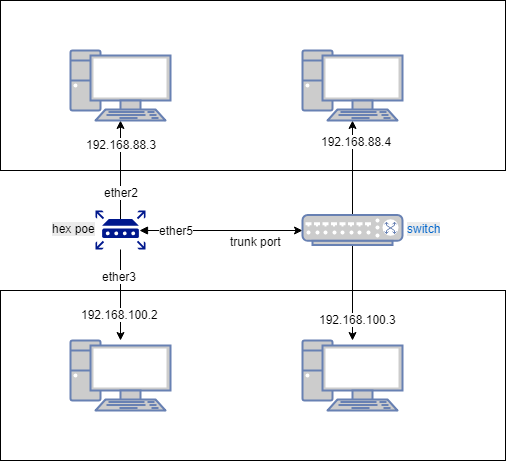
I’ve now tried this solution: https://wiki.mikrotik.com/wiki/Manual:Layer2_misconfiguration#Solution_7
But I still do not get ip-addresses on devices connected to the switch:
/interface bridge
add name=bridge vlan-filtering=yes
/interface bridge port
add bridge=bridge interface=ether2
add bridge=bridge interface=ether3
add bridge=bridge interface=ether5
/interface bridge vlan
add bridge=bridge tagged=ether5,bridge untagged=ether2,ether3 vlan-ids=88,100
/interface vlan
add name=vlan88 interface=bridge vlan-id=88
add name=vlan100 interface=bridge vlan-id=100
/ip address
add address=192.168.88.1/24 interface=vlan-88 interface=vlan-88 network=192.168.88.0
add address=192.168.100.1/24 interface=vlan-100 interface=vlan-100 network=192.168.100.0
/ip pool
add name=pool-88 ranges=192.168.88.10-192.168.88.254
add name=pool-100 ranges=192.168.100.10-192.168.100.254
/ip dhcp-server
add address-pool=pool-88 disabled=no interface=vlan-88 lease-time=1d name=dhcp-88
add address-pool=pool-100 disabled=no interface=vlan-100 lease-time=1d name=dhcp-100