Ok. I am back at trying this again. I have a RB4011iGS+ (running version 7.15.1) running as the gateway on my network & 2x cAPGi-5HaxD2HaxD (also running 7.15.1) for the access points. I want to use the RB4011iGS+ as the wifi6 capsman. I have it configured & when I turn on caps on the either cAPGi-5HaxD2HaxD, I see it connect in the remote caps on the RB4011iGS+, but the radios never populate in the capsman on RB4011iGS+. I am not sure what I am doing wrong. It looks like it should work, but I can’t get it to provision either cAPGi-5HaxD2HaxD (I can set identity from the RB4011iGS+, so it seems like they are talking) no matter what I try. So any guidance or help is appreciated as I am completely at a loss here. Let me know what you need to see & I will post it.
Please, export and post the configuration of both devices.
I would first look at provisioning rules.
But yes, export of config will help.
Apologies. But what command are you needing me to run on which device? I’m still kinda new to mikrotik and haven’t done that prior.also what all should I omit from the configuration I post here?
Open terminal
Export file= anynameyouwish
Then go to Files section in Winbox, locate that file. Move to PC (just drag and drop).
Open file, obfuscate serial, any password, public ip.
Don’t remove or we will not know it’s there.
Then post that file here in between code quotes (3th from the left).
As requested:
Both of the cAPGi-5HaxD2HaxD are setup the same way. Just the default configuration on it:
# 2024-06-22 10:43:55 by RouterOS 7.15.1
# software id = HUEB-1CX3
#
# model = cAPGi-5HaxD2HaxD
# serial number = <serial numbers>
/interface bridge
add admin-mac=<mac> auto-mac=no comment=defconf name=bridge
/interface wifi
# SSID not set
set [ find default-name=wifi1 ] configuration.mode=ap disabled=no
# SSID not set
set [ find default-name=wifi2 ] configuration.mode=ap disabled=no
/interface list
add comment=defconf name=WAN
add comment=defconf name=LAN
/ip pool
add name=default-dhcp ranges=192.168.88.10-192.168.88.254
/disk settings
set auto-media-interface=bridge auto-media-sharing=yes auto-smb-sharing=yes
/interface bridge port
add bridge=bridge comment=defconf interface=ether2
add bridge=bridge comment=defconf interface=*4
add bridge=bridge comment=defconf interface=*5
add bridge=bridge interface=ether1
/ip neighbor discovery-settings
set discover-interface-list=LAN
/interface detect-internet
set detect-interface-list=all
/interface list member
add comment=defconf interface=bridge list=LAN
add comment=defconf interface=ether1 list=WAN
/interface wifi cap
set caps-man-addresses=10.1.254.1 certificate=request discovery-interfaces=\
    bridge enabled=yes lock-to-caps-man=yes
/ip address
add address=192.168.88.1/24 comment=defconf disabled=yes interface=bridge \
    network=192.168.88.0
add address=10.1.254.85/23 interface=bridge network=10.1.254.0
/ip dhcp-client
# DHCP client can not run on slave or passthrough interface!
add comment=defconf interface=ether1
/ip dns
set allow-remote-requests=yes
/ip dns static
add address=192.168.88.1 comment=defconf name=router.lan
/ip firewall filter
add action=accept chain=input comment=\
    "defconf: accept established,related,untracked" connection-state=\
    established,related,untracked disabled=yes
add action=drop chain=input comment="defconf: drop invalid" connection-state=\
    invalid disabled=yes
add action=accept chain=input comment="defconf: accept ICMP" disabled=yes \
    protocol=icmp
add action=accept chain=input comment=\
    "defconf: accept to local loopback (for CAPsMAN)" disabled=yes \
    dst-address=127.0.0.1
add action=drop chain=input comment="defconf: drop all not coming from LAN" \
    disabled=yes in-interface-list=!LAN
add action=accept chain=forward comment="defconf: accept in ipsec policy" \
    disabled=yes ipsec-policy=in,ipsec
add action=accept chain=forward comment="defconf: accept out ipsec policy" \
    disabled=yes ipsec-policy=out,ipsec
add action=fasttrack-connection chain=forward comment="defconf: fasttrack" \
    connection-state=established,related disabled=yes hw-offload=yes
add action=accept chain=forward comment=\
    "defconf: accept established,related, untracked" connection-state=\
    established,related,untracked disabled=yes
add action=drop chain=forward comment="defconf: drop invalid" \
    connection-state=invalid disabled=yes
add action=drop chain=forward comment=\
    "defconf: drop all from WAN not DSTNATed" connection-nat-state=!dstnat \
    connection-state=new disabled=yes in-interface-list=WAN
/ip firewall nat
add action=masquerade chain=srcnat comment="defconf: masquerade" disabled=yes \
    ipsec-policy=out,none out-interface-list=WAN
/ipv6 firewall address-list
add address=::/128 comment="defconf: unspecified address" list=bad_ipv6
add address=::1/128 comment="defconf: lo" list=bad_ipv6
add address=fec0::/10 comment="defconf: site-local" list=bad_ipv6
add address=::ffff:0.0.0.0/96 comment="defconf: ipv4-mapped" list=bad_ipv6
add address=::/96 comment="defconf: ipv4 compat" list=bad_ipv6
add address=100::/64 comment="defconf: discard only " list=bad_ipv6
add address=2001:db8::/32 comment="defconf: documentation" list=bad_ipv6
add address=2001:10::/28 comment="defconf: ORCHID" list=bad_ipv6
add address=3ffe::/16 comment="defconf: 6bone" list=bad_ipv6
/ipv6 firewall filter
add action=accept chain=input comment=\
    "defconf: accept established,related,untracked" connection-state=\
    established,related,untracked
add action=drop chain=input comment="defconf: drop invalid" connection-state=\
    invalid
add action=accept chain=input comment="defconf: accept ICMPv6" protocol=\
    icmpv6
add action=accept chain=input comment="defconf: accept UDP traceroute" \
    dst-port=33434-33534 protocol=udp
add action=accept chain=input comment=\
    "defconf: accept DHCPv6-Client prefix delegation." dst-port=546 protocol=\
    udp src-address=fe80::/10
add action=accept chain=input comment="defconf: accept IKE" dst-port=500,4500 \
    protocol=udp
add action=accept chain=input comment="defconf: accept ipsec AH" protocol=\
    ipsec-ah
add action=accept chain=input comment="defconf: accept ipsec ESP" protocol=\
    ipsec-esp
add action=accept chain=input comment=\
    "defconf: accept all that matches ipsec policy" ipsec-policy=in,ipsec
add action=drop chain=input comment=\
    "defconf: drop everything else not coming from LAN" in-interface-list=\
    !LAN
add action=accept chain=forward comment=\
    "defconf: accept established,related,untracked" connection-state=\
    established,related,untracked
add action=drop chain=forward comment="defconf: drop invalid" \
    connection-state=invalid
add action=drop chain=forward comment=\
    "defconf: drop packets with bad src ipv6" src-address-list=bad_ipv6
add action=drop chain=forward comment=\
    "defconf: drop packets with bad dst ipv6" dst-address-list=bad_ipv6
add action=drop chain=forward comment="defconf: rfc4890 drop hop-limit=1" \
    hop-limit=equal:1 protocol=icmpv6
add action=accept chain=forward comment="defconf: accept ICMPv6" protocol=\
    icmpv6
add action=accept chain=forward comment="defconf: accept HIP" protocol=139
add action=accept chain=forward comment="defconf: accept IKE" dst-port=\
    500,4500 protocol=udp
add action=accept chain=forward comment="defconf: accept ipsec AH" protocol=\
    ipsec-ah
add action=accept chain=forward comment="defconf: accept ipsec ESP" protocol=\
    ipsec-esp
add action=accept chain=forward comment=\
    "defconf: accept all that matches ipsec policy" ipsec-policy=in,ipsec
add action=drop chain=forward comment=\
    "defconf: drop everything else not coming from LAN" in-interface-list=\
    !LAN
/system clock
set time-zone-name=America/New_York
/system note
set show-at-login=no
/system routerboard mode-button
set enabled=yes on-event=dark-mode
/system script
add comment=defconf dont-require-permissions=no name=dark-mode owner=*sys \
    policy=ftp,reboot,read,write,policy,test,password,sniff,sensitive,romon \
    source="\r\
    \n   :if ([system leds settings get all-leds-off] = \"never\") do={\r\
    \n     /system leds settings set all-leds-off=immediate \r\
    \n   } else={\r\
    \n     /system leds settings set all-leds-off=never \r\
    \n   }\r\
    \n "
/tool mac-server
set allowed-interface-list=LAN
/tool mac-server mac-winbox
set allowed-interface-list=LAN
here is the RB4011iGS+:
# 2024-06-22 10:42:09 by RouterOS 7.15.1
# software id = VLSW-K3BC
#
# model = RB4011iGS+
# serial number = <randon number here>
/interface bridge
add name=LAN port-cost-mode=short
add name=Wan1 port-cost-mode=short
add name=Wan2 port-cost-mode=short
/caps-man datapath
add bridge=LAN client-to-client-forwarding=yes local-forwarding=yes mtu=1500 \
    name=my-wireless
/caps-man security
add authentication-types=wpa2-psk encryption=aes-ccm name=my-wireless
/caps-man configuration
add country="united states" datapath=my-wireless installation=indoor mode=ap \
    name=my-wireless security=my-wireless ssid=my-wireless
/caps-man interface
add configuration=my-wireless disabled=no l2mtu=1600 mac-address=\
    18:FD:74:FB:D3:1A master-interface=none name=cap1 radio-mac=\
    18:FD:74:FB:D3:1A radio-name=18FD74FBD31A
add configuration=my-wireless disabled=no l2mtu=1600 mac-address=\
    18:FD:74:FB:D3:1B master-interface=none name=cap2 radio-mac=\
    18:FD:74:FB:D3:1B radio-name=18FD74FBD31B
add configuration=my-wireless disabled=no l2mtu=1600 mac-address=\
    18:FD:74:FB:D3:56 master-interface=none name=cap3 radio-mac=\
    18:FD:74:FB:D3:56 radio-name=18FD74FBD356
add configuration=my-wireless disabled=no l2mtu=1600 mac-address=\
    18:FD:74:FB:D3:57 master-interface=none name=cap4 radio-mac=\
    18:FD:74:FB:D3:57 radio-name=18FD74FBD357
/interface list
add name=WAN1
add name=WAN2
add name=LocalLAN
/interface lte apn
set [ find default=yes ] ip-type=ipv4 use-network-apn=no
/interface wifi channel
add band=5ghz-ax disabled=no name=5gh-AX width=20/40/80mhz
add band=2ghz-ax disabled=no name=2gh-ax width=20mhz
/interface wifi security
add authentication-types=wpa2-psk disabled=no encryption="" name=\
    wireless-auth
/interface wifi configuration
add channel=5gh-AX country="United States" disabled=no mode=ap name=wiireless \
    security=wireless-auth ssid=wireless-test
add channel=2gh-ax country="United States" disabled=no mode=ap name=wireless2 \
    security=wireless-auth ssid=wireless-test
/interface wireless security-profiles
set [ find default=yes ] supplicant-identity=MikroTik
/ip pool
add name=lan-dhcp ranges=10.1.255.0-10.1.255.254
/ip dhcp-server
add address-pool=lan-dhcp interface=LAN lease-time=10m name=lan-dhcp
/port
set 0 name=serial0
set 1 name=serial1
/caps-man manager
set enabled=yes
/caps-man provisioning
add action=create-enabled master-configuration=my-wireless
/interface bridge port
add bridge=Wan1 ingress-filtering=no interface=ether1 internal-path-cost=10 \
    path-cost=10
add bridge=Wan2 ingress-filtering=no interface=ether2 internal-path-cost=10 \
    path-cost=10
add bridge=LAN ingress-filtering=no interface=sfp-sfpplus1 \
    internal-path-cost=10 path-cost=10
add bridge=LAN ingress-filtering=no interface=ether3 internal-path-cost=10 \
    path-cost=10
add bridge=LAN ingress-filtering=no interface=ether4 internal-path-cost=10 \
    path-cost=10
add bridge=LAN ingress-filtering=no interface=ether5 internal-path-cost=10 \
    path-cost=10
add bridge=LAN ingress-filtering=no interface=ether6 internal-path-cost=10 \
    path-cost=10
add bridge=LAN ingress-filtering=no interface=ether7 internal-path-cost=10 \
    path-cost=10
add bridge=LAN ingress-filtering=no interface=ether8 internal-path-cost=10 \
    path-cost=10
add bridge=LAN ingress-filtering=no interface=ether9 internal-path-cost=10 \
    path-cost=10
add bridge=LAN ingress-filtering=no interface=ether10 internal-path-cost=10 \
    path-cost=10
/ip firewall connection tracking
set udp-timeout=10s
/ip settings
set max-neighbor-entries=8192
/ipv6 settings
set disable-ipv6=yes max-neighbor-entries=8192
/interface list member
add interface=LAN list=LocalLAN
add interface=Wan1 list=WAN1
add interface=Wan2 list=WAN2
/interface ovpn-server server
set auth=sha1,md5
/interface wifi capsman
set ca-certificate=auto certificate=auto enabled=yes interfaces=LAN \
    package-path="" require-peer-certificate=no upgrade-policy=\
    suggest-same-version
/interface wifi provisioning
add action=create-dynamic-enabled disabled=no master-configuration=wireless2 \
    name-format=wireless-capax supported-bands=2ghz-n
add action=create-dynamic-enabled disabled=no master-configuration=wiireless \
    name-format=wireless-capax supported-bands=5ghz-ax
/ip address
add address=10.1.254.1/23 interface=LAN network=10.1.254.0
/ip dhcp-client
add interface=Wan1
/ip dhcp-server lease
add address=10.1.255.1 client-id=<numbers> mac-address=\
    <mac> server=lan-dhcp
add address=10.1.255.2 client-id=<numbers> mac-address=\
    <mac> server=lan-dhcp
add address=10.1.255.3 client-id=<numbers> mac-address=\
    <mac> server=lan-dhcp
add address=10.1.255.0 client-id=<numbers> mac-address=\
    <mac> server=lan-dhcp
/ip dhcp-server network
add address=10.1.254.0/23 boot-file-name=netboot.xyz.kpxe dns-server=\
    10.1.254.17,10.1.254.18,10.1.254.19 domain=domain.local gateway=\
    10.1.254.1 netmask=23 next-server=10.1.254.18
/ip firewall filter
add action=accept chain=input comment="Accept CAPSMAN" dst-address=127.0.0.1
add action=accept chain=input comment=\
    "Accept established, related, untracked" connection-state=\
    established,related,untracked
add action=accept chain=input comment="Accept ICMP" protocol=icmp
add action=drop chain=input comment="Drop anything not coming from the LAN" \
    in-interface-list=!LocalLAN
add action=drop chain=forward comment="Drop invalid" connection-state=invalid
add action=drop chain=forward comment="Drop all from wan not distant-ed" \
    connection-nat-state=!dstnat connection-state=new in-interface-list=WAN1
/ip firewall nat
add action=masquerade chain=srcnat out-interface-list=WAN1
add action=dst-nat chain=dstnat dst-port=32400 in-interface-list=WAN1 \
    protocol=tcp src-port=32400 to-addresses=10.1.254.17 to-ports=32400
add action=dst-nat chain=dstnat disabled=yes dst-port=443 in-interface-list=\
    WAN1 protocol=tcp src-port=443 to-addresses=10.1.254.21 to-ports=443
/ip ssh
set always-allow-password-login=yes
/ip upnp
set enabled=yes
/routing bfd configuration
add disabled=no interfaces=all min-rx=200ms min-tx=200ms multiplier=5
/system clock
set time-zone-name=America/New_York
/system identity
set name=network-gateway
/system note
set show-at-login=no
/system package update
set channel=testing
/system resource irq rps
set sfp-sfpplus1 disabled=no
/system script
add dont-require-permissions=no name=update_cloudflare owner=admin policy=\
    read,write,policy,test source=":global mcdPreviousIP;\r\
    \n\r\
    \n:local mcdCurrentIP\r\
    \n:set mcdCurrentIP [/ip cloud get public-address]\r\
    \n\r\
    \n:if (\$mcdCurrentIP != \$mcdPreviousIP) do={\r\
    \n  :log info \"mcd: new IP \$mcdCurrentIP (was \$mcdPreviousIP)\"\r\
    \n  :set mcdPreviousIP \$mcdCurrentIP\r\
    \n  /tool fetch mode=https \\\r\
    \n    http-method=put \\\r\
    \n    url=\"<url here>" \\\r\
    \n    http-header-field=\"content-type: application/json,Authorization: Be\
    arer <key number>\" \\\r\
    \n    http-data=\"{\\\"type\\\":\\\"A\\\",\\\"name\\\":\\\"domain.c\
    om\\\",\\\"content\\\":\\\"\$mcdCurrentIP\\\"}\" \\\r\
    \n    output=none\r\
    \n}"
Change provisioning rule on RB4011
/caps-man provisioning
add action=create-enabled radio-mac=00:00:00:00:00:00 master-configuration=my-wireless
Reason: this makes sure there is always a provision rule for any radio joining that capsman controller. All 0’s is the default value to make sure all radios get recognized. If you leave it empty, nothing gets selected.
Afterwards: make that rule radio specific so you can fine-tune what channel gets used where.
Fine tuned how? I’m not sure what you mean. I do have it set to use the 5ghz rule for any 5 ghz adapters and then the 2.4ghz rule to any 2.4 ghz adapter.
I’ll try setting the radio to all 0’s. But the weird thing if not seeing the 2 radios in the capsman is what’s got me confused. I would have thought the system would see the 2 from each AP
Is there something else between that AP and capsman controller ?
Try to set IP address in capsman address on AP.
I do have a CRS328-24P-4S+ (running on 7.15.1) between the APs & the RB4011iGS+ that is running the wifi 6 capsman. It is providing POE to the 2x cAPGi-5HaxD2HaxD.I have it set & I am not seeing the radios in the radio tab in WiFi. It is weird.
Are you able to reach RB4011 from terminal on AP ?
If not, there is your first problem to address.
You could have mentioned that CRS earlier …
Wait a minute …
You didn’t setup capsman in the correct place, I think.
You need to go via Wifi menu. Not wireless / capsman.
AX devices need to be controlled via wave2 capsman. Not legacy capsman.
see here for more details: https://help.mikrotik.com/docs/display/ROS/Wireless
I did this configuration on the Wi-Fi menu. I have an older set of wifi5 APs setup under the older capsman. Those are working. I’m gonna replace them with these wifi6 APs.
I’m running both capsman on the RB4011iGS+. Yes. I can ping the RB4011iGS+ from both cAPGi-5HaxD2HaxD devices.
Sorry. I definitely should have.
Just for fun, I moved the new capsman to the CRS328-24P-4S+. I see both cAPGi-5HaxD2HaxD in the remote cap tab of winbox, but there is nothing listed in the Radios tab. It is almost like they are connected, but not talking to one another.
Disable controller on CRS.
Can you clear all existing certificates on the capsman controller (RB4011) ?
Winbox / system / certificates
Personally I don’t use certificates.
/interface wifi capsman
set ca-certificate=none
Here you still need to set 00:00:00:00:00:00 wildcard
/interface wifi provisioning
add action=create-dynamic-enabled disabled=no master-configuration=wireless2 \
    name-format=wireless-capax supported-bands=2ghz-n
add action=create-dynamic-enabled disabled=no master-configuration=wiireless \
    name-format=wireless-capax supported-bands=5ghz-ax
On both rules I would leave supported-bands as blank. Let it choose the maximum on it’s own.
And you still haven’t answered my question if you can reach RB4011 from one of the APs …
If not, that needs to be solved first.
Maybe we need to take this one step further back:
- how does your network look like ? Drawing on paper is ok.
- config of CRS: is it used as simple switch or does it also perform router functions ? Export of config.
I don’t think that radio mac is needed.
And supported-bands is needed to select the radio on which applying the rule, instead of selected the band itself. So it must be present, since the configurations specify the channel.
In my opinion, the error(s) lies in the CAP. For example, it lacks configuration.manager=capsman on the wifi devices of the CAP. Please add it. Or, better, reset to CAP mode.
Fully agree on this, reset the cAP ax’s to CAPS Mode:
https://help.mikrotik.com/docs/display/UM/cAP+ax
or
/system/reset configuration → CAPS Mode
do you have wifi or wifi-qcom on the caps??
like this
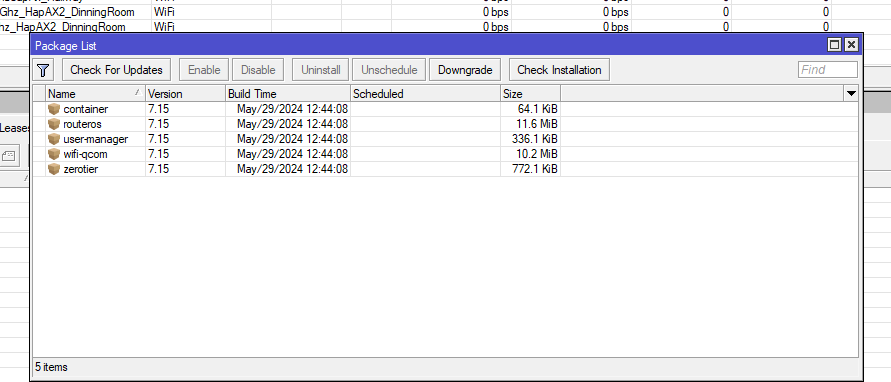
I have 2 caps running and a hapax2 running from capsman
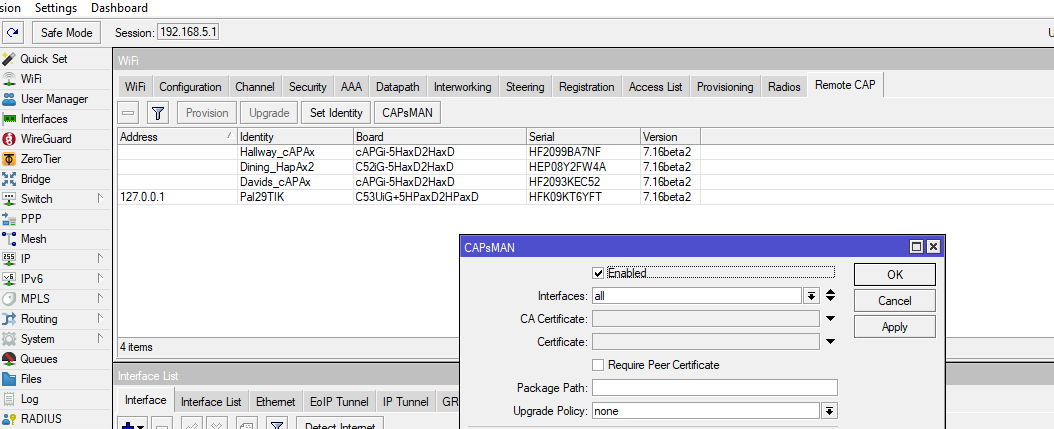
have you logged into the caps separately to see there config and reboot them into capsman mode
and on main router setup capsman should look like this
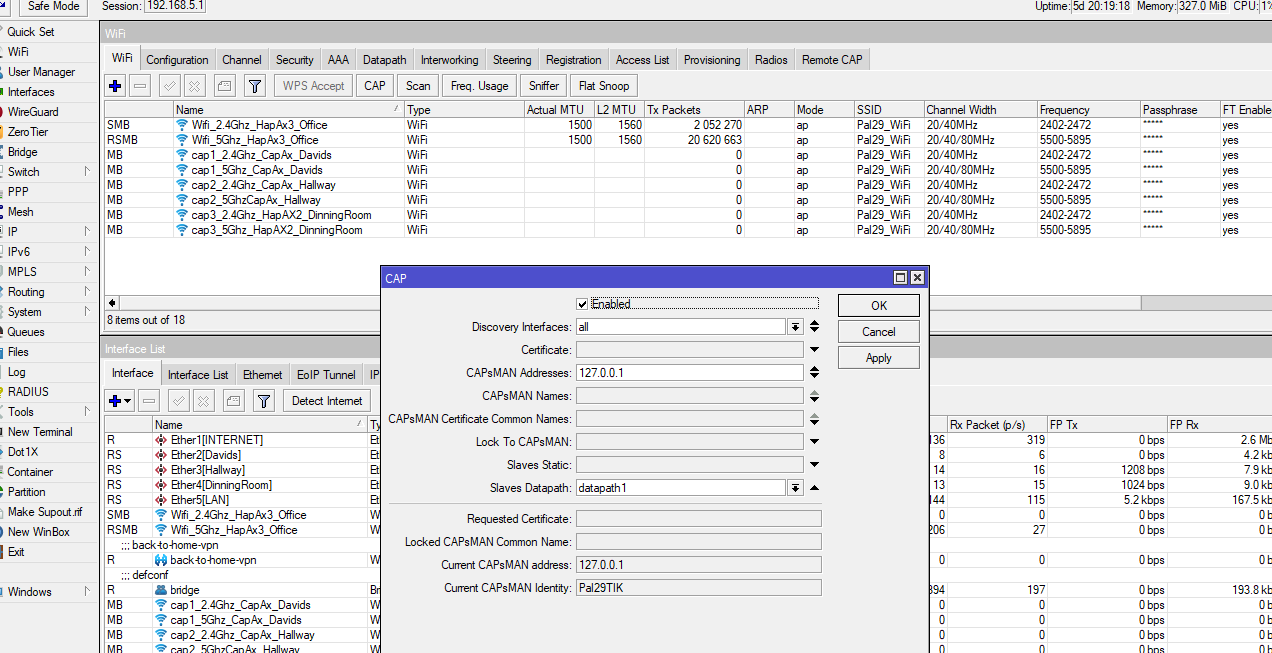
and the caps itself look like this
the wifi on the cap looks like this I see both 2.4g and 5g
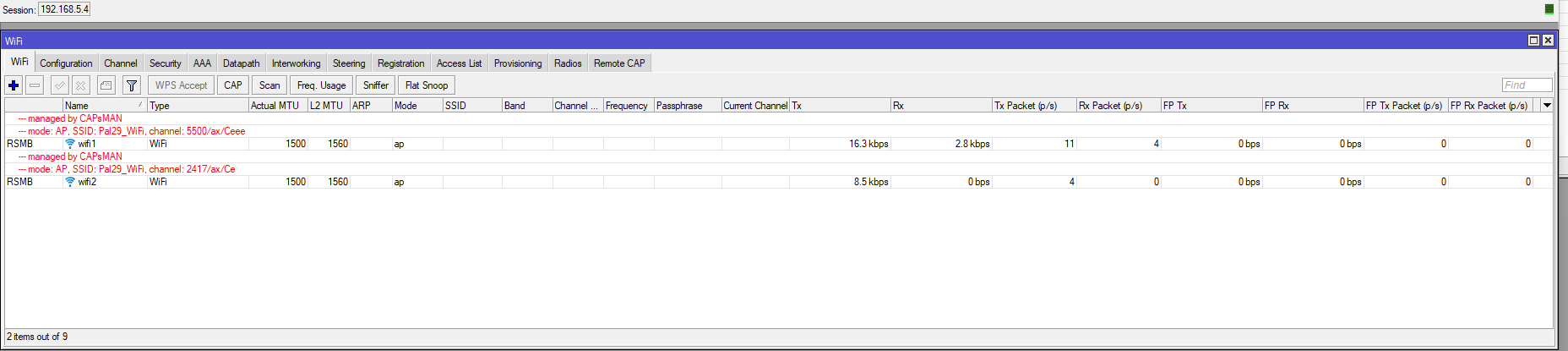
sorry for the simple questions just trying to play along and help
mine works fine with band steering and ft
I bet the problem is that configuration.manager=capsman is missing.