Hello,
I have an RB450G set up to run an office LAN. It has two static WANs (eth0 and eth1). I’m using PCC based on source lan address for WAN load balancing. Things are pretty much as you’d expect otherwise…LAN is on eth3,4,5. I can give more detail here if needed.
The two WAN connections are provided to us such that if you plug in and configure one of our public IPs as static, you get that address (and eth0 and eth1 are set static on the router). However the WAN connections will also give a 192. address if you just plug in and try to get DHCP (to be clear, the 192. you could get from either of the modems is not our LAN, which is a 10.).
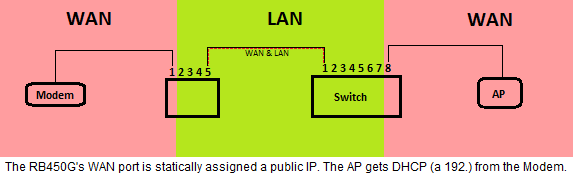
What I want to do is plug a switch into the LAN side of the RB450G and make one of its ports behave, essentially, as if it were a port on one of the WAN modems. So I could plug a computer into it and either get a 192., or could set one of our publics as static. So I want to access a WAN port from the LAN.
The way I’d hoped this would be done would be to put vlan1 (ID1) and vlan2 (ID2) on eth3, which is our LAN. Then, I created bridge1 and bridge2 and tried to add ISP1 and vlan1 to bridge1, and then add ISP2 and vlan2 to bridge2. At that point, I thought if I set up vlan IDs 1 and 2 on my switch I’d be able to make one of its ports be untagged for either ID1 or ID2 and I’d have a WAN port on one of the modems.
Unfortunately all that happened was when I added the interfaces to the bridges the Internet went down.  I’m assuming that by adding the ISP/WAN interfaces to a bridge they could no longer be used individually by PCC? In any case I’d greatly appreciate any suggestions.
Thank you,
Mark