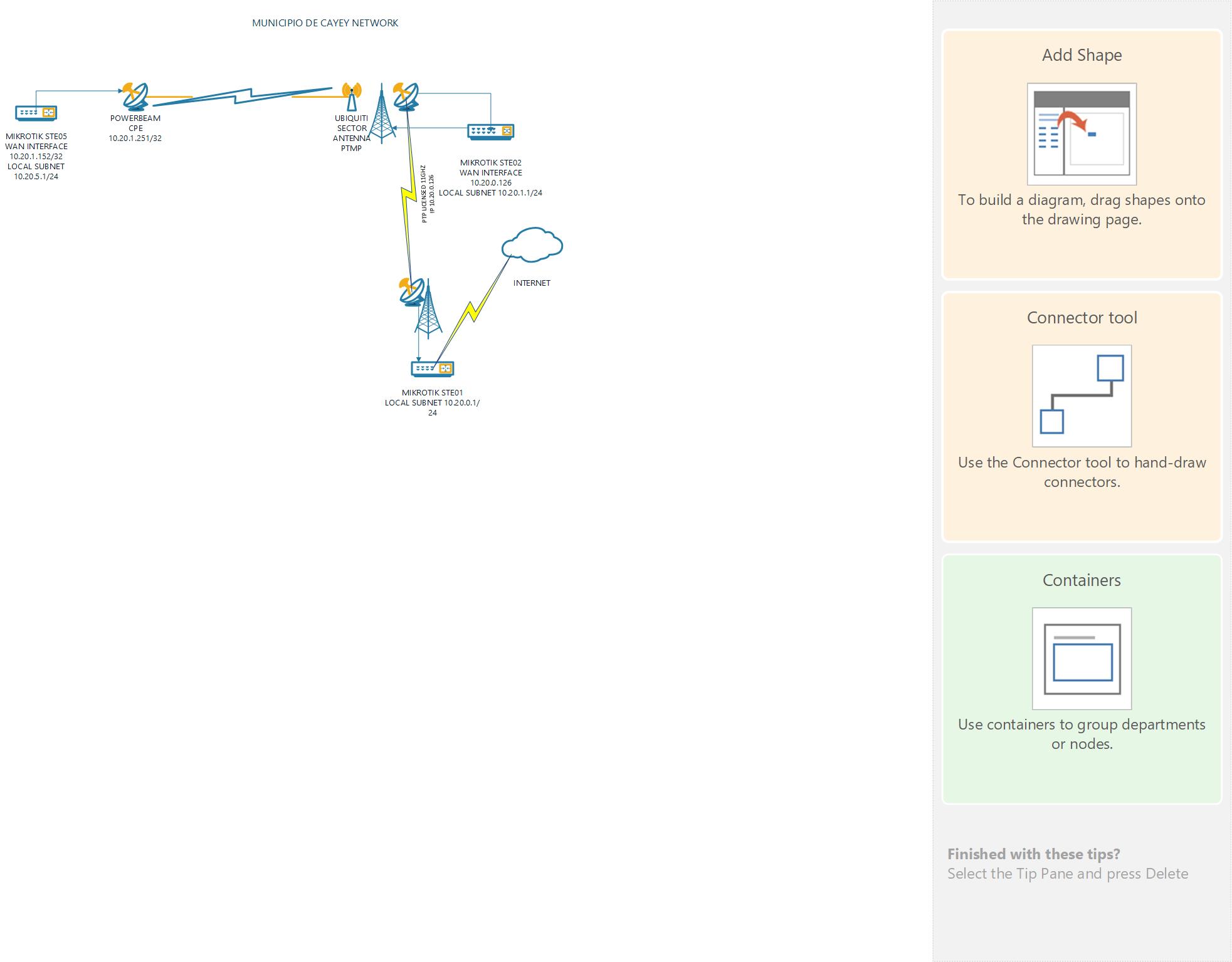
I have an issue reaching a new subnet 10.20.5.0/24 from the other networks
10.20.1.0/24 and 10.20.0.0/24
I dont have issues if i go to the mikrotik 10.20.5.1 and ping 10.20.1.1 succesfully and 10.20.0.1 succesfully.
But if i go to mikrotik 10.20.1.1 and ping 10.20.5.1 i get a reply from 10.20.1.251 with TTL Expired
The 10.20.5.1 mikrotik reaches 10.20.1.1 network via a wireless link, the interface gets ip address 10.20.1.152, but the radio doing the link
its getting assigned 10.20.1.251
I suspect it’s an issue about routing settings on all mikrotiks … perhaps mixed with some SRC-NAT.
Show us drawing of network topology (which RB connect to which one and what are involved IP subnets) and post results of /ip route print from each involved RB.
ip route from 10.20.0.1 MIKROTIK
8 ADC 10.20.0.0/24 10.20.0.1 bridge1 0
18 A S 10.20.1.0/24 10.20.0.126 1
19 A S 10.20.2.0/24 10.20.0.67 1
21 A S 10.20.4.0/24 10.20.0.126 1
22 A S 10.20.5.0/24 10.20.0.126 1
ip route from 10.20.1.1 MIKROTIK
0 ADS 0.0.0.0/0 10.20.0.1 1
27 A S 10.20.2.0/24 10.20.0.1 1
28 A S 10.20.3.0/24 10.20.0.1 1
29 A S 10.20.4.0/24 10.20.1.203 1
30 A S 10.20.5.0/24 10.20.1.152 1
ip route from 10.20.5.1 MIKROTIK
0 ADS 0.0.0.0/0 10.20.1.1 1
1 ADC 10.20.1.0/24 10.20.1.152 combo1 0
2 A S 10.20.2.0/24 combo1 1
3 A S 10.20.4.0/24 10.20.1.203 1
4 ADC 10.20.5.0/24 10.20.5.1 LAN-STE05 0
I’d check how’s Powerbeam CPE configured … on the diagram netmask on those interfaces is set to /32 while routing setup shows /24. So it might be that in order to have things half-working that devices performs some proxy-ARP. Or that there’s some L2 tunnel involved …