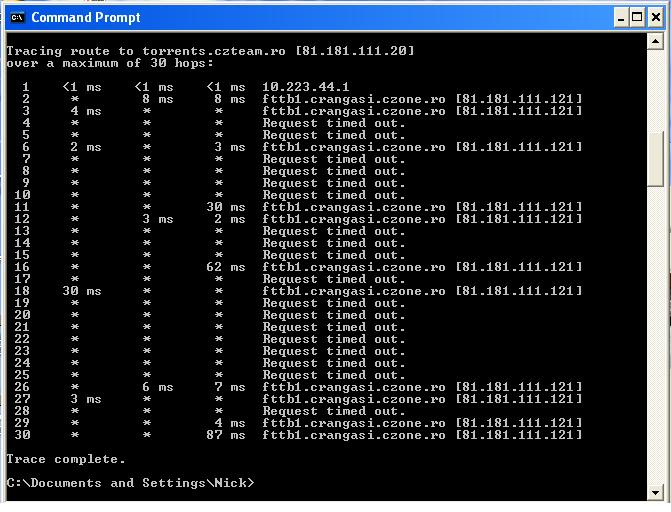
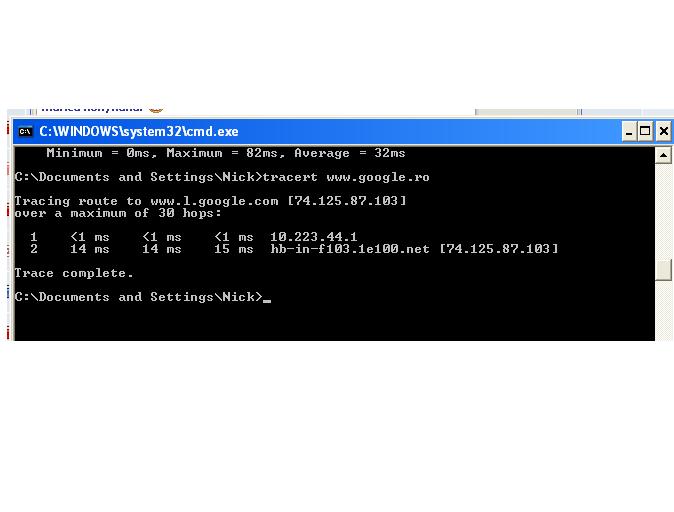
This is the command that I’ve used. I’m still getting the expired TTL error.
/ip firewall mangle add action=change-ttl chain=postrouting disabled=no dst-address=. . . . / . new-ttl=increment:1
if packet in prerouting is received with ttl=1 it is reduced to 0 and then dropped, if you want to receive further inside, you have to change chain to prerouting.
I did the following:
firewall-mangle: action=change ttl, TTL action = increment, new value=1, general=chain=prerouting.
I still get the error TTL expired in transit when I ping the website.
I’m guessing that it expects certain ttl values otherwise the ISP drops the packets.
When I connect the PC directly to the ISP connection it works fine.
My RB450G is set to NAT for a few PCs behind it.
How can I figure out the TTL rules that I have to apply?
I don’t understand why does this happen. Why doesn’t it ping with the specified TTL?
This is a ping originated from ether1(having the active IP address that I have from the ISP).
Ping-ing from here should react just like pinging from a PC that has the active IP address that I have from the ISP and it is directly connected to the ISP, right?
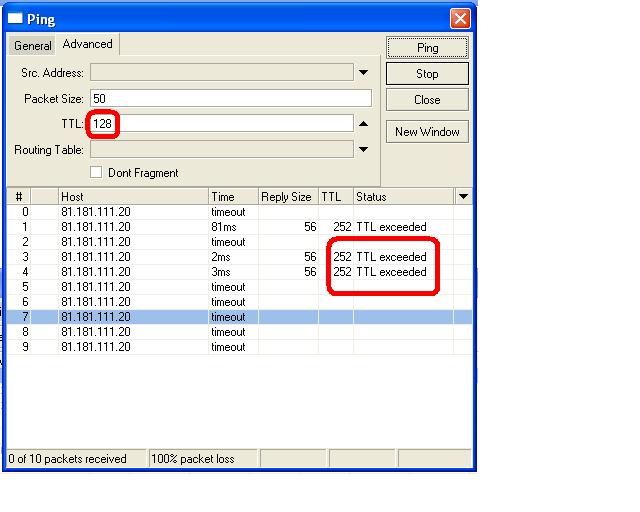
Please modify your mangle rule to include the in-interface. e.g.
/ip firewall mangle
add action=change-ttl chain=prerouting comment="" disabled=no in-interface=wan new-ttl=increment:1
replace “wan” with the actual name of the interface connected to the ISP
I did that, and it doesn’t work. It’s very strange.
99% of the websites work without any TTL rule. This tracker is the first one that gives me this error.
[It worked 5 minutes ago, for a short period, with the postrouting ttl set to value 53. Now it gives me that expired ttl error again.]
Look what happens when I try to trace the route.