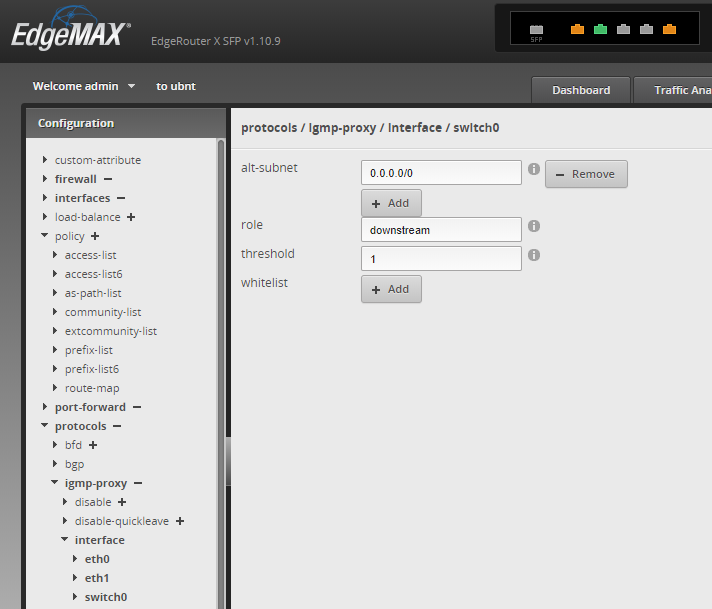
Hi all, recently I swapped out my old Asus AC68U Router for a RB 3011 UiAS-RM and an AC Pro AP, as a newcomer to RouterOS I’m struggling to get TVIP / IGMP working with BT Youview, I got all the port forwarding/NAT figured out eventually and can access my NASes externally but the IGMP has me stumped, I’ve followed some of the very good tutorials on how to do this but just cannot get this working. In desperation and under pressure from the missus  I also got a Ubiquiti ER-X-SFP which I got working fairly easily, so after learning how to set up the ER-X I thought it looked fairly similar to how RouterOS looked, and revisit the problem, but unfortunately still struggling. No subscription channels can play on the TV and get error messages about network problems.
My setup as follows:
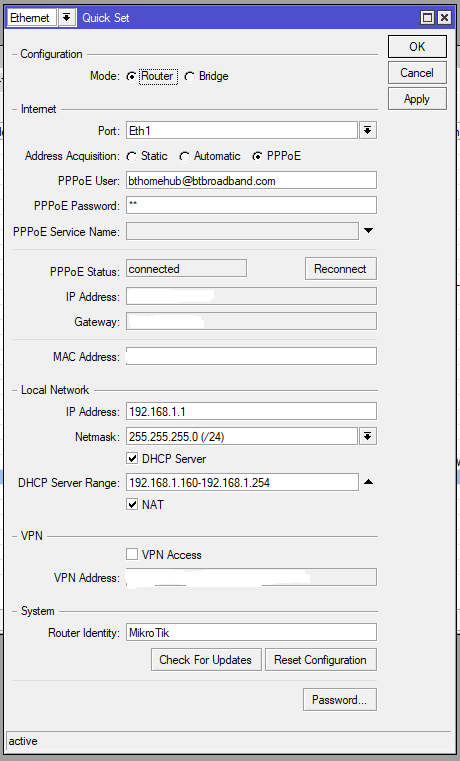
ISP/TV: BT Broadband with Youview STB, PPPoE, BT Broadband Modem (WAN)
Router: RB 3011 UiAS-RM - 6.44.1
ETH1 to BT modem (WAN)
ETH2 to Switch
ETH3 direct to Youview STB
I’d set up the ER-X as above, which works, so no cabling issues.
Some other info. below, which might help.
I’d really appreciate some input if possible, thanks.
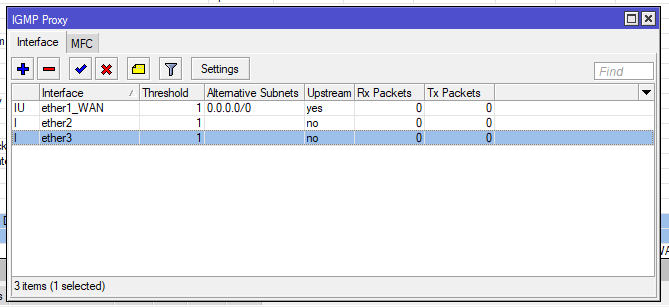
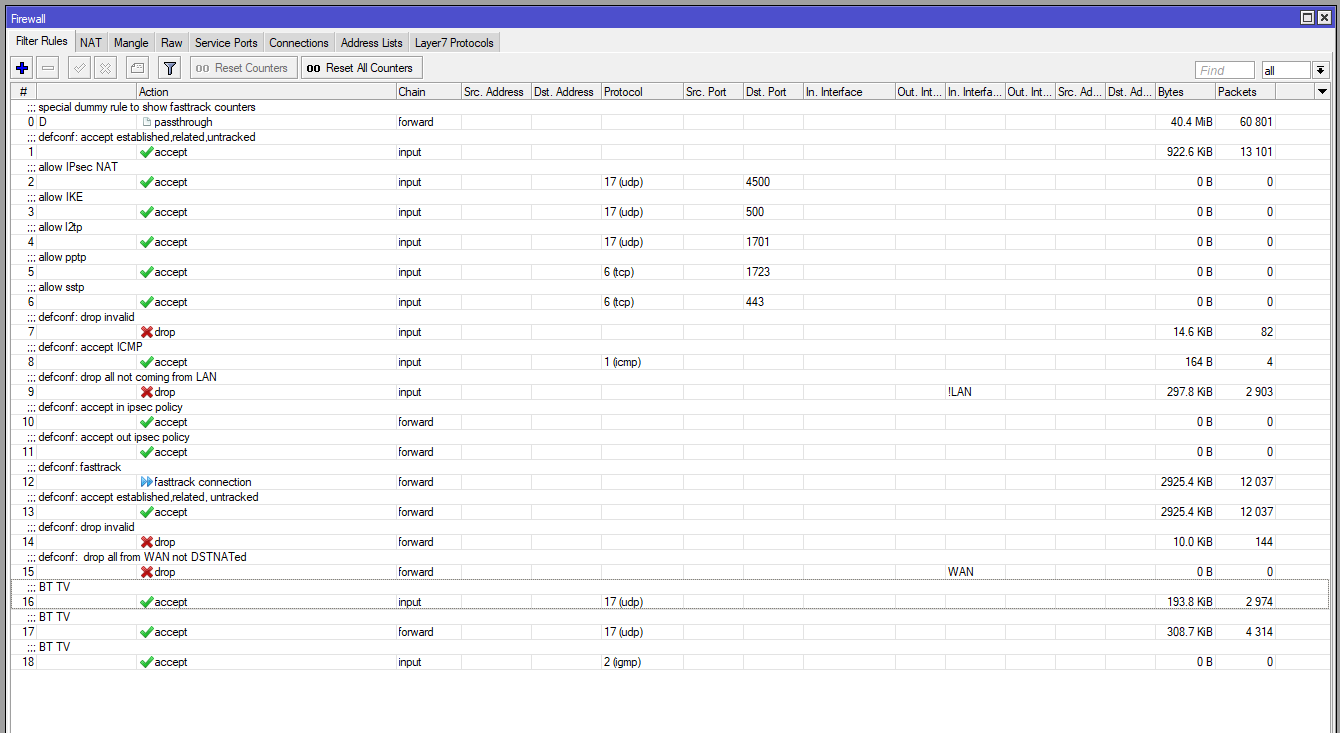
Everything looks well, IPTV should work, just may be drag rules 16,17,18 upper than rule 9.


The third rule “drop input udp 5239” is not really necessary, I just want to see how much real garbage was blocked by “drop from !LAN” rule.
@negavoid, thanks muchly for your reply, I tried dragging the rules up as suggested, unfortunatley still nothing, tried rebooting router and STB etc. Just seems to remain inactive.
No settings other than Firewall & IGMP Proxy need setup? Firewall now looks like this:
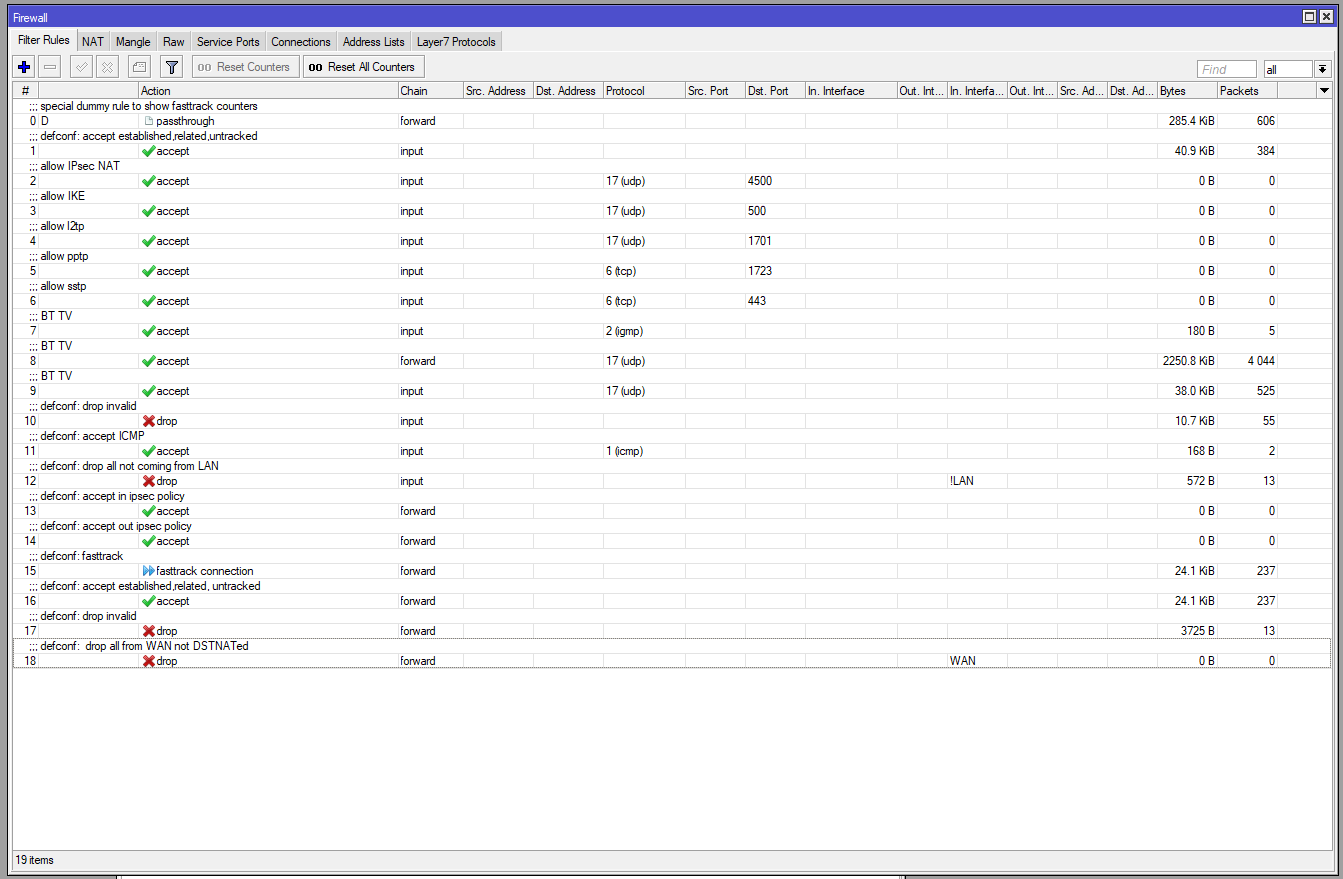
Only IGMP Proxy and firewall settings basically needed for most of common multicast iptv providers, and your settings looks correct, my isp works pretty well this way. I am also using bridge for LAN (with IGMP snooping turned on), which differs with your configuration, may be issue is hidden there.
Also, it is possible that your isp is “locking” to STB mac address, then you will need to assign STBs mac to mikrotiks ether1, or consider bridging of ether1 with etherN (stb port).
PS Huh, I am also buying iptv only for missis  , why girls need this stupid box so much?
PPPoE connection sometimes requires to add ether1 ip address: 1.0.0.1/30
Previous info I have posted on the topic here
http://forum.mikrotik.com/t/proper-way-for-iptv-routing/106854/1
I have used this with a number of YouView boxes on TalkTalk and BT. It might be that your missing the Multicast group IP’s rule in your firewall.
Post you full config from an export here instead of a screen shot so that we can see the whole config.
Thanks for replies guys, so in frustration after trying to assign IP’s to ether1 and PPPoE, I’d reset the router and started from scratch, just with the basic settings and a few NAT rules and with IGMP settings. The current config file is as below. I’ve also given the STB a static IP within the .1.160 range I’ve setup.
I’m obviously missing some important step, but any further advice greatly appreciated.
# apr/04/2019 17:37:02 by RouterOS 6.44.1
# software id = 4S1T-R0A9
#
# model = RouterBOARD 3011UiAS
# serial number = 8EED094273BD
/interface bridge
add admin-mac=C5:42:L4:J4:D7:35 auto-mac=no comment=defconf igmp-snooping=yes \
    name=bridge
/interface pppoe-client
add add-default-route=yes disabled=no interface=ether1 name=pppoe-out1 \
    use-peer-dns=yes user=bthomehub@btbroadband.com
/interface list
add comment=defconf name=WAN
add comment=defconf name=LAN
/interface wireless security-profiles
set [ find default=yes ] supplicant-identity=MikroTik
/ip pool
add name=dhcp ranges=192.168.1.160-192.168.1.254
/ip dhcp-server
add address-pool=dhcp disabled=no interface=bridge name=defconf
/interface bridge port
add bridge=bridge comment=defconf interface=ether2
add bridge=bridge comment=defconf interface=ether3
add bridge=bridge comment=defconf interface=ether4
add bridge=bridge comment=defconf interface=ether5
add bridge=bridge comment=defconf interface=ether6
add bridge=bridge comment=defconf interface=ether7
add bridge=bridge comment=defconf interface=ether8
add bridge=bridge comment=defconf interface=ether9
add bridge=bridge comment=defconf interface=ether10
add bridge=bridge comment=defconf interface=sfp1
/ip neighbor discovery-settings
set discover-interface-list=LAN
/interface list member
add comment=defconf interface=bridge list=LAN
add comment=defconf interface=ether1 list=WAN
add interface=pppoe-out1 list=WAN
/ip address
add address=192.168.1.1/24 comment=defconf interface=ether2 network=\
    192.168.1.0
/ip dhcp-client
add comment=defconf dhcp-options=hostname,clientid interface=ether1
/ip dhcp-server network
add address=192.168.1.0/24 comment=defconf gateway=192.168.1.1 netmask=24
/ip dns
set allow-remote-requests=yes
/ip dns static
add address=192.168.1.1 name=router.lan
/ip firewall filter
add action=accept chain=input comment=\
    "defconf: accept established,related,untracked" connection-state=\
    established,related,untracked
add action=accept chain=input comment="BT TV" protocol=igmp
add action=accept chain=forward comment="BT TV" protocol=udp
add action=accept chain=input comment=BTTV protocol=udp
add action=drop chain=input comment="defconf: drop invalid" connection-state=\
    invalid
add action=accept chain=input comment="defconf: accept ICMP" protocol=icmp
add action=drop chain=input comment="defconf: drop all not coming from LAN" \
    in-interface-list=!LAN
add action=accept chain=forward comment="defconf: accept in ipsec policy" \
    ipsec-policy=in,ipsec
add action=accept chain=forward comment="defconf: accept out ipsec policy" \
    ipsec-policy=out,ipsec
add action=fasttrack-connection chain=forward comment="defconf: fasttrack" \
    connection-state=established,related
add action=accept chain=forward comment=\
    "defconf: accept established,related, untracked" connection-state=\
    established,related,untracked
add action=drop chain=forward comment="defconf: drop invalid" \
    connection-state=invalid
add action=drop chain=forward comment=\
    "defconf:  drop all from WAN not DSTNATed" connection-nat-state=!dstnat \
    connection-state=new in-interface-list=WAN
/ip firewall nat
add action=masquerade chain=srcnat comment="defconf: masquerade" \
    ipsec-policy=out,none out-interface-list=WAN
add action=accept chain=dstnat comment="" dst-port=8080 \
    in-interface=pppoe-out1 protocol=tcp
add action=accept chain=dstnat comment=\
    "" dst-port=8800 in-interface=\
    pppoe-out1 protocol=tcp
add action=accept chain=dstnat comment="" dst-port=32400 \
    in-interface=pppoe-out1 protocol=tcp
add action=accept chain=dstnat comment="" dst-port=8081 \
    in-interface=pppoe-out1 protocol=tcp
add action=accept chain=dstnat comment="" dst-port=443 \
    in-interface=pppoe-out1 protocol=tcp
add action=accept chain=dstnat comment="" dst-port=80 in-interface=\
    pppoe-out1 protocol=tcp
/routing igmp-proxy
set quick-leave=yes
/routing igmp-proxy interface
add alternative-subnets=0.0.0.0/0 interface=ether1 upstream=yes
add alternative-subnets=0.0.0.0/0 interface=ether5
/system clock
set time-zone-name=Europe/London
/tool mac-server
set allowed-interface-list=LAN
/tool mac-server mac-winbox
set allowed-interface-list=LAN
Success - thanks for all the suggestions to date. To get it working I added bridge to IGMP Proxy ‘and’ added address for ether1 as 10.255.255.255, could’ve sworn I tried all this before, seems so obvious now… oh well happy days! I notice similar to the Edgerouter I can plug the STB into any switch in the network and works, is this good or bad, trafficwise?
Cheers.
 However, personally I prefer the Discovery/History channels which are also subscription