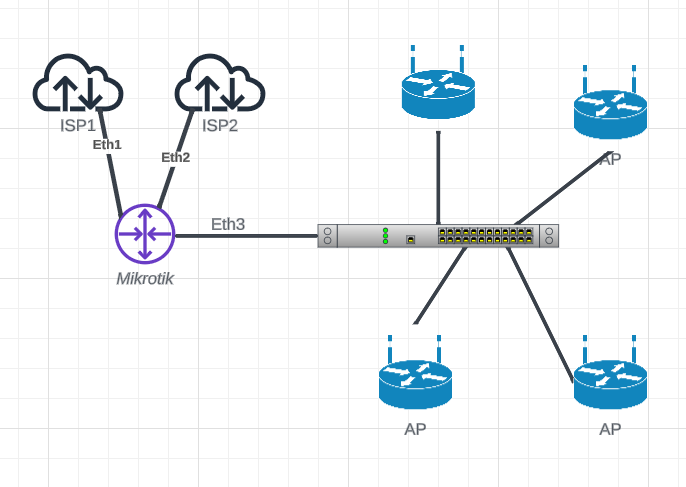
i have two wan goes through port 1 for wan 1 and port 2 for wan 2
i want to creat two hotspot one for isp1 and one for isp2
but the out is one lan that connected to switch that carry the access points
how to make it happen? still new
the access points is tplink 115AP
Setup up network/vlans and switch APs so all the traffic can flow.
Setup hotspot parameters.
Ensure your Routing for ISP is modified to enable/direct traffic to and from the correct ISP.
hotspot1 to ISP1 and hotspot2 to ISP2.
Once you have 1,2 done and are working on 3, it may be possible to see what is being done and then provide assistance on 3.
Well in general you should probably setup up all your subnets as vlans and trunk them to the switch.
The switch ports leading to the TPLINKs should also be trunk ports as the APs can read tags and assign vlans to ssids.
To setup the router for vlans…http://forum.mikrotik.com/t/using-routeros-to-vlan-your-network/126489/1
One bridge, all vlans created to interface bridge
all vlans get ip pool,ip address, dhcp-server, dhcp-server network.
ONE VLAN should be a trusted vlan that reaches all smart devices and they get their IP address on this vlan, aka the switch and all APs.
It may or may not be a vlan that is used for data ( like often a home subnet is the trusted one, and in business one always has an admin management vlan).
Setting up the switch and APs is up to you.
That is the basis for then to start looking at a hotspot setup.
I would imagine you will group vlans that need to go to the same hotspot (and thus through same ISP), in its own interface list.