The on-going learning curve with 5GHz continues on my hAP ax2. Why can’t I select 5580/Ceee in the UK? It doesn’t even do radar check - it instantly says “no supported channels”:
If I switch to 20MHz wide, it works. Try 5600, 5620, 5640 with 20MHz and same “no supported channels”. According to Wikipedia, this 80MHz part of the spectrum is available in the UK:
However, I note with interest that other countries (Australia and USA to left), don’t allow this part of the spectrum to be used. In correct regulation table in ROS 7?
But I can select this range on my hAP ac lite. Only observation is that the CAC did take longer than usual.
BTW - that “The Shire” network next door is from the hAP ax set on channel 5500. I’m sat here with my tablet in front of me - that network keeps disappearing and coming back but that’s a whole different issue!
You are indeed correct. This is another difference between ROS v6 default and ROS v7. In ROS v6, skip DFS channels is disabled by default:
But in ROS v7, it’s set to skip DFS channels with 10 minute CAC. DFS/CAC is slowly clicking into place! 5580 in UK has 1 minute CAC hence the reason that channel can be selected. But 5600, 5620 and 5640 are 10 minute CAC hence the reason they can’t be selected with the default ROS v7 setting. Disabling this skip allows the full 80MHz channel to be used albeit with the 10 minute delay.
Changes to the defaults settings of any device are important esp. if you’ve got any documentation or training involved. The accidental or unknown enabling of features is often the reason for vulnerabilities. So on a ROS v7 device out the box, it will never use the DFS channels with 10 minute CAC so will be using a limited spectrum. I personally think that’s important to know.
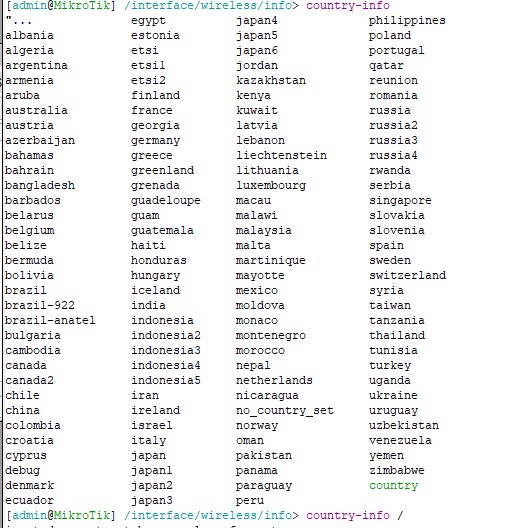
It’s a strange situation with the United Kingdom. You can select such country in the wifi settings, but you cannot see what restrictions for this country.
Both in the old version of the driver and in the new one. Please contact technical support
ROS 7 is a different platform than ROS6. Then qcom-wifi is completely different to old wireless. Different settings, different features, different everything. So why compare with ?
ROS default-configuration changes over time. It is not limited to wifi settings.
And another note: when you first bootup a new device or reset a device, ROS shows you the default configuration. At least on my device this information text does not reflect what the default configuration script ACTUALLY does. MT is lagging behind everywhere. Docs aren’t their strength.
[user@MikroTik] /interface/wifi/radio> reg-info country=a
"Aland Islands                                    "Sri Lanka                                Ethiopia       Moldova
"American Samoa                                   "Svalbard and Jan Mayen                   Finland        Monaco
"Antigua and Barbuda                              "Trinidad and Tobago                      France         Mongolia
"Bosnia and Herzegovina                           "Turks and Caicos                         Georgia        Montserrat
"British Virgin Islands                           "United Arab Emirates                     Germany        Myanmar
"Brunei Darussalam                                "United States                            Ghana          Namibia
"Burkina Faso                                     "United States Minor Outlying Islands     Gibraltar      Nepal
"Cayman Islands                                   "Viet Nam                                 Greenland      Netherlands
"Central Africa Republic                          "Virgin Islands                           Grenada        Nicaragua
"Christmas Island                                 "Wallis and Futuna                        Guadeloupe     Nigeria
"Cook Islands                                     Afghanistan                               Guam           Norway
"Costa Rica                                       Albania                                   Guatemala      Oman
"Dominican Republic                               Algeria                                   Guyana         Pakistan
"El Salvador                                      Andora                                    Haiti          Palau
"Falkland Islands                                 Anguilla                                  Honduras       Panama
"Faroe Islands                                    Argentina                                 Hungary        Paraguay
"French Guiana                                    Armenia                                   Iceland        Poland
"French Polynesia                                 Aruba                                     India          Portugal
"Heard Island and McDonald Islands                Australia                                 Indonesia      Qatar
"Isle of Man                                      Austria                                   Iraq           Romania
"Ivory Coast                                      Azerbaijan                                Ireland        Russia
"Marshall Islands                                 Bahamas                                   Israel         Rwanda
"Netherlands Antilles                             Bahrain                                   Italy          Samoa
"New Caledonia                                    Bangladesh                                Jamaica        Senegal
"New Zealand                                      Barbados                                  Japan          Serbia
"Norfolk Island                                   Belarus                                   Jordan         Singapore
"North Macedonia                                  Bermuda                                   Kazakhstan     Slovakia
"Northern Mariana Islands                         Bhutan                                    Kenya          Slovenia
"Papua New Guinea                                 Bolivia                                   Kuwait         Spain
"Saint Barthelemy                                 Brazil                                    Latvia         Suriname
"Saint Helena, Ascension and Tristan da Cunha     Bulgaria                                  Lebanon        Switzerland
"Saint Kitts and Nevis                            Cambodia                                  Lithuania      Taiwan
"Saint Lucia                                      Cameroon                                  Macau          Tanzania
"Saint Martin                                     Canada                                    Malawi         Thailand
"Saint Pierre and Miquelon                        Chad                                      Malaysia       Tunisia
"Saint Vincent and the Grenadines                 China                                     Maldives       Uganda
"San Marino                                       Colombia                                  Malta          Ukraine
"Sao Tome and Principe                            Croatia                                   Martinique     Uruguay
"Saudi Arabia                                     Denmark                                   Mauritania     Uzbekistan
"Sint Maarten                                     Dominica                                  Mauritius      Vanuatu
"South Africa                                     Ecuador                                   Mayotte        Venezuela
"South Korea                                      Estonia                                   Micronesia     Zimbabwe
MT seems to be more user-oriented lately. They obviously received a fair share of “my 5GHz wifi doesn’t work after I unpack device” complaints and decided to make things converge faster by disabling 10min CAC channels by default. Owners who think they deserve to use their devices to full potential are more than welcome to read (partially non-existing) documentation and optimize settings (and accept the fact they have to wait for 10 minutes before wifi appears … and many people tweaking settings fail to realize this might be the case and complain anyway). From radar operators point of view it’s actually good if more wifi vendors would do the same (i.e. disable use of DFS channels by default), I’m pretty sure they are still pissed off because FCC allowed mobs to (ab)use their “precious” frequencies.
accept the fact they have to wait for 10 minutes before wifi appears
Considering my neighbour’s Virgin Media Superhub is sat on the 10 minute CAC frequency, I would say that most people have no idea about the 10 minute wait for 5GHz to appear on power-up. For most people, their router is up 24/7 for months.
It doesn’t matter what other APs do. CAC requires for device to sit silent for specified period of time and listen for anything resembling radar signals. Only after that it can start to transmit. And while occupying DFS frequencies, it has to continue to constantly monitor for anything resembling radar signals. So your neighbours can hapily use DFS frequencies, but your AP still needs to do the initial silence thing. The same silence thing has to happen if AP decides to switch to DFS channel from a different channel. The only way to avoid it would be to add another receiver into radio chip which would be used only for frequency monitoring (CAC, snooping, scanning, etc. You name it).
Your neighbours may use slightly older devices with obsolete firmware which doesn’t conform to regulations (no, regulations did not change much in last few years, regulators got stricter at enforcing it so WiFi vendors were forced to take these regulations seriously). Or your neighbour’s AP did the 10min silence during small hours when nobody noticed it and now happily sits on DFS channel since it doesn’t detect anything resembling radar signals.
But as I said: defaults now avoid using 10 minute CAC frequencies, making most users happier. Which is what counts most of time. If you decide to change settings and you don’t like the effect, then you can either try harder (read docs, etc.) or you can reset back to defaults and enjoy the 10min-CAC-less operation.
But as I said: defaults now avoid using 10 minute CAC frequencies, making most users happier.
I would say that most consumer customers don’t even know about this 10 minute wait so they’ll be quite happy to accept it in order to use a less congested part of the spectrum. Virgin Media has 16 million customers in the UK so there are a lot of Superhubs out there. I’m on VM as well but my hub is in modem mode so I can’t easily check if there is a 10 minute CAC on this channel but considering there are so many of them, I would assume it does.
I’m going to mark one of the early replies as the solution as we’re wandering. My core question has been answered: by default the AX devices are configured to skip the 10 minute CAC channels which is why I was unable to use it. The hole in my knowledge that there are both 1 minute and 10 minute CAC channels has been filled



 with
with  ?
?
