Hi all
i’m under UDP flood attack, I have been trying to solve it for several weeks, but I can’t
i have a game server (hosted in my home) using several tcp/udp ports (8807,8808…), and someone it’s attacking doing udp flood from multiple and diferent ip’s.
if i change the tcp/udp ports., atacker atack the new port.
it’s possible catch the author ?
I have anti-ddos rules configured, but do no’t nothing.., players can’t connect to my the server, and server lost conectivity and sometimes pppoe client broke the conection.
and same problem if droping all packets from the port under the attack not solve the problem (add action=drop chain=detect-ddos connection-state=“” disabled=no dst-port=8807 protocol=udp).
i’m using a mtk-tb760igs ( hex s )
Example, conections under the attack.
may be need other router - firewall ?
any can help me ?, may be need some addicional firewall rules?
thats my rules
#used list
/ip firewall address-list
add address=192.168.1.2-192.168.1.254 list=allowed_to_router
add address=0.0.0.0/8 comment=RFC6890 list=not_in_internet
add address=172.16.0.0/12 comment=RFC6890 list=not_in_internet
add address=192.168.0.0/16 comment=RFC6890 list=not_in_internet
add address=10.0.0.0/8 comment=RFC6890 list=not_in_internet
add address=169.254.0.0/16 comment=RFC6890 list=not_in_internet
add address=127.0.0.0/8 comment=RFC6890 list=not_in_internet
add address=224.0.0.0/4 comment=Multicast list=not_in_internet
add address=198.18.0.0/15 comment=RFC6890 list=not_in_internet
add address=192.0.0.0/24 comment=RFC6890 list=not_in_internet
add address=192.0.2.0/24 comment=RFC6890 list=not_in_internet
add address=198.51.100.0/24 comment=RFC6890 list=not_in_internet
add address=203.0.113.0/24 comment=RFC6890 list=not_in_internet
add address=100.64.0.0/10 comment=RFC6890 list=not_in_internet
add address=240.0.0.0/4 comment=RFC6890 list=not_in_internet
add address=192.88.99.0/24 comment="6to4 relay Anycast [RFC 3068]" list=not_in_internet
add list=ddos-attackers
add list=ddos-target

#add ddos protection
/ip firewall filter
add action=jump chain=forward connection-state=new jump-target=detect-ddos
add action=return chain=detect-ddos dst-limit=32,32,src-and-dst-addresses/10s
add action=add-dst-to-address-list address-list=ddos-target address-list-timeout=10m chain=detect-ddos
add action=add-src-to-address-list address-list=ddos-attackers address-list-timeout=10m chain=detect-ddos
add action=return chain=detect-ddos dst-limit=32,32,src-and-dst-addresses/5s protocol=tcp tcp-flags=syn,ack
/ip firewall raw
add action=drop chain=prerouting dst-address-list=ddos-target src-address-list=ddos-attackers
/ip/settings/set tcp-syncookies=yes


#other rules (drop invalid, icmp, not nat, not_internet,etc)
add action=fasttrack-connection chain=forward comment=FastTrack connection-state=established,related
add action=accept chain=forward comment="Established, Related" connection-state=established,related
add action=drop chain=forward comment="Drop invalid" connection-state=invalid log=yes log-prefix=invalid
add action=drop chain=forward comment="Drop tries to reach not public addresses from LAN" dst-address-list=not_in_internet in-interface=bridge1 log=yes log-prefix=!public_from_LAN out-interface=!bridge1
add action=drop chain=forward comment="Drop incoming packets that are not NAT`ted" connection-nat-state=!dstnat connection-state=new in-interface=ether1 log=yes log-prefix=!NAT
add action=jump chain=forward comment="jump to ICMP filters" jump-target=icmp protocol=icmp
add action=drop chain=forward comment="Drop incoming from internet which is not public IP" in-interface=ether1 log=yes log-prefix=!public src-address-list=not_in_internet
add action=drop chain=forward comment="Drop packets from LAN that do not have LAN IP" in-interface=bridge1 log=yes log-prefix=LAN_!LAN src-address=!192.168.1.0/24
add action=drop chain=icmp comment="deny icmp"
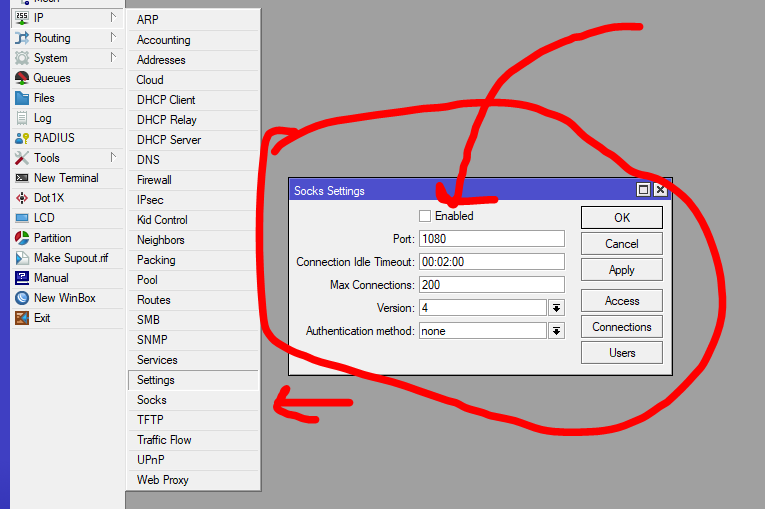
Check SOCKS port and close/block SOCKS to strangers … terrible things happen when you do not care of it.
I left it opened once by mistake and please do not ask what happend
Do you have a list of the people using your gaming server?
If this is for a business then suggest an edge router and talking to your ISP for better protection before stuff hits your router.
If this is for home then, make an IP list of people allowed to game.
A. they provide you with a WANIP if static/fixed
B. they provide you with a dyndns domain name if WANIP is fixed. there are plenty of free DYNDNS providers out there so no excuses.
Drop all the extra crap rules in your firewall and add to your destination rule for the applicable list of ports
source-address=list=allowed_gamers
What is Socks port?
I have a Sock drawer and a Drawer for my drawers…
Yes, I have never used a socks port setting on any router so not aware of its uses…
Of course, it was my way of really asking why did you suspect that the OP is using socks protocol, I dont see any evidence, and thus it appeared to be a random thought??
@anav … No, it’s not a random thought … I faced such a problem. I share my experience and try to help. @rextended … please do not start unneccessary conversation.
Once I left SOCKS enabled and my router started to be a “trampoline” for so many open connections that I was blacklisted.
Small mistake and then HUGE problems
I know.., how to protect UDP flood from multiple ips using filter rule?, tried some diferent rules widhout result.
only destination port (88xx) it's determined..
i don't know how legitimate that UDP traffic it's for game server..
Server it`s a public server, and knowing players ip it's not the solución.
if i drop all trafic of attacked port
-> add action=drop chain=detect-ddos connection-state="" disabled=no dst-port=8807 protocol=udp
not solves the problem.., connection continues saturated and server it's innaccesible from public. and wan connection it's 1gbit.
One solution can be some check if “return connection” is made from server after valid connections to user and put that address on whitelist, blacklist all the others…
i don't understand why you say this.., but no problem, I really appreciate a lot your help or anyone who gives their advice to avoid this attack problem.
Sorry thats the only idea I have, but you have not answered the question.
WHY is it impossible??
I clearly stated that anyone can get a free domain name dyndns and that they can give to you if they want to play.
If this is a business then pay your ISP for a business account and get the DDOS protection the ISP should provide.
Also invest in a much more secure access method to the game server using a radius server or other stable more robust method.
If this is just casual then use the IP method I described, if its a business then spend the money to do it right and dont waste your time trying to do it as you have been attempting.