Ok. I have a couple of questions about VLANs that hopefully can be answered by someone here. Take a look at the following diagram:
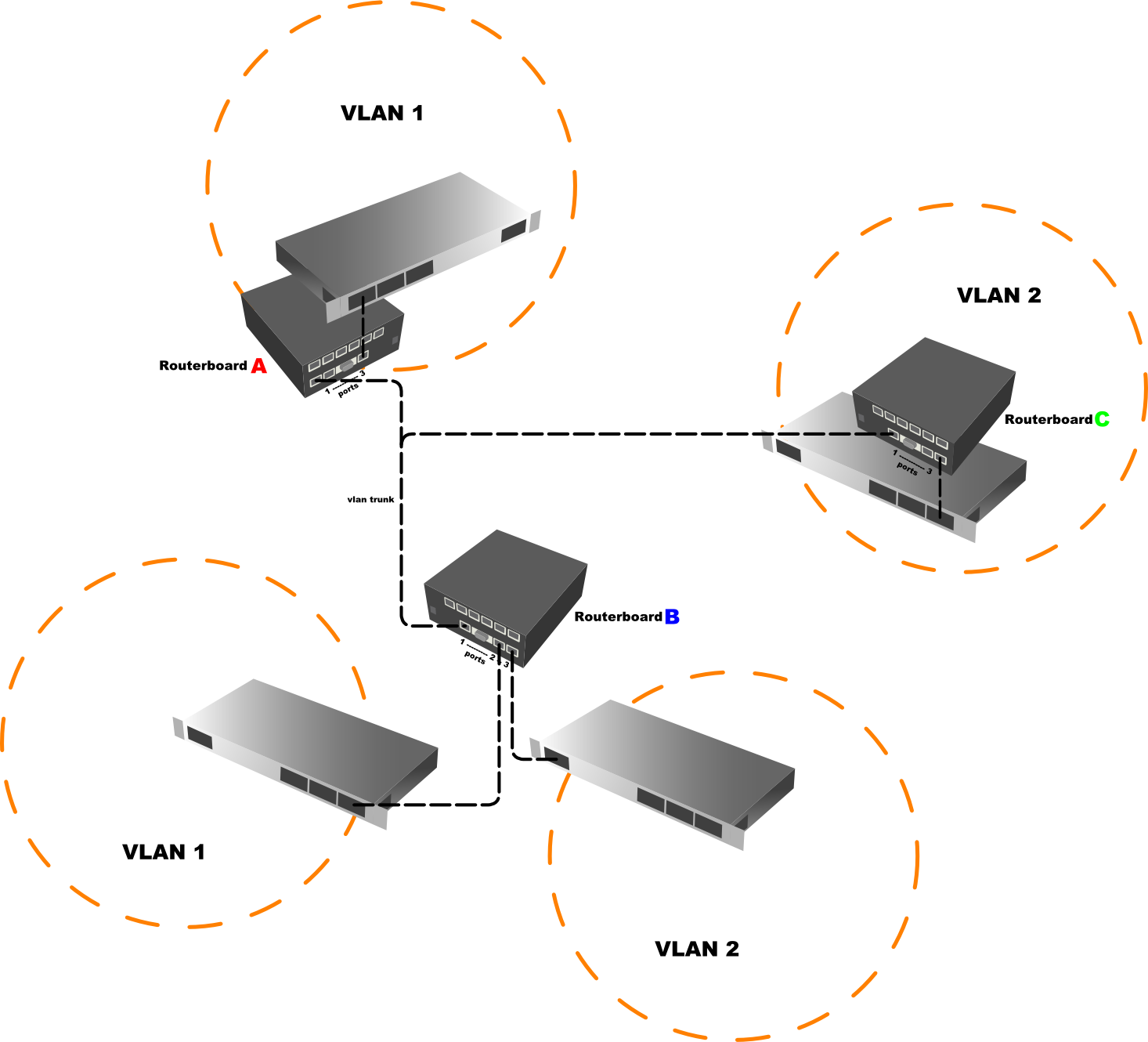
In it, you will see a setup of VLAN’s that I have configured. My first question is
-
Is this the proper way to setup VLANs?
I have the first ethernet port on all the routerboards configured with their respective VLANs and routerboard “B” has both VLAN1 and VLAN2 placed on this port. Routerboards “A” and “C” both have switches connected to ethernet port 3 which is then bridged to the VLAN interface attached to port 1 in the routerOS software. Routerboard “B” has a similar setup with ports 2 and 3 for the two VLANs. I am able to ping devices attached to VLAN1 on routerboard “A” from the routerboard “B” VLAN1 segment. The VLAN2 segments function similarly. I am aware that I can attach VLAN aware switches to the VLAN trunk but let’s just assume I prefer to have routerboard functionality at these locations. -
If this is the proper way to setup VLANs, my main question is in regards to the VLAN trunk portion of the network. What are the limitations here? I have also tested this setup with the trunk passing through up to 3 wireless bridge hops and it seems to be operating as expected. I am not an expert on VLANs and am wondering how they find their route. If I send some data from VLAN1 on routerboard “B” to a device connected through routerboard “A” is that data also being broadcast to routerboard “C” and then just being discarded or is the data only going to devices that are designated as VLAN1 devices. My goal is to make sure that traffic is not being sent across links, wasting bandwidth unnecessarily. If it is, is there any way to route the VLAN traffic to make it
Thanks for any input you guys may have and thanks for an awesome product Mikrotik people!
edit - 05.19.09 - still interested in hearing any comments anyone may have.