Uneffective firewall rules

Hi everyone,
just bought my first MikroTik hEX. I'm struggling with something which to me should be straightforward.
Below i'll attach my current config.

My setup is this
Internet --- ISP router (LAN port) ---- (internet port) hEX (LAN port) ---- (WAN port) Mercusys router (192.168.1.117)

Mercusys clients have a subnet of their own 192.168.8.0/24, while the main network is 192.168.1.0/24

I want the hEX to drop traffic coming from 192.168.8.0/24 and directed to 192.168.1.0/24 (ISP router excluded, so still allowing internet access).

I’ve set up a firewall rule but seems uneffective. I think that maybe the mercusys addresses may not appear to the hEX due to natting or something, but at least the traffic from the mercusys router should be caught…

Thank you,
any help or suggestions are welcome

# 2025-11-05 20:21:26 by RouterOS 7.20.2
# software id = DZG0-KHZX
#
# model = E50UG
# serial number = byebye
/interface bridge
add admin-mac=F4:1E:57:7E:7E:91 auto-mac=no comment=defconf name=bridge
/interface list
add comment=defconf name=WAN
add comment=defconf name=LAN
/ip pool
add name=default-dhcp ranges=192.168.88.10-192.168.88.254
add name=dhcp_pool1 ranges=192.168.1.200-192.168.1.241
/ip dhcp-server
add address-pool=default-dhcp disabled=yes interface=ether2 name=defconf
add address-pool=dhcp_pool1 interface=bridge name=dhcp1
/disk settings
set auto-media-interface=bridge auto-media-sharing=yes auto-smb-sharing=yes
/interface bridge port
add bridge=bridge comment=defconf interface=ether2
add bridge=bridge comment=defconf interface=ether3
add bridge=bridge comment=defconf interface=ether4
add bridge=bridge comment=defconf interface=ether5
add bridge=bridge interface=ether1
/ip neighbor discovery-settings
set discover-interface-list=LAN
/ipv6 settings
set disable-ipv6=yes forward=no
/interface list member
add comment=defconf interface=ether1 list=WAN
add interface=ether2 list=LAN
add interface=ether3 list=LAN
add interface=ether4 list=LAN
add interface=ether5 list=LAN
/interface ovpn-server server
add mac-address=FE:33:22:22:9C:82 name=ovpn-server1
/ip address
add address=192.168.1.118/16 comment=defconf interface=ether2 network=192.168.0.0
/ip dhcp-client
add comment=defconf disabled=yes interface=bridge
/ip dhcp-server network
add address=192.168.1.0/24 comment=defconf dns-server=192.168.1.118 gateway=192.168.1.118 netmask=24
/ip dns
set allow-remote-requests=yes servers=192.168.1.1
/ip dns static
add address=192.168.1.118 comment=defconf name=router.lan type=A
/ip firewall address-list
add address=192.168.1.2-192.168.1.255 comment="Vodafone Station Lan / senza Router" list=VF_Lan
add address=192.168.8.0/24 comment="Mercusys LAN" list=Mercusys_LAN
/ip firewall filter
add action=drop chain=forward comment="DROP  Mercusys  to Vodafone LAN" dst-address-list=VF_Lan in-interface-list=all out-interface-list=all src-address=192.168.1.117 src-address-list=Mercusys_LAN
add action=accept chain=input comment="Accept Management from TUF" disabled=yes dst-address=192.168.1.118 dst-port=8291 protocol=tcp src-address=192.168.1.28
add action=accept chain=input comment="defconf: accept established,related,untracked" connection-state=established,related,untracked
add action=drop chain=input comment="defconf: drop invalid" connection-state=invalid
add action=accept chain=input comment="defconf: accept ICMP" protocol=icmp
add action=accept chain=input comment="defconf: accept to local loopback (for CAPsMAN)" dst-address=127.0.0.1
add action=drop chain=input comment="defconf: drop all not coming from LAN" in-interface-list=!LAN
add action=accept chain=forward comment="defconf: accept in ipsec policy" ipsec-policy=in,ipsec
add action=accept chain=forward comment="defconf: accept out ipsec policy" ipsec-policy=out,ipsec
add action=fasttrack-connection chain=forward comment="defconf: fasttrack" connection-state=established,related hw-offload=yes
add action=accept chain=forward comment="defconf: accept established,related, untracked" connection-state=established,related,untracked
add action=drop chain=forward comment="defconf: drop invalid / Questa rompe spesso navigazione" connection-state=invalid disabled=yes
add action=drop chain=forward comment="defconf: drop all from WAN not DSTNATed" connection-nat-state=!dstnat connection-state=new in-interface-list=WAN
/ip firewall nat
add action=masquerade chain=srcnat comment="defconf: masquerade" ipsec-policy=out,none out-interface-list=WAN
/ipv6 firewall address-list
add address=::/128 comment="defconf: unspecified address" list=bad_ipv6
add address=::1/128 comment="defconf: lo" list=bad_ipv6
add address=fec0::/10 comment="defconf: site-local" list=bad_ipv6
add address=::ffff:0.0.0.0/96 comment="defconf: ipv4-mapped" list=bad_ipv6
add address=::/96 comment="defconf: ipv4 compat" list=bad_ipv6
add address=100::/64 comment="defconf: discard only " list=bad_ipv6
add address=2001:db8::/32 comment="defconf: documentation" list=bad_ipv6
add address=2001:10::/28 comment="defconf: ORCHID" list=bad_ipv6
add address=3ffe::/16 comment="defconf: 6bone" list=bad_ipv6
/ipv6 firewall filter
add action=accept chain=input comment="defconf: accept established,related,untracked" connection-state=established,related,untracked
add action=drop chain=input comment="defconf: drop invalid" connection-state=invalid
add action=accept chain=input comment="defconf: accept ICMPv6" protocol=icmpv6
add action=accept chain=input comment="defconf: accept UDP traceroute" dst-port=33434-33534 protocol=udp
add action=accept chain=input comment="defconf: accept DHCPv6-Client prefix delegation." dst-port=546 protocol=udp src-address=fe80::/10
add action=accept chain=input comment="defconf: accept IKE" dst-port=500,4500 protocol=udp
add action=accept chain=input comment="defconf: accept ipsec AH" protocol=ipsec-ah
add action=accept chain=input comment="defconf: accept ipsec ESP" protocol=ipsec-esp
add action=accept chain=input comment="defconf: accept all that matches ipsec policy" ipsec-policy=in,ipsec
add action=drop chain=input comment="defconf: drop everything else not coming from LAN" in-interface-list=!LAN
add action=accept chain=forward comment="defconf: accept established,related,untracked" connection-state=established,related,untracked
add action=drop chain=forward comment="defconf: drop invalid" connection-state=invalid
add action=drop chain=forward comment="defconf: drop packets with bad src ipv6" src-address-list=bad_ipv6
add action=drop chain=forward comment="defconf: drop packets with bad dst ipv6" dst-address-list=bad_ipv6
add action=drop chain=forward comment="defconf: rfc4890 drop hop-limit=1" hop-limit=equal:1 protocol=icmpv6
add action=accept chain=forward comment="defconf: accept ICMPv6" protocol=icmpv6
add action=accept chain=forward comment="defconf: accept HIP" protocol=139
add action=accept chain=forward comment="defconf: accept IKE" dst-port=500,4500 protocol=udp
add action=accept chain=forward comment="defconf: accept ipsec AH" protocol=ipsec-ah
add action=accept chain=forward comment="defconf: accept ipsec ESP" protocol=ipsec-esp
add action=accept chain=forward comment="defconf: accept all that matches ipsec policy" ipsec-policy=in,ipsec
add action=drop chain=forward comment="defconf: drop everything else not coming from LAN" in-interface-list=!LAN
/system clock
set time-zone-name=Europe/Rome
/tool mac-server
set allowed-interface-list=LAN
/tool mac-server mac-winbox
set allowed-interface-list=LAN
IF you mean this rule:
add action=drop chain=forward comment="DROP Mercusys to Vodafone LAN" dst-address-list=VF_Lan in-interface-list=all out-interface-list=all src-address=192.168.1.117 src-address-list=Mercusys_LAN

Its unneseccary complicated.

Its EITHER src-address OR src-address-list

So your correct rule would be something like this:

add action=drop chain=forward comment="DROP Mercusys to Vodafone LAN" dst-address-list=VF_Lan src-address-list=Mercusys_LAN

I had tried as you say, doesn’t work either.
Strange thing is that I don’t see any flows coming from 192.168.8.0/24 subnet in the “Connections” tab in firewall menu…

No need to do NAT anywhere except on the WAN port of the ISP router. The only purpose of NAT is to interface between the public internet and private networks. Private IPv4 networks live on 10.0.0.0/8 172.16.0.0/12 and 192.168.0.0/16 and NAT is needed to translate IP addresses according to where any packet is at any moment.

So before you go too far into looking at configs, make sure you understand what I wrote above. Because if you are using NAT between the routers of your network it will give all the traffic from the network you want to block source addresses on the network you are trying to protect and no means to discriminate which traffic really comes from the network you want to block.

Beyond the scope of your question, you are daisy chaining routers WAN port to LAN Port and I wonder why. Given the basic level of your question, I am doubting that you really need to do this. Your requirements might be better met using switches.

So to put it more clearly, you have the MT router hooked up to the ethernet on ether1, and on ether2 you have a different router which gets MT lanip of 192.168.1.117. You have multiple errors on the config getting in the way of success but fundamentally it wont work as is. But there is a solution.

Since the double-natted router joins the lan of the hex, its easy for the 192.168.8.0 users to ping or reach any of the MT LAN devices. Since most routers masquerade traffic out of their WAN port, the MT sees only traffic coming from the Mercury Router as source and returns any traffic to the Mercury Router and then the Mercury router figures out which user to send that back to.

So the bottom line, since the Mercury Router is on the private LAN of the hex, and that is like a layer 2 thing, there is NOTHING you can do to prevent local access with the setup you have on the MT device.

The only thing not automatic on your setup is if normal MT lan users want to reach Mercurty private subnet users, which would only be possible if you create a static router on the MT to do so. IN any case not want you want anyway.

EASY SOLUTION. Create an extra subnet on the HEX, just on the etherport going to the mercury router. Then you can use layer3 rules to block subnet to subnet connectivity in the forward chain problem solved.
We do this by using a block all rule at the end of the chain, anything not explicitly permitted above this rule is dropped.

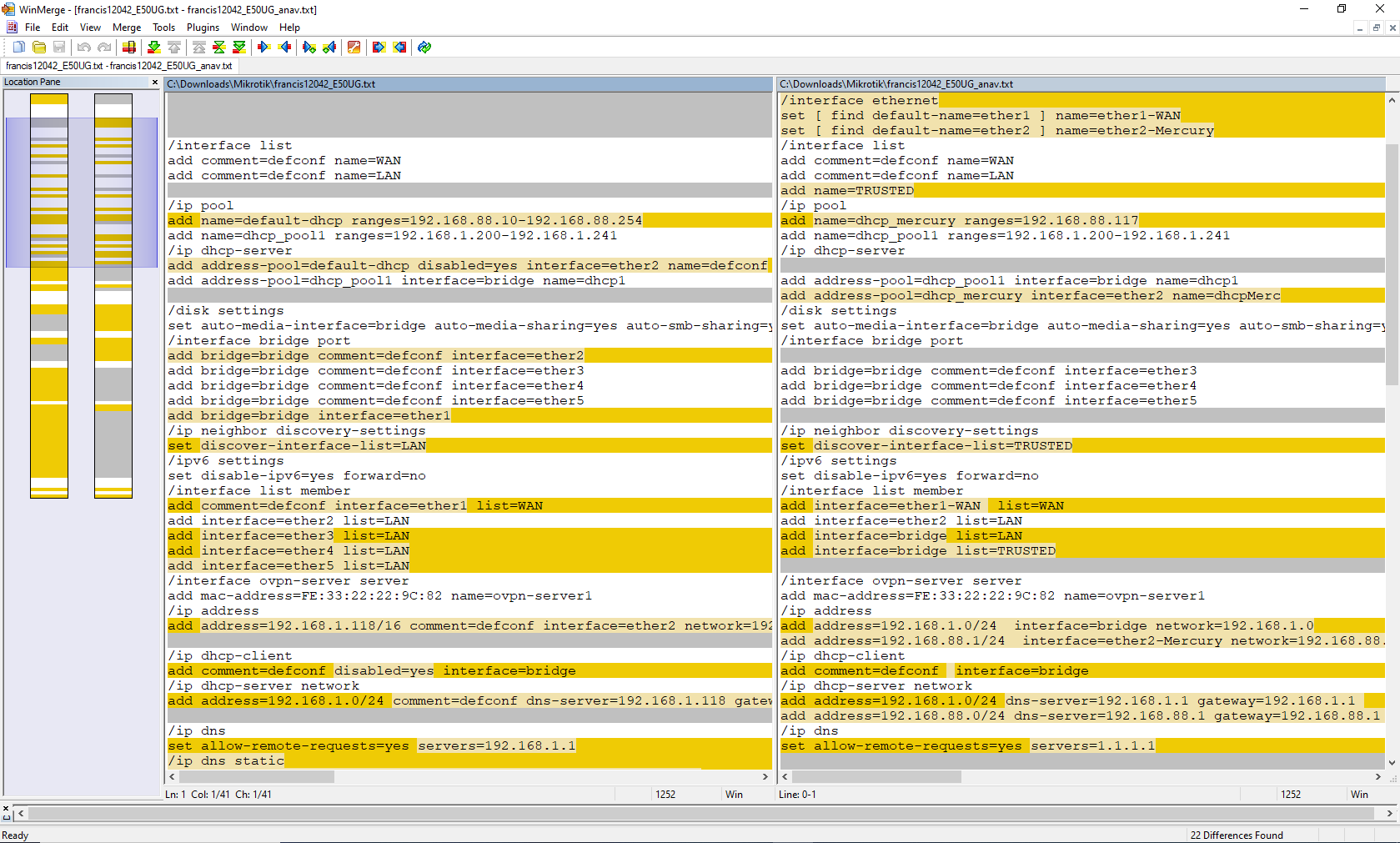
See below:

# model = E50UG
# serial number = byebye
/interface bridge
add admin-mac=F4:1E:57:7E:7E:91 auto-mac=no comment=defconf name=bridge
/interface ethernet
set [ find default-name=ether1 ] name=ether1-WAN
set [ find default-name=ether2 ] name=ether2-Mercury
/interface list
add comment=defconf name=WAN
add comment=defconf name=LAN
add name=TRUSTED
/ip pool
add name=dhcp_mercury ranges=192.168.88.117
add name=dhcp_pool1 ranges=192.168.1.200-192.168.1.241
/ip dhcp-server
add address-pool=dhcp_pool1 interface=bridge name=dhcp1
add address-pool=dhcp_mercury interface=ether2-Mercury name=dhcpMerc
/disk settings
set auto-media-interface=bridge auto-media-sharing=yes auto-smb-sharing=yes
/interface bridge port
add bridge=bridge comment=defconf interface=ether3
add bridge=bridge comment=defconf interface=ether4
add bridge=bridge comment=defconf interface=ether5
/ip neighbor discovery-settings
set discover-interface-list=TRUSTED
/ipv6 settings
set disable-ipv6=yes forward=no
/interface list member
add interface=ether1-WAN  list=WAN
add interface=ether2 list=LAN
add interface=bridge list=LAN
add interface=bridge list=TRUSTED
/interface ovpn-server server
add mac-address=FE:33:22:22:9C:82 name=ovpn-server1
/ip address
add address=192.168.1.0/24  interface=bridge network=192.168.1.0
add address=192.168.88.1/24  interface=ether2-Mercury network=192.168.88.0
/ip dhcp-client
add comment=defconf  interface=bridge
/ip dhcp-server network
add address=192.168.1.0/24 dns-server=192.168.1.1 gateway=192.168.1.1 
add address=192.168.88.0/24 dns-server=192.168.88.1 gateway=192.168.88.1 
/ip dns
set allow-remote-requests=yes servers=1.1.1.1
/ip firewall filter
{ default rules to keep }
add action=accept chain=input comment="defconf: accept established,related,untracked" connection-state=established,related,untracked
add action=drop chain=input comment="defconf: drop invalid" connection-state=invalid
add action=accept chain=input comment="defconf: accept ICMP" protocol=icmp
add action=accept chain=input comment="defconf: accept to local loopback (for CAPsMAN)" dst-address=127.0.0.1
{ admin rules }
add action=accept chain=input comment="trusted access" in-interface-list=TRUSTED
add action=accept chain=input comment="users to services" in-interface-list=LAN \
    dst-port=53 protocol=udp 
add action=accept chain=input comment="users to services" in-interface-list=LAN \
    dst-port=53 protocol=tcp
add action=drop chain=input comment="Drop all else"  { put this rule here, but entered as last rule to make }
++++++++++++++++++++++++++++++++++++++++
add action=fasttrack-connection chain=forward comment="defconf: fasttrack" connection-state=established,related hw-offload=yes
add action=accept chain=forward comment="defconf: accept established,related, untracked" connection-state=established,related,untracked
add action=drop chain=forward comment="defconf: drop invalid " connection-state=invalid
add action=accept chain=forward comment="internet traffic"  in-interface-list=LAN \
     out-interface-list=WAN 
add action=accept chain=forward comment="access to Mercury by bridge users" in-interface=bridge out-interface=ether2-Mercury  disabled=yes  {  enable if required or remove }
add action=accept chain=forward comment="port forwarding"  connection-nat-state=dstnat \
   disabled=yes  { enable if required or remove }
add action=drop chain=forward comment="drop all else" 
/ip firewall nat
add action=masquerade chain=srcnat comment="defconf: masquerade" ipsec-policy=out,none out-interface-list=WAN
/ipv6 firewall filter
add action=drop chain=input
add action=drop chain=forward
/system clock
set time-zone-name=Europe/Rome
/tool mac-server
set allowed-interface-list=none
/tool mac-server mac-winbox
set allowed-interface-list=TRUSTED

Once setup and working, then you can refine requirement such as only allow a few admin IP addresses access to the router for config purposes etc....

1 Like

Why is ether1 added to the bridge?

Why do you have bridge members added to interface list. Once a port is added to a bridge it becomes a bridge-port and should no longer be used as an interface (L3). And you should have bridge in the LAN list.

You should not add an ip address to a bridge-port. And the netmask makes no sense as it includes all addresses that start with 192.168, including the 192.168.8.0/24 that is behind the mercusys router.

The above is instructing ROS to configure the bridge with an ip address from a dhcp server. But you have all ports included in the bridge. Edit: I just noticed the "disabled=yes" which should make it a no-op.

Before worrying about getting your firewall to work, get your configuration working correctly.

I would have thought that the default config would have worked (to allow the mercusys router to view the E50UG as its "ISP" connection), but without knowing what the mercusys router is doing (if it is configured like a consumer router, it is doing nat masquerade and firewalling. Because of the NAT any traffic from the mercusys "LAN" will appear to be coming from the ip address of the mercusys WAN interface. See @DuctView 's note above.

In your OP you said:

Your diagram isn't very specific about where the different subnets are, there should be 4.

  1. subnet for ISP router's WAN port is in (only viewable from ISP modem)
  2. subnet for ISP router's LAN and E50UG's WAN port (which is ether1 in the default config) 192.168.1.0/24
  3. subnet for the E50UG's LAN (bridge in the default config) ports and the mercusys's WAN port (this appears to be incorrectly configured on ether2 as 192.168.1.118/16 - note that the netmask includes all of 192.168.0.0/16, e.g. all of the addresses that begin with 192.168.
  4. subnet for the mercusys's LAN port(s). 192.168.8.0/24

Why did you change the default config?

The "conventional" way to do what (I think) you want, would be to partition the bridge (either with vlans or by removing one port that would then be usable as a separate interface.

I see that @anav just posted a much more correct config.

Make a backup of your current config (if you want to be able to revert in one step) and also an export for reference (what you have already posted may be sufficient).

Then try @anav 's config and connect E50UG ether2 to the WAN port of the mercsys router, or better to a dumb switch and let the E50UG be the DHCP server for the devices currently connected to the mercusys LAN.

If that is the approach taken, one would have to open up the IP pool I provided LOL

I hadn't looked closely at the config you posted, just saw it didn't include all ports in the bridge.

My guess is that @francis12042 started with the default config, it didn't work to allow the blocking of ip addresses to the upstream subnet, and then started making changes (possibly seen in some other post or youtube video) in the attempt to get something to work without really understanding what the change is doing. In my experience, that stratedgy (shotgun method) has a low success rate and high frustration rate. It often leads to breaking things that were previously correct and not the cause of the original problem. I prefer to think first and be able to explain why a potential solution could fix the issue that is preventing the wanted behavior. But that does require more understanding of the fundamentals.

Yup, chat gpt fail gets real ugly.
I only provided enough pool for the one device attached to the etherport.
It may not be pretty but should work.

I see what you mean, perhaps this could work. However, from the config you provided, I'm missing how would the Mercusys (192.168.88.1) be able to access internet through 192.168.1.1.

Probably it's just me that I'm missing something obvious

That's pretty much it LOL. Funny thing is that i’ve even studied this stuff in theory, but when it comes to the real world any certainty falls apart.

Wrong question. If you look at the config I provided........
The mercury router is assigned the address of 192.168.88.117 on the LAN Subnet we created, on the MT router, with address 192.168.88.1/24 that is attached to ether2 (due to the dhcp server on that subnet giving out the single LANIP available in the Pool, on the mikrotik).

So the mercury router looks like a LAN entity to the mikrotik.
192.168.88.117=LAN address on Mikrotik LAN
192.168.88.117=WAN address on mercury router

The mercury router, behind its NAT, has its own private LAN IP address structure of 192.168.8.0/24 NOT 88!

So the correct question is, how does a user such as 192.168.8.5 reach the internet.

Simple the user wants to reach CBC news, on the PC browser, his request is natted to the address of the WANIP of the mercury router, when leaving the mercury router, so
scr=192.168.8.5 dst=cbc
becomes
src 192.168.88.117 dst=cbc when it hits the mikrotik and is considered normal LAN traffic to be directed.

The mikrotik has config rules to follow
a. traffic from LAN to WAN is allowed YES
b. there is a route for traffic out WAN YES

  • either default route in ip dhcp client/ppoe client, or
  • manual route created by admin pointing to ISP gateway IP
    c. there is a path to DNS to resolve CBC into an internet address. YES

Traffic leaves the router hits CBC, comes back, the router keeps track of all traffic and thus sends the return traffic back to the source it knows about --> 192.168.88.117, this traffic arrives at the wan interface of the mercury router, it unsourcenats the traffic back to an original source of 192.168.8.5 and thus sends the return traffic back to the originator.

Okay, thank you for the detailed explanation.

I think i got what you say.

I still have a few doubts.

So, summing up:

  1. src=192.168.8.5 dst=cbc
  2. NAT occurs, so src:=192.168.88.117
  3. MT sees src=192.168.88.117 dst=cbc and forwards to WAN
  4. ISP router (192.168.1.1) sees a packet src=192.168.88.117 from a different subnet

Does the ISP router redirect it to WAN or drop it being it from a different subnet?

Otherwise, if the MT performs NAT then the ISP router should see a packet with src=192.168.1.0 (the MT).

But being the MT in bridge mode, no NATting should be performed (?)

That is the purpose of doing hands on stuff in a lab. It will quickly point out things that you don't understand as well as you thought. It tests your assumptions. See this.

Not quite..... I didnt know that the first router the MT was not attached to an ISP directly through a Modem, but another modem/ROUTER. Thus its double nat situation, so what goes on is this...

MT sees src=192.168.88.117 dst=cbc and forwards to WAN
this traffic is now natted to the WANIP of the MT router 192.168.1.1?
Thus the ISP router sees traffic from a LAN device going to CBC, and out it goes, and the return is similar to already described but two iterations of it.

I don't know (?), would the MT perform NAT if it is setup as bridge or simply forward the packet as is?

I suspect that everything that reaches the end router (192.168.1.1) which is not 192.168.1.0/24 does not go out.

I could also config the MT as a router, and the Mercusys as simple AP, and at that point the MT would surely perform NAT.

Sadly I've not been home to try more stuff out. I have to dig in more tomorrow

Or as @anav rephrased "how does a user such as 192.168.8.5 reach the internet."

Here's an old but good simple explanation of how nat masquerade works.

How Network Address Translation Works by PieterExplainsTech.

In your setup, there would actually be three levels of NAT translation (one on ISP router), one on MT E50UG, and one on the Mercusys router.

After looking more closely at the config @anav posted, it appears he started with your config and manually edited it to fix some of the problems. It won't work as is, you have the dhcp client configured on the bridge instead of ether1, and the bridge will probably need an ip address (a separate subnet from what the ISP LAN uses, and the mercusys LAN uses), @anav used the Mikrotik default subnet (192.168.88.0/24) for ether2 (and .0 for the ether2 interface too, I didn't think it would allow .0 (the network address) as a valid address, but MikroTik appears to allow setting it that way, although it may cause interoperability problems, I would use .1 instead).

At any rate, the config posted by @anav still has some left over mistakes.

And without an accurate physical connection diagram, we don't even know what ports are being used for WAN LAN etc.

Really, let me know what is wrong with ether2 as a separate subnet???

/interface ethernet
set [ find default-name=ether2 ] name=ether2-Mercury
/ip pool
add name=dhcp_mercury ranges=192.168.88.117
/ip dhcp-server
add address-pool=dhcp_mercury interface=ether2-Mercury name=dhcpMerc
/ip address
add address=192.168.88.1/24  interface=ether2-Mercury network=192.168.88.0
/ip dhcp-server network
add address=192.168.88.0/24 dns-server=192.168.88.1 gateway=192.168.88.1 

Nothing wrong with using ether2 as separate subnet.

Oops. it was the 192.168.1.0/24 on the bridge not the 192.168.88.0/24 on ether2.

These were issues in the orginal you started with.

The original you started with has:

Part of your fixed had this.

In the original, the dhcp client on bridge was disabled (but also had all 5 ports included in bridge)

original had hardcoded bridge ip address as 192.168.1.118/16 (incorrect mask) and in the dhcp server network section had the network with /24 mask and 192.168.1.118 as the dns-server and gateway address.

In your modified version the bridge address 192.168.1.118/16 was changed to 192.168.1.0/24 and the dhcp client was re-enabled. (this is odd that MikroTik allows .0 on an interface address, but I just tried on 7.19.6 and it allowed it. There was a recent topic requesting that it be allowed, evidently recent versions of linux allow using the "network address" as an ip address. Whether it will work without other problems, I don't know, I just changed an interface I wasn't using and then changed it back.

But I don't think having a static ip and dhcp client on the same interface is a valid config (on the bridge).

1 Like

Try to keep up LOL.