What would be useful is that somebody creates supout.rif file before trying to do the upgrade. If the upgrade fails and requires reboot before upgrade eventually succeeds, then that supout file would be immensely useful for MT support to figure out what's the problem requiring device reboot.
Other than that, the same procedure (reboot before upgrade) was sometimes required also in some previous cases ... it seems that it's particular combination of device type and old ROS version ... but probably also particular configuration and run-time history, making diagnosing this problem pretty hard.
Since requirement to reboot device prior to trying to upgrade is not an obvious one, it's also not obvious that creating a supout.rif before rebooting the device is a way to go ... but if one administers multiple similarly (if not identically) configured and used devices and the same thing happens two times in a row, then IMO this should hint at a systematic problem which prompts for diagnosing actions on the third (or fourth) device ...
I have upgraded ~10 hap ac3s without "prior reboot", their uptime was from a few hours to maybe 2 weeks, most of them were on 7.24. All of them upgraded on the first try.
Which couldn't be said for hap ac2s, with which there was some "hunting" for 7kb more free space before they would accept upgrade (previously were on 7.23.2). On one of them I had to uninstall wifi-qcom-ac before upgrade, then reinstall after.
i had issues upgrading some hAP ac2 due to memory leaks in ROS, which eventually required a reboot of the device anyway. but sometimes, it had enough free memory to continue running, but not enough to upgrade, and had to be rebooted first.
To increase your chances of installing without rebooting, delete all unnecessary files in Files, then clear the history in the Terminal.
You have no idea how much space clearing the Terminal history increases if you use it frequently.
Rebooting the device sometimes helps clear the undo history, which also takes up a lot of memory.
In general, I always recommend a reboot before updating,
which can perhaps be used to update RouterBOOT at the same time,
without having to reboot again afterwards to do so...
From:
Verify that everything is backed up
Verify that there are no errors in the current files inside the device
Delete the local log files and terminal history
Verify that there is enough space, as per lab tests
Reboot the machine regardless
Copy the latest firmware and software to the CPE (yes, both)
Apply the RouterBOOT update (no reboot needed)
Apply the RouterOS update (which reboots is needed)
Upon reboot, the machine is already updated; there's no need to reboot again.
Export the configuration again and compare it with the previous one to check for unexpected discrepancies.
Rebooting usually doesn't free up any storage space.
And that can only be determined by taking supout.rif file and sending it to MT support. And if it's indeed memory leak (which we still aren't completely sure about ... could be normal memory usage), then good people at MT might be able to fix it.
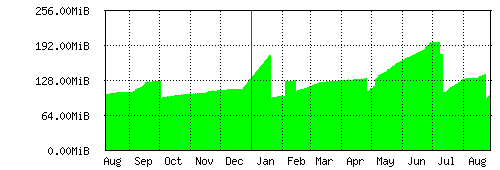
Observing my own hAP ac2 (which doesn't run wifi drivers, hence storage space is not an issue) shows steady growing memory usage ... up to a certain point:
comment on events since April: reboot near the end of April. Reboot around 10th of July. Reboot at the end of August. So nothing really happened in the beginning of May (where memory usage increased at much higher rate than usually), nothing happened at the end of June (again steeper increase of memory used) and ... most crucially ... nothing happened around 5th of July where memory usage dropped by around 20MB. The flat line during fist half of August correlates with no local usage (users were not present). Which might indicate that increase in memory usage (memory leak if you want) might be due to connection tracking (not recycling used memory). The same probably applies to roughly a week at the end of June / beginning of July.
Comment on slope between mid February and almost end of April: at first memory usage slope was steeper, then it became less steep (but still increasing): again no difference in usage of device.
I was about to let memory usage increase as far as possible (to see if memory usage eventually stops before maxing out), but some reboots were necessary. But that drop around 5th of July was not due to reboot and I don't know what happened there.