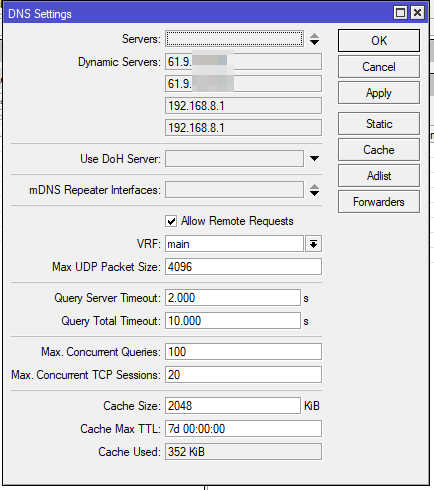
This is a strange one, the problem has resurfaced. I have a work laptop using F5 FPN that can't resolve internal hostnames when connected to the Mikrotik, however if I use a hotspot on my phone they resolve fine. Other devices on my network are also fine.
I've limied ability to troubleshoot too much from the laptop, as I don't have admin, and the VPN is an always on, so I can't check my local network before connecting to the VPN.
From the laptop I can do an nslookup on a host and it returns the expected IP, however I can't ping by hostname (IP ping is fine), nor can I access network shares by hostname (IP is fine).
Ping request could not find host , please check and try again.
Here is the config export with sensitive into removed, not sure what may be blocking it?
# 2025-08-19 19:28:21 by RouterOS 7.19.4
# software id = UUZ2-Z8I4
#
# model = RB3011UiAS
# serial number = removed
/interface bridge
add admin-mac=CC:2D:E0:7B:34:9F auto-mac=no comment=defconf \
    ingress-filtering=no name=bridge port-cost-mode=short vlan-filtering=yes
/interface ethernet
set [ find default-name=ether1 ] name=ether1-WAN
set [ find default-name=ether2 ] name=ether2-LAN
set [ find default-name=ether6 ] name=ether6-master
/interface wireguard
add listen-port=13222 mtu=1420 name=wireguard1
/interface vlan
add interface=bridge name=vlan10_Guest vlan-id=10
add interface=bridge name=vlan20_DNSProxy vlan-id=20
add interface=bridge name=vlan30_Kids vlan-id=30
add interface=bridge name=vlan40_CCTV vlan-id=40
add interface=bridge name=vlan50_IOT vlan-id=50
add interface=bridge name=vlanTest vlan-id=99
/interface ethernet switch port
set 4 default-vlan-id=50
/interface list
add exclude=dynamic name=discover
add name=mactel
add name=mac-winbox
add name=WAN
/interface lte apn
set [ find default=yes ] apn=telstra.internet ip-type=ipv4 use-network-apn=no
add apn=telstra.internet ip-type=ipv4 name=telstra
/ip ipsec profile
set [ find default=yes ] dpd-interval=2m dpd-maximum-failures=5
add dh-group=modp1024 dpd-interval=2m dpd-maximum-failures=5 name=profile_1
/ip ipsec peer
# This entry is unreachable
add name=peer1 passive=yes profile=profile_1
/ip pool
add name=dhcp ranges=192.168.100.1-192.168.100.254
add name=Guest ranges=10.0.10.2-10.0.10.254
add name=DNSProxy ranges=10.0.20.2-10.0.20.254
add name=Kids_OpenDNS ranges=10.0.30.2-10.0.30.254
add name=CCTV ranges=10.0.40.2-10.0.40.254
add name=vpn ranges=192.168.99.10-192.168.99.200
add name=IOT ranges=10.0.50.2-10.0.50.254
add name=Test ranges=192.168.0.2-192.168.0.254
/ip dhcp-server
add address-pool=dhcp interface=bridge lease-time=10m name=LAN \
    use-reconfigure=yes
add address-pool=Guest interface=vlan10_Guest lease-time=10m name=GUEST \
    use-reconfigure=yes
add address-pool=DNSProxy interface=vlan20_DNSProxy lease-time=10m name=\
    DNSProxy
add address-pool=Kids_OpenDNS interface=vlan30_Kids lease-time=10m name=\
    Kids_OpenDNS use-reconfigure=yes
add address-pool=CCTV interface=vlan40_CCTV lease-time=10m name=CCTV \
    use-reconfigure=yes
add address-pool=IOT interface=vlan50_IOT lease-time=10m name=IOT \
    use-reconfigure=yes
add address-pool=Test interface=vlanTest lease-time=10m name=Test
/ip smb users
set [ find default=yes ] disabled=yes
/port
set 0 name=serial0
/ppp profile
add bridge=bridge dns-server=192.168.89.1 local-address=vpn name=open_vpn \
    remote-address=vpn use-compression=no use-encryption=required
set *FFFFFFFE dns-server=192.168.100.254 local-address=192.168.89.1 \
    remote-address=vpn
/routing bgp template
set default disabled=no output.network=bgp-networks
/routing ospf instance
add disabled=no name=default-v2
/routing ospf area
add disabled=yes instance=default-v2 name=backbone-v2
/routing table
add fib name=to_WAN4G
/certificate settings
set builtin-trust-anchors=not-trusted
/interface bridge port
add bridge=bridge comment=defconf ingress-filtering=no interface=ether2-LAN \
    internal-path-cost=10 path-cost=10
add bridge=bridge comment=defconf ingress-filtering=no interface=\
    ether6-master internal-path-cost=10 path-cost=10
add bridge=bridge comment=defconf hw=no ingress-filtering=no interface=sfp1 \
    internal-path-cost=10 path-cost=10
add bridge=bridge ingress-filtering=no interface=ether3 internal-path-cost=10 \
    path-cost=10
add bridge=bridge ingress-filtering=no interface=ether4 internal-path-cost=10 \
    path-cost=10
add bridge=bridge ingress-filtering=no interface=ether5 internal-path-cost=10 \
    path-cost=10
add bridge=bridge ingress-filtering=no interface=ether7 internal-path-cost=10 \
    path-cost=10
add bridge=bridge ingress-filtering=no interface=ether8 internal-path-cost=10 \
    path-cost=10
add bridge=bridge ingress-filtering=no interface=ether9 internal-path-cost=10 \
    path-cost=10
add bridge=bridge ingress-filtering=no interface=ether10 internal-path-cost=\
    10 path-cost=10
/ip firewall connection tracking
set udp-timeout=10s
/ip neighbor discovery-settings
set discover-interface-list=discover
/ip settings
set max-neighbor-entries=8192
/ipv6 settings
set disable-ipv6=yes max-neighbor-entries=8192 soft-max-neighbor-entries=8191
/interface bridge vlan
add bridge=bridge tagged=bridge,ether2-LAN vlan-ids=10,20,30,40,50
/interface ethernet switch vlan
add independent-learning=no ports=ether5 switch=switch1 vlan-id=50
/interface l2tp-server server
set enabled=yes use-ipsec=yes
/interface list member
add interface=ether2-LAN list=discover
add interface=ether3 list=discover
add interface=ether4 list=discover
add interface=ether5 list=discover
add interface=sfp1 list=discover
add interface=ether6-master list=discover
add interface=ether7 list=discover
add interface=ether8 list=discover
add interface=ether9 list=discover
add interface=ether10 list=discover
add interface=bridge list=discover
add interface=bridge list=mactel
add interface=bridge list=mac-winbox
add interface=ether1-WAN list=WAN
/interface ovpn-server server
add auth=sha1,md5 certificate=server cipher=\
    blowfish128,aes128-cbc,aes192-cbc,aes256-cbc default-profile=open_vpn \
    disabled=no mac-address=FE:BA:A6:FE:32:AE name=ovpn-server1 port=9194 \
    require-client-certificate=yes
/interface pptp-server server
# PPTP connections are considered unsafe, it is suggested to use a more modern VPN protocol instead
set enabled=yes
/interface sstp-server server
set default-profile=default-encryption enabled=yes
/interface wireguard peers
add allowed-address=10.0.60.4/32 comment="Removed1 Surface Laptop" interface=\
    wireguard1 name=peer1 public-key=\
    "removed"
add allowed-address=10.0.60.5/32 comment="Removed1 Galaxy s21" interface=\
    wireguard1 name=peer3 public-key=\
    "removed"
add allowed-address=10.0.60.6/32 comment="Removed2 G15 Laptop" interface=\
    wireguard1 name=peer4 public-key=\
    "removed"
add allowed-address=10.0.60.7/32 comment="Removed3 Dell Laptop" interface=\
    wireguard1 name=peer5 public-key=\
    "removed"
/ip address
add address=192.168.100.254/24 comment=defconf interface=ether2-LAN network=\
    192.168.100.0
add address=10.0.10.1/24 comment=Guest interface=vlan10_Guest network=\
    10.0.10.0
add address=10.0.20.1/24 comment="DNS Proxy" interface=vlan20_DNSProxy \
    network=10.0.20.0
add address=10.0.30.1/24 comment=Kids interface=vlan30_Kids network=10.0.30.0
add address=10.0.40.1/24 comment=CCTV interface=vlan40_CCTV network=10.0.40.0
add address=10.0.50.1/24 comment=IOT interface=vlan50_IOT network=10.0.50.0
add address=10.0.60.1/24 interface=wireguard1 network=10.0.60.0
add address=192.168.0.1/24 interface=vlanTest network=192.168.0.0
/ip arp
add address=10.0.50.6 interface=vlan50_IOT mac-address=FC:67:1F:D1:C5:9E
/ip cloud
set ddns-enabled=yes
/ip dhcp-client
add add-default-route=no allow-reconfigure=yes comment=defconf \
    default-route-tables=main interface=ether1-WAN script=":local newgw [/ip d\
    hcp-client get [find interface=\"ether1-WAN\"] gateway];\r\
    \n:local routegw [/ip route get [find comment=\"NBN\"] gateway ];\r\
    \n:log warning \"ether1-WAN DHCP-CLIENT update, Current Route GW: \$routeg\
    w   DHCP-Client GW: \$newgw\";\r\
    \n:delay 20\r\
    \n/tool e-mail send to=removed@gmail.com subject=\"NBN DHCP Refresh\" body\
    =\"DHCP Gateway: \$newgw\\nether1-WAN Gateway: \$routegw\"\r\
    \n:if (\$newgw != \$routegw) do={     \r\
    \n     :log warning \"NBN Gateway change detected, updating route ... Curr\
    ent Route GW: \$routegw   DHCP-Client GW: \$newgw \";     \r\
    \n     /ip route set [find comment=\"NBN\"] gateway=\$newgw;\r\
    \n     :delay 10\r\
    \n     /tool e-mail send to=removed@gmail.com subject=\"NBN Gateway Change\
    \_detected\" body=\"DHCP Gateway: \$newgw\\nether1-WAN Gateway: \$routegw\
    \";\r\
    \n}"
/ip dhcp-server alert
add comment="Email notification when new lease is obtained" disabled=no \
    interface=bridge on-alert=":local recipient \"removed@mail.com\"\r\
    \n/ip dhcp-server lease\r\
    \n:if (\$leaseBound = 1) do={\r\
    \n\t:do {\r\
    \n\t\t:tool e-mail send to=\$recipient subject=\"DHCP Address Alert [MAC: \
    \$leaseActMAC]\" body=\"The following MAC address [\$leaseActMAC] received\
    \_an IP address [\$leaseActIP] from the DHCP Server [\$leaseServerName]\"\
    \r\
    \n\t\t:log info \"Sent DHCP alert for MAC \$leaseActMAC\"\r\
    \n\t} on-error={:log error \"Failed to send alert email to \$recipient\"}\
    \r\
    \n}\r\
    \n" valid-server=00:00:00:00:00:00
/ip dhcp-server lease
   ***removed***
/ip dhcp-server network
add address=10.0.10.0/24 comment=GUEST dns-server=8.8.8.8,8.8.4.4 gateway=\
    10.0.10.1 netmask=24
add address=10.0.20.0/24 comment="DNS Proxy" dns-server=10.0.20.1 gateway=\
    10.0.20.1
add address=10.0.30.0/24 comment="Kids - OpenDNS" dns-server=10.0.30.1 \
    domain=local gateway=10.0.30.1
add address=10.0.40.0/24 comment=CCTV dns-server=10.0.40.1 gateway=10.0.40.1
add address=10.0.50.0/24 comment=IOT dns-server=10.0.50.1 gateway=10.0.50.1
add address=192.168.0.0/24 comment=Test dns-server=8.8.8.8,8.8.4.4 gateway=\
    192.168.0.1
add address=192.168.99.0/24 comment=vpn dns-server=192.168.89.1 gateway=\
    192.168.89.1 netmask=24
add address=192.168.100.0/24 comment=LAN dns-server=192.168.100.254 domain=\
    local gateway=192.168.100.254 netmask=24
/ip dns
set allow-remote-requests=yes
/ip dns static
add address=192.168.100.254 name=router type=A
add address=192.168.100.102 comment=office name=office type=A
add address=192.168.100.100 comment=server name=server type=A
/ip firewall address-list
add address=removed.dyndns.org list=WANIP
add address=192.168.100.210 list=WAN-4G
add address=8.8.8.8 list=GOOGLE_DNS
add address=8.8.4.4 list=GOOGLE_DNS
add address=45.57.62.0/24 list=NETFLIX
add address=45.57.63.0/24 list=NETFLIX
/ip firewall filter
add action=fasttrack-connection chain=forward comment="defconf: fasttrack" \
    connection-state=established,related hw-offload=yes
add action=accept chain=forward comment="defconf: accept established,related" \
    connection-state=established,related
add action=drop chain=prerouting comment="Blocked IP" disabled=yes \
    in-interface=ether1-WAN log=yes protocol=tcp src-address=78.128.113.0/24
add action=accept chain=input comment="defconf: accept established,related" \
    connection-state=established,related
add action=drop chain=input comment="Drop Ping from WAN" dst-address-list=\
    WANIP in-interface=ether1-WAN protocol=icmp
add action=accept chain=input comment="defconf: accept ICMP" log-prefix=icmp \
    protocol=icmp
add action=accept chain=forward disabled=yes dst-port=8228 in-interface=\
    ether1-WAN log=yes log-prefix="accept forward port 22" protocol=tcp
add action=accept chain=input comment="allow IPsec NAT" dst-port=4500 \
    protocol=udp
add action=accept chain=input comment="allow IKE" dst-port=500 protocol=udp
add action=accept chain=input comment="Open VPN" dst-port=9194 log-prefix=\
    OVPN protocol=tcp
add action=accept chain=input comment="Wireguard VPN" dst-port=13222 log=yes \
    log-prefix=Wireguard protocol=udp
add action=accept chain=forward comment="Allow PiHole from VLAN" dst-address=\
    192.168.100.250 in-interface=all-vlan
add action=drop chain=input comment="defconf: drop all from WAN" \
    in-interface=ether1-WAN log-prefix="drop all from wan - input"
add action=drop chain=forward dst-address=192.168.100.0/24 in-interface=\
    vlan10_Guest
add action=drop chain=forward comment="defconf: drop invalid" \
    connection-state=invalid log-prefix="drop invalid"
add action=drop chain=forward comment=\
    "defconf:  drop all from WAN not DSTNATed" connection-nat-state=!dstnat \
    connection-state=new in-interface=ether1-WAN log-prefix=\
    "drop from wan not dstnated"
add action=accept chain=forward comment="Allow KIDS VLAN access to LAN" \
    dst-address=192.168.100.0/24 src-address=10.0.30.0/24
add action=accept chain=forward comment="Allow Wireguard VPN access to LAN" \
    dst-address=192.168.100.0/24 src-address=10.0.60.0/24
add action=drop chain=forward comment="Block Internet to CCTV VLAN 40" \
    in-interface=vlan40_CCTV out-interface=ether1-WAN
add action=drop chain=forward comment="Drop all inter vlan" in-interface=\
    all-vlan out-interface=all-vlan
add action=accept chain=input comment="Allow SNMP" dst-port=161 log-prefix=\
    SMNP protocol=udp src-address=192.168.100.0/24
/ip firewall mangle
add action=mark-routing chain=prerouting comment=\
    "Mark STATIC route to WAN-4G" disabled=yes dst-address-type=!local \
    in-interface=bridge new-routing-mark=to_WAN4G src-address-list=WAN-4G
/ip firewall nat
add action=masquerade chain=srcnat comment="HAIRPIN Nat for loopback" \
    dst-address=192.168.100.0/24 src-address=192.168.100.0/24
add action=masquerade chain=srcnat comment="defconf: masquerade" \
    out-interface=ether1-WAN
add action=dst-nat chain=dstnat comment="SSH Server" disabled=yes dst-port=\
    8228 in-interface=ether1-WAN protocol=tcp to-addresses=192.168.100.150 \
    to-ports=22
add action=dst-nat chain=dstnat comment="Blue Iris" dst-address-list=WANIP \
    dst-port=90 protocol=tcp to-addresses=192.168.100.99 to-ports=90
add action=dst-nat chain=dstnat comment="Minecraft to Jordi" \
    dst-address-list=WANIP dst-port=55882 protocol=tcp to-addresses=10.0.30.9 \
    to-ports=59459
add action=dst-nat chain=dstnat comment="M1 XEP" dst-address-list=WANIP \
    dst-port=22601 protocol=tcp to-addresses=192.168.100.16 to-ports=2601
add action=dst-nat chain=dstnat comment=Imperihome dst-address-list=WANIP \
    dst-port=8872 protocol=tcp to-addresses=192.168.100.99 to-ports=8872
add action=dst-nat chain=dstnat comment="Unifi 3" dst-address-list=WANIP \
    dst-port=9443 protocol=tcp to-addresses=192.168.100.27 to-ports=8443
add action=dst-nat chain=dstnat comment=Plex dst-address-list=WANIP dst-port=\
    32444 protocol=tcp to-addresses=192.168.100.99 to-ports=32400
add action=dst-nat chain=dstnat comment="HIK NVR Test" disabled=yes \
    dst-address-list=WANIP dst-port=8833 protocol=tcp to-addresses=\
    192.168.100.7 to-ports=8000
add action=dst-nat chain=dstnat comment="HIK NVR Test2" disabled=yes \
    dst-address-list=WANIP dst-port=83 protocol=tcp to-addresses=\
    192.168.100.7 to-ports=80
add action=dst-nat chain=dstnat comment="HIK NVR 554" disabled=yes \
    dst-address-list=WANIP dst-port=554 protocol=tcp src-address-list="" \
    to-addresses=192.168.100.7 to-ports=554
add action=dst-nat chain=dstnat comment="HIK Driveway Cam" disabled=yes \
    dst-address-list=WANIP dst-port=8100 protocol=tcp to-addresses=\
    10.0.40.151 to-ports=8000
add action=dst-nat chain=dstnat comment="Minecraft Server" dst-address-list=\
    WANIP dst-port=11223 protocol=tcp to-addresses=192.168.100.99 to-ports=\
    25565
add action=dst-nat chain=dstnat comment="BI Camera Test 554" disabled=yes \
    dst-address-list=WANIP dst-port=9554 protocol=tcp to-addresses=\
    10.0.40.153 to-ports=554
add action=dst-nat chain=dstnat disabled=yes dst-address-list=WANIP dst-port=\
    443 protocol=tcp src-address-list="" to-addresses=192.168.100.102 \
    to-ports=2000
add action=dst-nat chain=dstnat comment="Icecast Test" disabled=yes \
    dst-address-list=WANIP dst-port=7230 protocol=tcp to-addresses=\
    192.168.100.68 to-ports=7230
add action=dst-nat chain=dstnat comment=ROKU disabled=yes dst-port=53 \
    in-interface=bridge protocol=udp src-address=192.168.100.144 \
    to-addresses=168.1.79.238
add action=dst-nat chain=dstnat comment="ROKU Wifi" disabled=yes dst-port=53 \
    in-interface=bridge protocol=udp src-address=192.168.100.30 to-addresses=\
    168.1.79.238
add action=dst-nat chain=dstnat comment="LG TV" disabled=yes dst-port=53 \
    in-interface=bridge protocol=udp src-address=192.168.100.6 to-addresses=\
    168.1.79.238
add action=dst-nat chain=dstnat comment=\
    "DNS Rule for vlan20_DNSProxy 1.1.1.1" dst-port=53 in-interface=\
    vlan20_DNSProxy protocol=udp to-addresses=1.1.1.1
add action=dst-nat chain=dstnat comment="DNS Rule for vlan30_Kids OPENDNS" \
    dst-port=53 in-interface=vlan30_Kids protocol=udp src-port="" \
    to-addresses=208.67.222.222
add action=dst-nat chain=dstnat comment="VPN via SmartDNS Proxy" disabled=yes \
    dst-port=53 protocol=udp src-address=192.168.99.0/24 to-addresses=\
    168.1.79.238
add action=dst-nat chain=dstnat comment="Removed2 LAN OpenDNS" disabled=yes \
    dst-port=53 in-interface=bridge protocol=udp src-address=192.168.100.20 \
    to-addresses=208.67.222.222
add action=masquerade chain=srcnat comment="masq. vpn traffic" src-address=\
    192.168.99.0/24
add action=masquerade chain=srcnat comment="masq. vpn traffic" src-address=\
    192.168.89.0/24
# lte1 not ready
add action=masquerade chain=srcnat out-interface=lte1
/ip ipsec identity
add generate-policy=port-override peer=peer1
/ip route
add check-gateway=ping comment=NBN disabled=no distance=1 dst-address=\
    0.0.0.0/0 gateway=124.189.255.254 pref-src="" routing-table=main scope=30 \
    suppress-hw-offload=no target-scope=10
add disabled=no distance=1 dst-address=1.1.1.2/32 gateway=192.168.8.1 \
    routing-table=main scope=30 suppress-hw-offload=no target-scope=10
/ip smb shares
set [ find default=yes ] directory=/pub
/ip upnp
set enabled=yes
/ip upnp interfaces
add interface=bridge type=internal
/lcd
set backlight-timeout=never default-screen=stat-slideshow
/lcd interface
set ether3 disabled=yes
set ether4 disabled=yes
set ether5 disabled=yes
set sfp1 disabled=yes
set ether6-master disabled=yes
set ether7 disabled=yes
set ether8 disabled=yes
set ether9 disabled=yes
set ether10 disabled=yes
/lcd interface pages
set 0 interfaces=ether1-WAN,ether2-LAN
/ppp secret
add name=vpn profile=default-encryption service=l2tp
add name=removed profile=open_vpn service=ovpn
/routing bfd configuration
add disabled=no interfaces=all min-rx=200us min-tx=200us multiplier=5
/snmp
set enabled=yes trap-interfaces=ether2-LAN
/system clock
set time-zone-name=Australia/Melbourne
/system logging
add topics=lte
add disabled=yes prefix="L2TPDBG===>" topics=l2tp
add disabled=yes prefix="IPSECDBG===>" topics=ipsec
add topics=interface
add disabled=yes topics=dhcp
add action=echo topics=interface
/system ntp client
set enabled=yes
/system ntp server
set broadcast=yes enabled=yes manycast=yes
/system ntp client servers
add address=103.38.120.36
add address=194.0.5.123
/system scheduler
add interval=5m name=dynDNS on-event="/system script run DynDNS" policy=\
    ftp,reboot,read,write,policy,test,password,sniff,sensitive,romon \
    start-date=2018-07-27 start-time=13:54:58
add interval=1w name="Check for software update" on-event=\
    "/system script run \"Check for software updates\"" policy=\
    ftp,reboot,read,write,policy,test,password,sniff,sensitive,romon \
    start-date=2016-12-24 start-time=00:00:00
add disabled=yes name="disable vlan-filtering" on-event=\
    "/interface bridge set bridge vlan-filtering=no" policy=\
    ftp,reboot,read,write,policy,test,password,sniff,sensitive,romon \
    start-date=2018-08-13 start-time=19:05:00
add disabled=yes interval=30m name="Check LTE" on-event=\
    "/system script run \"Check LTE Interface\"" policy=\
    ftp,reboot,read,write,policy,test,password,sniff,sensitive,romon \
    start-date=2019-12-17 start-time=03:15:36
add interval=5m name=CloudfrontDNS on-event=\
    "/system script run CloudflareDNS" policy=\
    ftp,reboot,read,write,policy,test,password,sniff,sensitive,romon \
    start-date=2024-10-03 start-time=09:51:04
Remaining config will be in the next post
Thanks