friend how is your connection dial and packet marking in mangrove?
I found it today! Thank you!
Btw, do you prefer to put highest priority 1 (in my situation game : Apex) to fast track?
Fast Track is CPU usage mitigation technique. Queuing is a bandwidth utilization technique. Different goals. If the CPU can handle it, you need to use Queue technique only.
OK for WAN, but what about LAN in cases when more than 1 interface is used?
For example, I use ether2+wlan1+wlan2 in homebridge, but I also have ether3+wlan1-guest in guestbridge. How I identify them both together as LAN in the QoS rules and don’t let one of them to take the whole bandwidth if both are traffic-hungry?
Thanks,
T.P.
There are several ways, in RouterOS, to combine several things into one. Maybe VLAN, maybe interface lists, maybe address lists. Its up to you. Then you simply mangle them and send them to the queue.
If anyone can add a tutorial on how to conduct QoS on CRS328-24P-4S+RM that would be great…
maybe when MikroTik enable DSCP and TOS remarking
maybe when MikroTik enable 4 or 8 hardware queues per port
all of this in hardware switch ASIC to do it at wire-speed without almost CPU usage
then will be nice to do QoS on MikroTik switch’s, but today is not
Thanks alot …Trying
Shouldn’t the topic be moved to https://forum.mikrotik.com/viewforum.php?f=23?
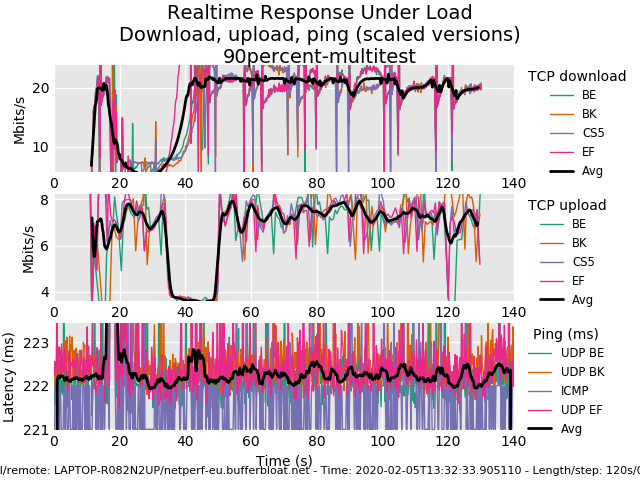
Did a pile of testing today with Flent measuring bufferbloat and performance. The final system that gave the best results (no increase in latency when limited to 90% of line bandwidth) is below.
- Set the two parent queues (UP and DOWN) to have a bucket-size of 0.005. This means that up to 5ms of token can accumulate.
- Create a bulkUp queue of kind PCQ, set the pcq-limit to 11*[upload rate in Mbps] (100ms of upload bandwidth) and the pcq-total-limit to 10 times that. Select all 4 classifier options.
- Create a bulkDown queue of kind sqf. (Using RED gave similar performance, but multiple downloads were less fair)
- Change the default queue to sfq. (This will only effect something if the interactive traffic is saturating the link, which is a bad state to get into)
- Set the HTTP/HTTP_BIG/QUIC/OTHER queues to be bulkUp in the UP direction, and bulkDown in the DOWN direction.
Rationale for the 0.005 size is to copy CoDel as much as possible. We set bulkUp to 100ms of data to smooth out throughput, 100ms of latency for bulk traffic isn’t expected to be noticeable in practice. In the down direction we have a much smaller buffering capacity to ensure we are dropping early - the down direction isn’t controlled as well so early drops are the only way to avoid bloat at the ISP end. RED and SFQ work well here - I had more fairness during testing using SFQ.
An example of 100ms of data setting for my 40 Mbps upload is pcq-limit = 440. Because pcq-limit is a value in KiB, multiplying the Mbps by 11 gives us approximately 100ms of data transfer at 90% of the line speed.
Attached image is my final Flent test. I’m testing from Australia to Europe so the baseline latency is pretty high, upload and download limits in router are 90% of the line speeds (90/36). At the start of this test I also did a simultaneous speedtest.com test to see how fair things are.
I’m okay with that. Please keep the original url and redirect it to whatever the new one will be. Also, remove many of the old posts that don’t advance the topic, since the new 2020 edition for example.
Wow, thank you for doing this. To remove any ambiguity, would you please post your queue config (between code tags) so I can study it? How well did my reference implementation do for you? I want to make sure that your config is not too specific to your needs as we do need something general that people can start and learn from.
Moved. Topic ID is the same, so all links are still valid.
as this is trending and the initial target if I understand it correctly was VoIP priority, here is a small example on how we do it.
the assumption is like this: download-link can be oversaturated, though this is not desireable we usually can’t do much about it if incoming packets are thrown at the CPE, therefore the provider-end is assumed to also hold it’s end of the bargain and do their VoIP prio right. in our situation we are the provider end ourselves and yes our BRAS do this quite well.
so the real job of the mikrotik at the customer-site is handle the upload well.
also we assume VoIP packets are well marked using DSCP-markings (usually all VoIP equipment does this quite well).
therefore we first build a DSCP-marking to packet-marking within MT setup and we slide in a marking for remote-winbox-connects also:
/ip firewall mangle add action=mark-packet chain=postrouting comment="mgmt prio winbox" \
dst-address=<dudeserver-mgmt-IP> new-packet-mark=dscp.48 passthrough=no protocol=tcp src-port=8291
/ip firewall mangle add action=mark-packet chain=postrouting comment=dscp.0_no-marking disabled=no \
dscp=0 new-packet-mark=dscp.0 passthrough=no
/ip firewall mangle add action=mark-packet chain=postrouting comment=dscp.46_VoIP-marking disabled=no \
dscp=46 new-packet-mark=dscp.46 passthrough=no
/ip firewall mangle add action=mark-packet chain=postrouting comment=dscp.48_network-mark disabled=no \
dscp=48 new-packet-mark=dscp.48 passthrough=no
:for x from 1 to 45 do={/ip firewall mangle add action=mark-packet chain=postrouting \
comment=dscp.1-45 disabled=no dscp=$x new-packet-mark=dscp.other passthrough=no}
/ip firewall mangle add action=mark-packet chain=postrouting comment=dscp.47 disabled=no \
dscp=47 new-packet-mark=dscp.other passthrough=no
:for x from 49 to 63 do={/ip firewall mangle add action=mark-packet chain=postrouting \
comment=dscp.49-63 disabled=no dscp=$x new-packet-mark=dscp.other passthrough=no}
and as you sure do provide IPv6 connectivity to your customers we do this very same thing for IPv6 packets:
/ipv6 firewall mangle add action=mark-packet chain=postrouting comment="mgmt prio winbox" \
dst-address=<dudeserver-mgmt-IP> new-packet-mark=dscp.48 passthrough=no protocol=tcp src-port=8291
/ipv6 firewall mangle add action=mark-packet chain=postrouting comment=dscp.0_no-marking disabled=no \
dscp=0 new-packet-mark=dscp.0 passthrough=no
/ipv6 firewall mangle add action=mark-packet chain=postrouting comment=dscp.46_VoIP-marking disabled=no \
dscp=46 new-packet-mark=dscp.46 passthrough=no
/ipv6 firewall mangle add action=mark-packet chain=postrouting comment=dscp.48_network-mark disabled=no \
dscp=48 new-packet-mark=dscp.48 passthrough=no
:for x from 1 to 45 do={/ipv6 firewall mangle add action=mark-packet chain=postrouting \
comment=dscp.1-45 disabled=no dscp=$x new-packet-mark=dscp.other passthrough=no}
/ipv6 firewall mangle add action=mark-packet chain=postrouting comment=dscp.47 disabled=no \
dscp=47 new-packet-mark=dscp.other passthrough=no
:for x from 49 to 63 do={/ipv6 firewall mangle add action=mark-packet chain=postrouting \
comment=dscp.49-63 disabled=no dscp=$x new-packet-mark=dscp.other passthrough=no}
now we have packets marked for further use in our queues.
the basic queue max-limit depends on the upload speed, usually we automate this and take for example 90% of the theoretically available bandwidth (as we have IP/PPP/.. overhead to accomodate):
/queue tree
add max-limit=666k name=line01 parent=ppp-out-line1 queue=default
then we add priority based on the previously created dscp-markings:
add name="line01_dscp-48-prio=2" packet-mark=dscp.48 parent=line01 priority=2
add name="line01_dscp-46-prio=3" packet-mark=dscp.46 parent=line01 priority=3
add name="line01_dscp-other-prio=7" packet-mark=dscp.other parent=line01 priority=7
add name="line01_dscp-none_besteffort" packet-mark=dscp.0 parent=line01
if you have a non-overhead-connection (eg. ethernet-connection) to your provider, you could do this (assuming the uplink is on ether2):
/queue tree
add max-limit=1000M name=ether2-queue parent=ether2 queue=default
add name="ether2_dscp-48-prio=2" packet-mark=dscp.48 parent=ether2-queue priority=2
add name="ether2_dscp-46-prio=3" packet-mark=dscp.46 parent=ether2-queue priority=3
add name="ether2_dscp-other-prio=7" packet-mark=dscp.other parent=ether2-queue priority=7
add name="ether2_dscp-none_besteffort" packet-mark=dscp.0 parent=ether2-queue
now in case you’re wondering how the provider-end holds up to their promise - we do this on ciscos like this (simplified but also working if you want to try it):
class-map match-any MEDIA
 match dscp ef
class-map match-all VOICE
  description express forward = VoIP
 match ip dscp ef
class-map match-any SIGNALING
  description VoIP Signalling
 match ip dscp cs3
 match dscp cs3
 match dscp af31
now we have kind of what is a marking in mikrotiks for packets matching those classes in dscp.
we then need a policy what to do:
policy-map VOIP1M
 description VoIP Prio for 1Mbit
 class SIGNALING
  bandwidth 100
 class MEDIA
  bandwidth 1000
 class class-default
  fair-queue
we simpy define the bandwidth we want to be guaranteed downstream to the CPE and then
we also need to create a policy for the interface towards the user limiting the bandwidth to their expected bandwidth:
policy-map 10MVOIP
 class class-default
  shape average 10000000
   service-policy VOIP1M
this shapes the connection to 10Mbps and hands over the calculation to the before defined 1Mbps VoIP prio.
in your radius-server there then you add a pair like this to the user-account: cisco-avpair += ip:sub-qos-policy-out=10MVOIP
the result on the provider-end looks like this (here for a 30Mbps access-service):
sh policy-map interface Vi2.17

 Virtual-Access2.17

 SSS session identifier 447 -

  Service-policy output: 30MVOIP

    Class-map: class-default (match-any)
      7255033 packets, 949096170 bytes
      30 second offered rate 0000 bps, drop rate 0000 bps
      Match: any
      Queueing
      queue limit 64 packets
      (queue depth/total drops/no-buffer drops) 0/1401/0
      (pkts output/bytes output) 5906077/903171025
      shape (average) cir 30000000, bc 120000, be 120000
      target shape rate 30000000

      Service-policy : VOIP1M

        Class-map: SIGNALING (match-any)
          614466 packets, 396421487 bytes
          30 second offered rate 0000 bps, drop rate 0000 bps
          Match: ip dscp cs3 (24)
          Match:  dscp cs3 (24)
          Match:  dscp af31 (26)
          Queueing
          queue limit 64 packets
          (queue depth/total drops/no-buffer drops) 0/0/0
          (pkts output/bytes output) 614468/396422741
          bandwidth 100 kbps

        Class-map: MEDIA (match-any)
          453497 packets, 102353156 bytes
          30 second offered rate 0000 bps, drop rate 0000 bps
          Match:  dscp ef (46)
          Queueing
          queue limit 64 packets
          (queue depth/total drops/no-buffer drops) 0/0/0
          (pkts output/bytes output) 453497/102353156
          bandwidth 1000 kbps

        Class-map: class-default (match-any)
          6187064 packets, 450322568 bytes
          30 second offered rate 0000 bps, drop rate 0000 bps
          Match: any
          Queueing
          queue limit 64 packets
          (queue depth/total drops/no-buffer drops/flowdrops) 0/1401/0/1401
          (pkts output/bytes output) 4838112/404395128
          Fair-queue: per-flow queue limit 16 packets
the drops if bandwidth is exceeded happen in the default-class (as expected).
at first DSCP might seem uncontrollable (and for some users who choose their own dscp-markings at their devices it is), but if your users also want to have the QoS for their VoIP calls and they follow the guidelines to simply use DSCP and leave the rest alone this usually works out very well and everybody gets what they want - good service.
maybe this helps someone.
Need text here for the code block to work.
/queue type
set 0 kind=sfq
add kind=pcq name=bulkUp pcq-classifier=src-address,dst-address,src-port,dst-port pcq-limit=450KiB pcq-total-limit=4500KiB
add kind=sfq name=bulkDown

/queue tree
add bucket-size=0.005 max-limit=90M name=DOWN parent=BR1 queue=default
add name="1. VOIP" packet-mark=VOIP parent=DOWN priority=1 queue=default
add name="2. DNS" packet-mark=DNS parent=DOWN priority=2 queue=default
add name="3. ACK" packet-mark=ACK parent=DOWN priority=3 queue=default
add name="4. UDP" packet-mark=UDP parent=DOWN priority=3 queue=default
add name="5. ICMP" packet-mark=ICMP parent=DOWN priority=4 queue=default
add name="6. HTTP" packet-mark=HTTP parent=DOWN priority=5 queue=bulkDown
add name="7. HTTP_BIG" packet-mark=HTTP_BIG parent=DOWN priority=6 queue=bulkDown
add name="8. QUIC" packet-mark=QUIC parent=DOWN priority=7 queue=bulkDown
add name="9. OTHER" packet-mark=OTHER parent=DOWN priority=8 queue=bulkDown
add bucket-size=0.005 max-limit=36M name=UP parent=WAN1 queue=default
add name="1. VOIP_" packet-mark=VOIP parent=UP priority=1 queue=default
add name="2. DNS_" packet-mark=DNS parent=UP priority=2 queue=default
add name="3. ACK_" packet-mark=ACK parent=UP priority=3 queue=default
add name="4. UDP_" packet-mark=UDP parent=UP priority=3 queue=default
add name="5. ICMP_" packet-mark=ICMP parent=UP priority=4 queue=default
add name="6. HTTP_" packet-mark=HTTP parent=UP priority=5 queue=bulkUp
add name="7. HTTP_BIG_" packet-mark=HTTP_BIG parent=UP priority=6 queue=bulkUp
add name="8. QUIC_" packet-mark=QUIC parent=UP priority=7 queue=bulkUp
add name="9. OTHER_" packet-mark=OTHER parent=UP priority=8 queue=bulkUp
I’ll re-run the tests next week with a baseline and the reference implementation to compare. Just trying to get a test server set up closer so there is less natural latency variability.
I’m also keen to test out the “Layer Cake” style system where instead of 9 categories you just have 3 - ‘priority’, ‘sparse’ and ‘bulk’. VoIP becomes priority (maybe DNS and ACK too), and the rest of the connections are classified as either sparse or bulk depending on their connection-rate/packet-size/not-sure-yet. Cake is making them ‘bulk’ when the queue for that connection is not emptying, they are ‘sparse’ when packet/bit rate is low enough to not queue any packets (at least that is what I’m seeing from a quick scan through the code). I don’t have access to the PCQ data at the mangle stage, so I need to experiment with a different heuristics - similar to your HTTP vs HTTP_BIG heuristic. Thinking something along the lines of this - with tweaking based on experiments next week. Mainly using connection-rate, and including some dst-limit to work around the fact that rate is calculated every second.
/ip firewall mangle

add action=mark-connection chain=prerouting comment="SPARSE by default" connection-mark=no-mark new-connection-mark=SPARSE passthrough=yes
add action=mark-connection chain=postrouting connection-mark=no-mark new-connection-mark=SPARSE passthrough=yes
add action=mark-connection chain=prerouting comment="SPARSE low rate" new-connection-mark=SPARSE connection-rate=0-1000 passthrough=yes
add action=mark-connection chain=postrouting new-connection-mark=SPARSE connection-rate=0-1000 passthrough=yes

add action=mark-connection chain=prerouting comment="SPARSE first packets when idle or new" new-connection-mark=SPARSE_FORCE connection-rate=0-1 dst-limit=1,1,addresses-and-dst-port/1m40s passthrough=yes
add action=mark-connection chain=postrouting new-connection-mark=SPARSE_FORCE connection-rate=0-1 dst-limit=1,1,addresses-and-dst-port/1m40s passthrough=yes
add action=mark-connection chain=prerouting comment="BULK large packets in idle or new" connection-mark=SPARSE new-connection-mark=BULK packet-size=!0-500 connection-rate=0-1 passthrough=yes
add action=mark-connection chain=postrouting connection-mark=SPARSE new-connection-mark=BULK packet-size=!0-500 connection-rate=0-1 passthrough=yes
add action=mark-connection chain=prerouting comment="BULK high rate" new-connection-mark=BULK connection-rate=!0-10000 passthrough=yes
add action=mark-connection chain=postrouting new-connection-mark=BULK connection-rate=!0-10000 passthrough=yes

add action=mark-connection chain=prerouting connection-mark=SPARSE_FORCE new-connection-mark=SPARSE passthrough=yes
add action=mark-connection chain=postrouting connection-mark=SPARSE_FORCE new-connection-mark=SPARSE passthrough=yes
add action=mark-packet chain=prerouting connection-mark=BULK new-packet-mark=BULK passthrough=no
add action=mark-packet chain=postrouting connection-mark=BULK new-packet-mark=BULK passthrough=no
add action=mark-packet chain=prerouting connection-mark=SPARSE new-packet-mark=SPARSE passthrough=no
add action=mark-packet chain=postrouting connection-mark=SPARSE new-packet-mark=SPARSE passthrough=no
nice job guys, Thanks a lot 
Agreed, this is great work. 
I get error “input does not match any value of parent”
Anyone got a complete file to test please?
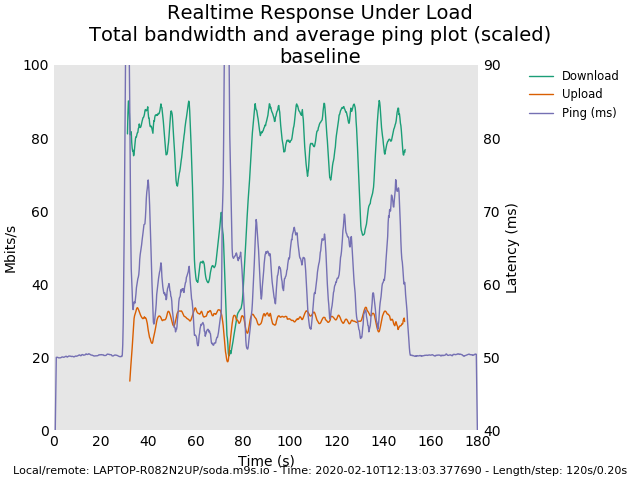
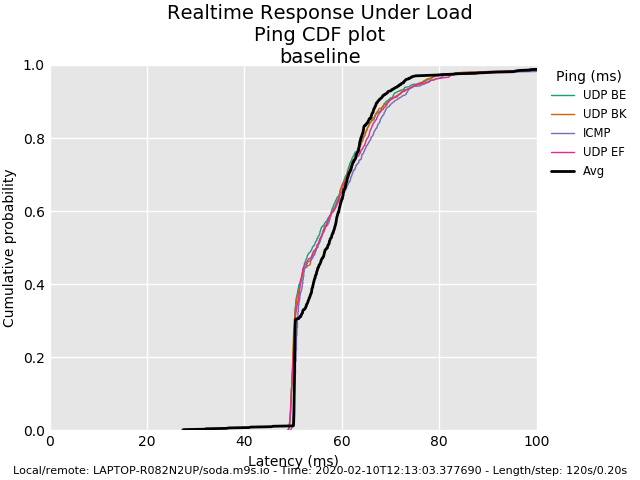
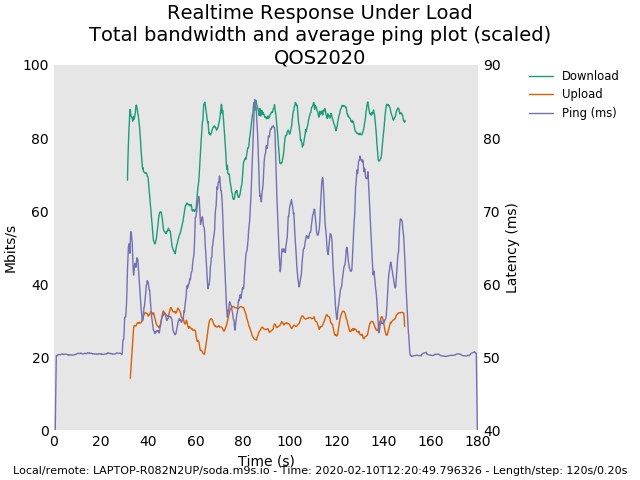
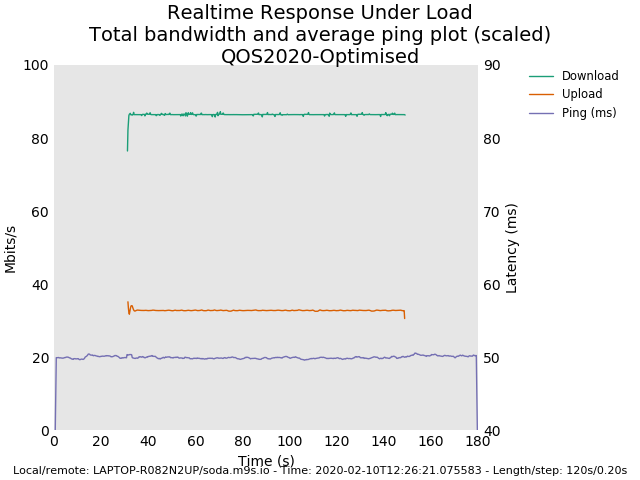
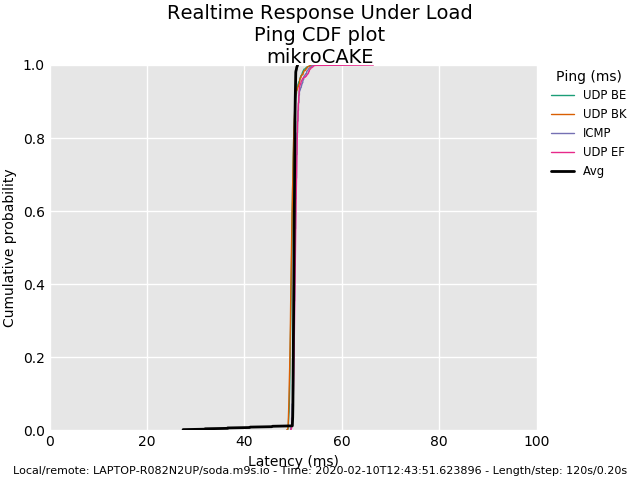
I’ve done some testing with a closer server. Four cases considered: baseline, QOS2020, QOS2020-Optimised (my recommended changes), mikroCAKE (pseudo-CAKE implementation).
Graphs of the bandwidth vs latency, and a latency distribution plot. All tests were Perth to Sydney, 30 seconds of baseline either side of a 120 second test. Local connection is 100/40 Mbps fibre, remote connection is 1000/250 Mbps OVH dedicated server. I’ve used 90% of the rated line speed locally for the settings.
Configuration exports below
Baseline
/ip firewall mangle
/queue type
/queue tree
add max-limit=36M name=UP packet-mark=no-mark parent=WAN1 queue=default
add max-limit=90M name=DOWN packet-mark=no-mark parent=BR1 queue=default
QOS2020
/ip firewall mangle
add action=mark-connection chain=prerouting comment=DNS connection-state=new new-connection-mark=DNS passthrough=yes port=53 protocol=udp
add action=mark-packet chain=prerouting connection-mark=DNS new-packet-mark=DNS passthrough=no
add action=mark-connection chain=postrouting connection-state=new new-connection-mark=DNS passthrough=yes port=53 protocol=udp
add action=mark-packet chain=postrouting connection-mark=DNS new-packet-mark=DNS passthrough=no
add action=mark-connection chain=prerouting comment=VOIP new-connection-mark=VOIP passthrough=yes port=5060-5062,10000-20000 protocol=udp
add action=mark-packet chain=prerouting connection-mark=VOIP new-packet-mark=VOIP passthrough=no
add action=mark-connection chain=prerouting comment=QUIC connection-state=new new-connection-mark=QUIC passthrough=yes port=80,443 \
    protocol=udp
add action=mark-packet chain=prerouting connection-mark=QUIC new-packet-mark=QUIC passthrough=no
add action=mark-connection chain=prerouting comment=UDP connection-state=new new-connection-mark=UDP passthrough=yes protocol=udp
add action=mark-packet chain=prerouting connection-mark=UDP new-packet-mark=UDP passthrough=no
add action=mark-connection chain=prerouting comment=ICMP connection-state=new new-connection-mark=ICMP passthrough=yes protocol=icmp
add action=mark-packet chain=prerouting connection-mark=ICMP new-packet-mark=ICMP passthrough=no
add action=mark-connection chain=postrouting connection-state=new new-connection-mark=ICMP passthrough=yes protocol=icmp
add action=mark-packet chain=postrouting connection-mark=ICMP new-packet-mark=ICMP passthrough=no
add action=mark-packet chain=postrouting comment=ACK new-packet-mark=ACK packet-size=0-123 passthrough=no protocol=tcp tcp-flags=ack
add action=mark-packet chain=prerouting new-packet-mark=ACK packet-size=0-123 passthrough=no protocol=tcp tcp-flags=ack
add action=mark-connection chain=prerouting comment=HTTP connection-mark=no-mark connection-state=new new-connection-mark=HTTP passthrough=\
    yes port=80,443 protocol=tcp
add action=mark-connection chain=prerouting connection-bytes=5000000-0 connection-mark=HTTP connection-rate=2M-100M new-connection-mark=\
    HTTP_BIG passthrough=yes protocol=tcp
add action=mark-packet chain=prerouting connection-mark=HTTP_BIG new-packet-mark=HTTP_BIG passthrough=no
add action=mark-packet chain=prerouting connection-mark=HTTP new-packet-mark=HTTP passthrough=no
add action=mark-connection chain=prerouting comment=OTHER connection-state=new new-connection-mark=POP3 passthrough=yes port=995,465,587 \
    protocol=tcp
add action=mark-packet chain=prerouting connection-mark=POP3 new-packet-mark=OTHER passthrough=no
add action=mark-connection chain=prerouting connection-mark=no-mark new-connection-mark=OTHER passthrough=yes
add action=mark-packet chain=prerouting connection-mark=OTHER new-packet-mark=OTHER passthrough=no

/queue type
add kind=red name=customRED red-avg-packet=1514

/queue tree
add max-limit=36M name=UP parent=WAN1 queue=default
add max-limit=90M name=DOWN parent=BR1 queue=default
add name="1. VOIP" packet-mark=VOIP parent=DOWN priority=1 queue=default
add name="2. DNS" packet-mark=DNS parent=DOWN priority=2 queue=default
add name="3. ACK" packet-mark=ACK parent=DOWN priority=3 queue=default
add name="4. UDP" packet-mark=UDP parent=DOWN priority=3 queue=default
add name="5. ICMP" packet-mark=ICMP parent=DOWN priority=4 queue=default
add name="6. HTTP" packet-mark=HTTP parent=DOWN priority=5 queue=customRED
add name="7. HTTP_BIG" packet-mark=HTTP_BIG parent=DOWN priority=6 queue=customRED
add name="8. QUIC" packet-mark=QUIC parent=DOWN priority=7 queue=customRED
add name="9. OTHER" packet-mark=OTHER parent=DOWN queue=default
add name="1. VOIP_" packet-mark=VOIP parent=UP priority=1 queue=default
add name="2. DNS_" packet-mark=DNS parent=UP priority=2 queue=default
add name="3. ACK_" packet-mark=ACK parent=UP priority=3 queue=default
add name="4. UDP_" packet-mark=UDP parent=UP priority=3 queue=default
add name="5. ICMP_" packet-mark=ICMP parent=UP priority=4 queue=default
add name="6. HTTP_" packet-mark=HTTP parent=UP priority=5 queue=customRED
add name="7. HTTP_BIG_" packet-mark=HTTP_BIG parent=UP priority=6 queue=customRED
add name="8. QUIC_" packet-mark=QUIC parent=UP priority=7 queue=customRED
add name="9. OTHER_" packet-mark=OTHER parent=UP queue=default
QOS2020 - Optimised
# Mangle is as above
/queue type
set 0 kind=sfq
add kind=pcq name=bulkUp pcq-classifier=src-address,dst-address,src-port,dst-port pcq-limit=450KiB pcq-total-limit=4500KiB

/queue tree
add bucket-size=0.005 max-limit=90M name=DOWN parent=BR1 queue=default
add name="1. VOIP" packet-mark=VOIP parent=DOWN priority=1 queue=default
add name="2. DNS" packet-mark=DNS parent=DOWN priority=2 queue=default
add name="3. ACK" packet-mark=ACK parent=DOWN priority=3 queue=default
add name="4. UDP" packet-mark=UDP parent=DOWN priority=3 queue=default
add name="5. ICMP" packet-mark=ICMP parent=DOWN priority=4 queue=default
add name="6. HTTP" packet-mark=HTTP parent=DOWN priority=5 queue=default
add name="7. HTTP_BIG" packet-mark=HTTP_BIG parent=DOWN priority=6 queue=default
add name="8. QUIC" packet-mark=QUIC parent=DOWN priority=7 queue=default
add name="9. OTHER" packet-mark=OTHER parent=DOWN priority=8 queue=default
add bucket-size=0.005 max-limit=36M name=UP parent=WAN1 queue=default
add name="1. VOIP_" packet-mark=VOIP parent=UP priority=1 queue=default
add name="2. DNS_" packet-mark=DNS parent=UP priority=2 queue=default
add name="3. ACK_" packet-mark=ACK parent=UP priority=3 queue=default
add name="4. UDP_" packet-mark=UDP parent=UP priority=3 queue=default
add name="5. ICMP_" packet-mark=ICMP parent=UP priority=4 queue=default
add name="6. HTTP_" packet-mark=HTTP parent=UP priority=5 queue=bulkUp
add name="7. HTTP_BIG_" packet-mark=HTTP_BIG parent=UP priority=6 queue=bulkUp
add name="8. QUIC_" packet-mark=QUIC parent=UP priority=7 queue=bulkUp
add name="9. OTHER_" packet-mark=OTHER parent=UP priority=8 queue=bulkUp
mikroCAKE
/ip firewall mangle
add action=mark-connection chain=prerouting comment=DNS connection-state=new new-connection-mark=PRIO passthrough=yes port=53 protocol=udp
add action=mark-connection chain=postrouting connection-state=new new-connection-mark=PRIO passthrough=yes port=53 protocol=udp
add action=mark-connection chain=prerouting comment=VOIP new-connection-mark=PRIO passthrough=yes port=5060-5062,10000-20000 protocol=udp
add action=mark-packet chain=postrouting connection-mark=PRIO new-packet-mark=PRIO passthrough=no
add action=mark-packet chain=prerouting connection-mark=PRIO new-packet-mark=PRIO passthrough=no
add action=mark-packet chain=postrouting comment=ACK new-packet-mark=PRIO packet-size=0-123 passthrough=no protocol=tcp tcp-flags=ack
add action=mark-packet chain=prerouting new-packet-mark=PRIO packet-size=0-123 passthrough=no protocol=tcp tcp-flags=ack
add action=mark-packet chain=postrouting comment=Sparse connection-rate=0-1 dst-limit=5,2,addresses-and-dst-port/1m40s new-packet-mark=\
    SPARSE passthrough=no
add action=mark-packet chain=postrouting connection-rate=1-10k new-packet-mark=SPARSE passthrough=no
add action=mark-packet chain=postrouting comment=Bulk new-packet-mark=BULK passthrough=no

/queue type
set 0 kind=sfq
add kind=pcq name=bulkUp pcq-classifier=src-address,dst-address,src-port,dst-port pcq-limit=450KiB pcq-total-limit=4500KiB

/queue tree
add bucket-size=0.005 max-limit=90M name=DOWN parent=BR1 queue=default
add name="1. Priority" packet-mark=PRIO parent=DOWN priority=1 queue=default
add name="2. Sparse" packet-mark=SPARSE parent=DOWN priority=2 queue=default
add name="3. Bulk" packet-mark=BULK parent=DOWN priority=3 queue=default
add bucket-size=0.005 max-limit=36M name=UP parent=WAN1 queue=default
add name="1. Priority_" packet-mark=PRIO parent=UP priority=1 queue=default
add name="2. Sparse_" packet-mark=SPARSE parent=UP priority=2 queue=default
add name="3. Bulk_" packet-mark=BULK parent=UP priority=3 queue=bulkUp



Hi, I am trying your configuration. Until now there are too much drops ACK upload packets than HTTP or HTTP_BIG packets. Download ACK packets are not dropped. Is this normal?
Also I want to ask a question aboud bulkUp pcq queue size and total queue size. I have set upload max-limit to 4M. What I should set queue size and total queue size in bulkUp queue type for my connection?