Using Windows as a Getaway for mikrotik

Hi, do anybody have any info how to do so?

I have a router that has access to internet, i have a windows machine that has two ethernet ports, one i use as a steady internet connection (to the exact same mikrotik as the second one), and the other one i tried to enable multiple things to allow it to work as a router port, specifically to grant VPN-ed access.

When enabling specific VPN, called “Palo alto Global Protect” it has third virtual ethernet that allows the pc to access specific domain on 111.111.111.14, the sub is 111.111.111.0/24

One ethernet port gets Lan 172.10.10.26, the other one 172.10.10.27

Virtual one receives random gateway ip

Whatever i did, i can only reach the interface and tracing drops.

Mikrotik config includes one local LAN dhcp , wlan www access.

What i configured:

Add ip route 111.111.111.0/24 172.10.10.27 main

I tried srcnat masquerade, doing another routing point such as instean of main something like TOVPN and doing mangle mark routing whatever.

From my last post i already have working solution for remote routers, linux, mac machine servers etc.

But i just so have to use windows in my local LAN. So the question, sadly, is not about configuring mikrotik, but rather windows…..

What i tried:

  1. Creating pptp server on windows, it works but does not allow me to use 111.111.111.0/24 whatever i did , and when connecting i just loose internet access
  2. Making bridge
  3. Sharing physical port
  4. Sharing virtual port
  5. Windows proxy in docker using squid
  6. Sstp server in docker in windows machine

What somehow worked for some time:

Proxy and sstp server. But for some time only, just days later it mysteriously stopped working, but everything seemed fine. Guess the VPN developer patched it. So last time for entire hour i managed to route 111.111.111.14 through the second ethernet, what i did: i removed mikrotik gateway ip on the second port, enabled routing in regedit, enabled routing on both ethernets, enabled routing service and typed a range and an ethernet port, went to mikrotik, added main routing , and it worked for an hour, but then just stopped working.

Basically default router config with one LAN range. windows machine with running virtual ethernet and two physical ethernets that have lan IP. Everything connected to each other.
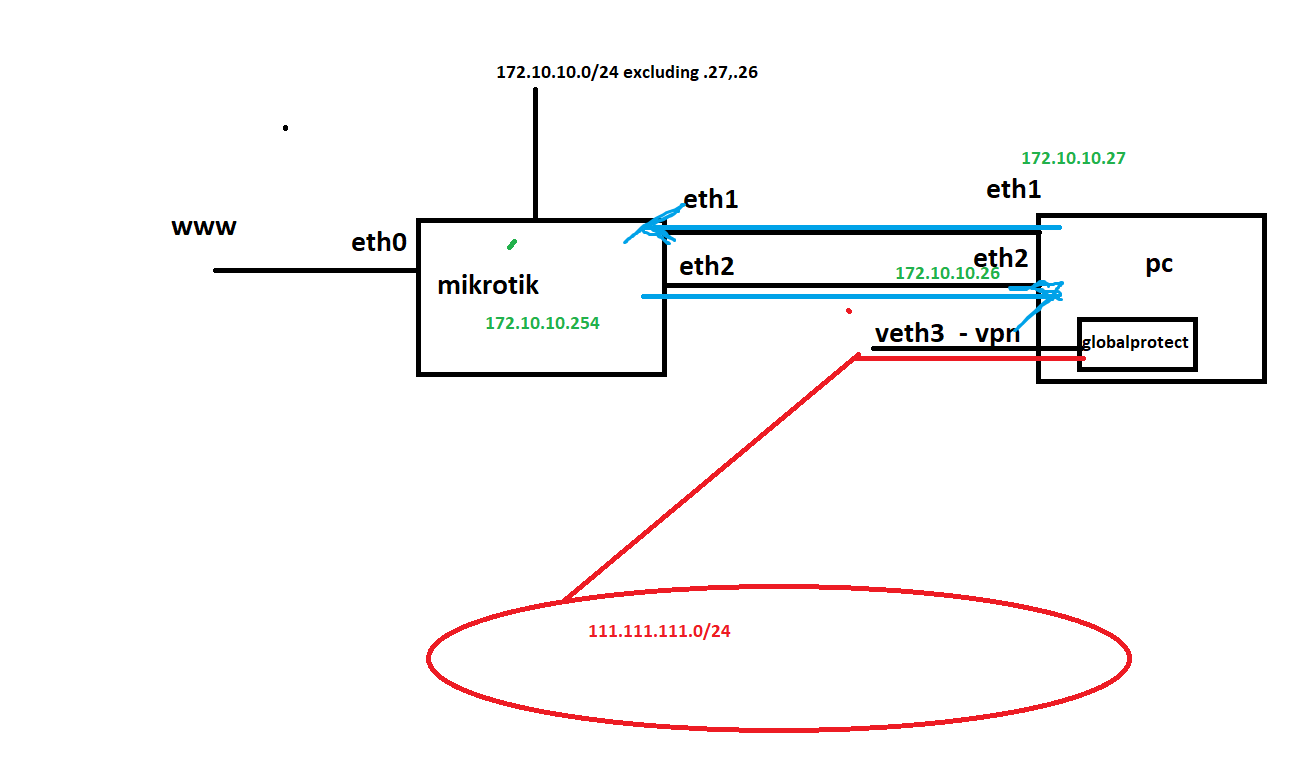
Can you put up a diagram of your network please? Your text description is not clear to me at leas.

next is the sample image you request
pc has eth1,eth2 and virtual eth3

i want one of the ports to be a normal config (so vpn will work) and the other eth2 should be able to work as a routing port, so we can share 111.111.111.0/24 network with 172.10.10.0/24 and anyone could use it .
nat is preffered to make it look as if 111.111.111.0/24 reached only by pc, so they wont find out some different pc might access it

Assuming that your Windows version is recent enough (up to date Windows 10 or Windows 11), this can be done, but you'll need to configure NAT on the Windows device.

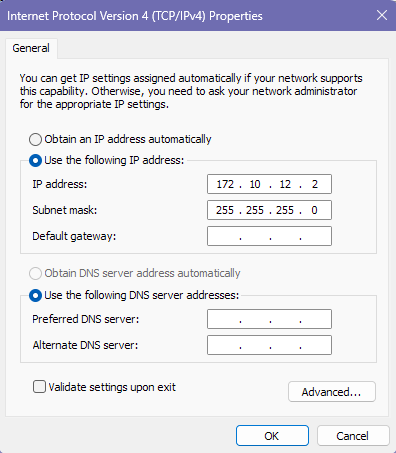
  • First, you should give the 2nd network adapter on the PC another subnet, instead of using the same 172.10.10.0/24 subnet. For example, let's assign 172.10.12.2 netmask 255.255.255.0 and no gateway on this 2nd network adapter of the Windows device:

  • On the MikroTik router, add an additional address entry to the bridge interface that currently has 172.10.10.254/24 assigned, let's assume the bridge is named bridge1:

    /ip address
    add address=172.10.12.254/24 interface=bridge1
    

    Please note that we've added the same 172.10.12.0/24 subnet as the one of the 2nd Windows adapter to this bridge interface, so that it has two subnets!

  • On the router, add the route for the 111.111.111.0/24 subnet to use the address of the 2nd Windows adapter as gateway:

    /ip route
    add dst-address=111.111.111.0/24 gateway=172.10.12.2 routing-table=main
    
  • On the router, configure masquerade for the destination subnet:

    /ip firewall nat
    add action=masquerade chain=srcnat dst-address=111.111.111.0/24
    
  • On the Windows machine, configure NAT with this command running in an elevated (admin / UAC) Powershell command prompt:

    New-NetNat -Name "NAT-FOR-VPN" -InternalIPInterfaceAddressPrefix 172.10.12.0/24
    

    Here is the documentation for New-NetNat: https://learn.microsoft.com/en-us/powershell/module/netnat/new-netnat. From the side menu you can also access documentation for Get-NetNat and Remove-NetNat to manage the created NAT rule.

That should do it. Of course, if you have time, you can also improve the network configuration on the router by adding a VLAN specially for this purpose. The VLAN will have ether2 on the router as access port and you can move the 172.10.12.254/24 address assignment to that VLAN interface instead of keeping it on the bridge interface.

1 Like

i remember i tried something like that. thanks for clear instructions, i think i missed when i forgot to create another sub for the second eth. i will come back in a month to review it. thanks, it seems to me this will work 100%