+1
Simple queues stopped limiting the upload side on the hotspot bridge interface.
CCR1036-12G-4S
works fine
+1
Simple queues stopped limiting the upload side on the hotspot bridge interface.
CCR1036-12G-4S
works fine
your configuration is probably wrong, check above solution by macgaiver
Only dynamic simple queue
/queue simple print detail
 8  D name="hs-<HTTP_Auth_IT1>" target=br191 parent=none packet-marks="" priority=8/8 queue=hotspot-default/hotspot-default
      limit-at=10M/10M max-limit=10M/10M burst-limit=0/0 burst-threshold=0/0 burst-time=0s/0s

/interface bridge print
 0  R name="br191" mtu=1500 l2mtu=65535 arp=enabled mac-address=XX:XX:XX:XX:XX:XX protocol-mode=rstp priority=0x8000 auto-mac=yes
      admin-mac=00:00:00:00:00:00 max-message-age=20s forward-delay=15s transmit-hold-count=6 ageing-time=5m

/ip hotspot print detail
 0 S name="HTTP_Auth_IT1" interface=br191 profile=Free_10MB idle-timeout=none
     keepalive-timeout=none ip-of-dns-name=10.0.0.2 proxy-status="running

/ip hotspot profile print detail
 3   name="Free_10MB" hotspot-address=10.0.0.2 dns-name="xxx.xx"
     html-directory=Free rate-limit="10M" http-proxy=0.0.0.0:0
     smtp-server=0.0.0.0 login-by=https,http-pap ssl-certificate=cert1
     split-user-domain=no use-radius=no
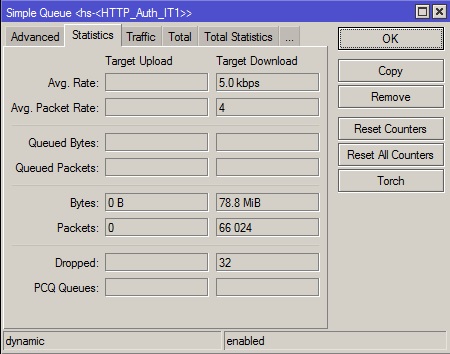
Do you use bridge and “use-ip-firewall” in bridge settings?
Try to disable it and check if it works.
Yes, it works when “use-ip-firewall” disabled.
How to make that work simultaneously?
Avoid using simple queues with interface names as “target” and “dst.” instead use ip addresses in those options.
No directly related to 6.0, but will there be a RouterBoot upgrade for the RB600A, with support for partitioning?
RB600 nand is 64mb
Minimum partition sizes:
32MB on MIPS
40MB on PowerPC
48MB on CCR
There is not enough space for two partitions on RB600
I didn’t think that 6.0 was out of RC yet… perhaps MK is pushing it out too early? 
Dear Normis!
Multicast routing (PIM-SM) same source to different interface still doesn’t work in CCR1036.
Same ROS version and same configuration (1. RP, 3. Interface) work like a charm in RB2011.
Please check out the problem.
Attila
You get to a point where the user based of a RC have tested all they had to test… And it normal that issues are popingup after an RC since the user base who try it going to be very large with lot of particular setup. As with any upgrade between major releases like this, it always good to test in a lab environment before putting in production, so it will allow them to fix the issues that wasn’t reported or confirmed in the RC for the user who have specific usages.
+1 But then again - MT is pretty much known for this behaviour… Just the recent issues I saw in RC14 (not even talking about this growing list)… I’m definately waiting before taking 6.0 anywhere near production.
I just upgraded from 6.0rc14 to 6.0 final and found that IPv6 conntrack is not working. None of the rules appear to create state (in the Connections tab in Winbox) and reply packets all hit my default drop rules at the end of each chain, instead of the “accept established/related” rules. This is only happening with the IPv6 firewall; IPv4 conntrack appears to work as it should. I opened a ticket (#2013052166000812) about this and attached a supout file.
Problem with IPsec Peer and “Generate policy” Not working.
Downgraded til v6rc13 and it worked again
address=0.0.0.0/0 passive=no port=500 auth-method=pre-shared-key
secret=“password” generate-policy=port-override
exchange-mode=main send-initial-contact=yes nat-traversal=no
my-id-user-fqdn=“GroupVPN” proposal-check=obey hash-algorithm=sha1
enc-algorithm=3des dh-group=modp1024 lifetime=1d lifebytes=0
dpd-interval=disable-dpd dpd-maximum-failures=3
RB751G-2HnD 5.25 Support USB wireless network card(ATHEROS 9271)
But 6.0 does not support,Why?
Something I noticed about upgrading to 6.0 on x86. It kills all of the queues in queue tree. Once I rebuilt the queues everything else works.
Awesome, thank you Mikrotik 
Dynamic WDS after reconnect station WDS creates new, no replacement free# of them.
Routerboard upgrade won`t work on all RB from winbox, only terminal.
Wireless works super! Good work MT team! 
Hello MikroTik,
Is VLAN working on 6.0 when enabled on x86 Intel PCI-X interface?
It’s not working since first 6.x betas were released.
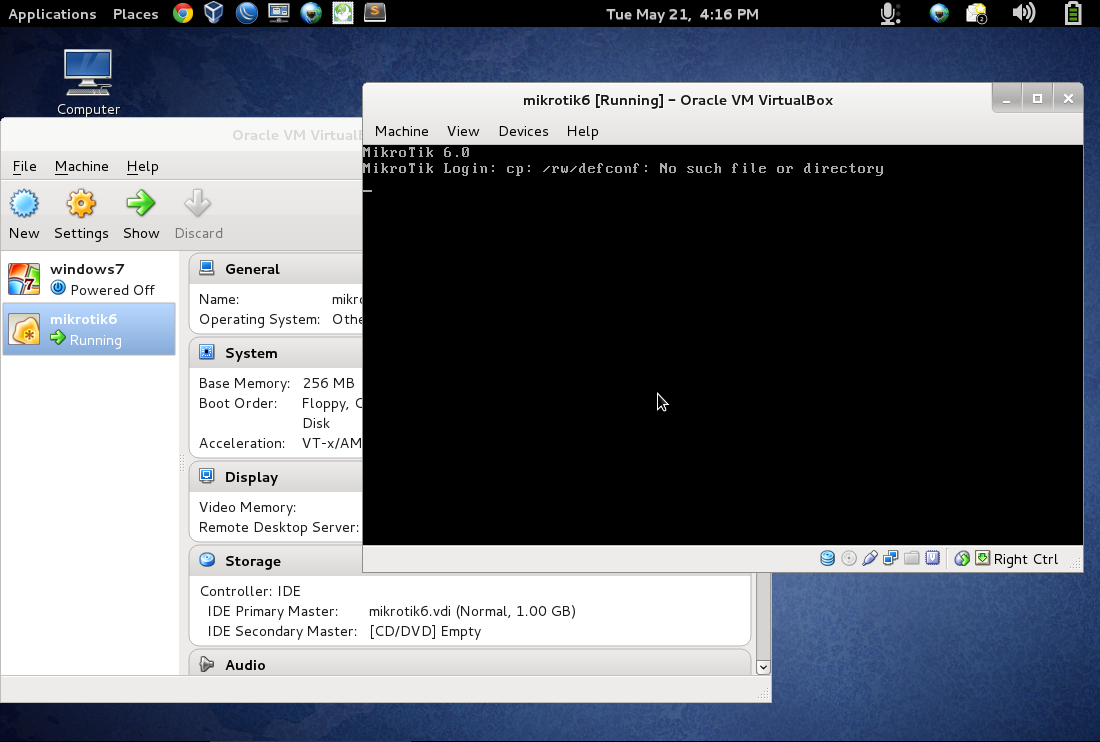
fresh x86 install on virtualbox:
i did a “system reset-configuration”, on next boot i got a “no such file or directory” error, image attached.
virtual box related ?
Hello all
as we can see v6.0 on CCR1036 works fine and smooth in production environment with
max packet : 300000 per vpls which mean about 170 Mbps duplex for 64 byte and full 1Gbps duplex with 512 bytes at minimum
all setup from scratch to avoid migration issues
a+
Thierry