Hi Support,
I have a repeatable issue which is causing a kernel panic on 6.1 using MPLS/VPLS.
In short, the MPLS router that decapsulates the packet from a VPLS tunnel is panic’ing when the MPLS tagged ethernet interface MTU is greater than 1500 and a ping > 216 bytes is sent via the VPLS tunnel.
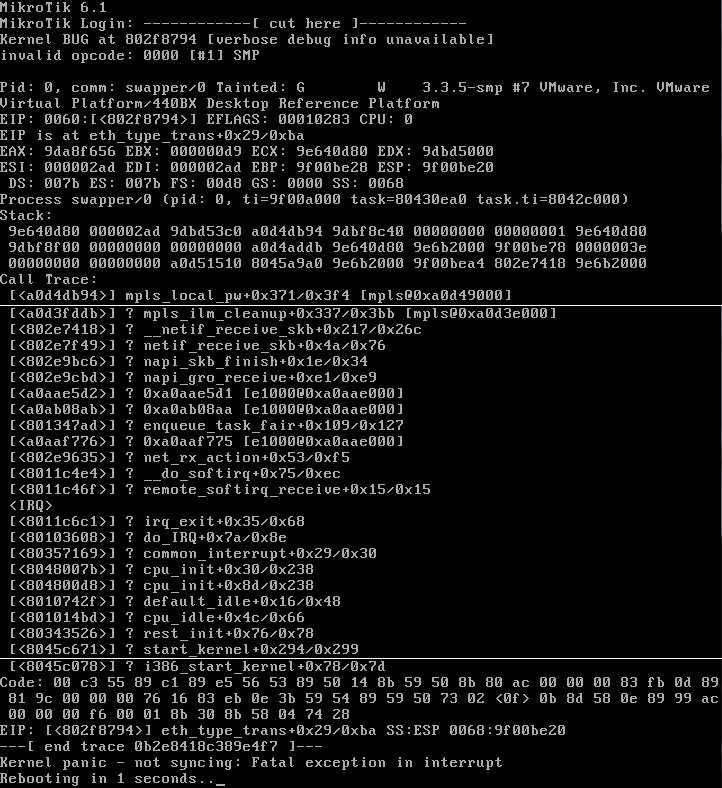
Here’s the panic. I’ve had to splice it together from a few screen shots (at the white line breaks) over multiple panics, so some of the memory addresses probably don’t match up.
Here’s the details :-
This is my network setup.
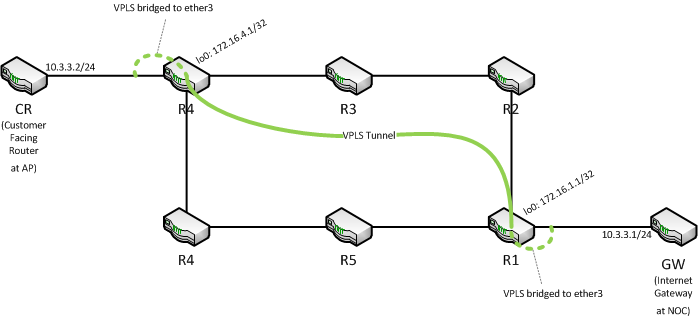
This is a lab environment as I am modelling an EoIP replacement. All routers are running on an ESXi 5 server with 512mb RAM per VM and v6.1 with all packages installed. Each VM has a separate vSwitch connecting to the neighbor with promiscuous mode permitted for bridging. Hard drive is IDE.
The MPLS setup is as per the wiki guide :-
- Start with a factory fresh config
- Routers R1 to R6 each have a separate ethernet interface assigned for their point to point links.
- OSPF is running on R1 to R6 on all interfaces that connect between the neighboring R1 to R6 router.
- Each R1-R6 router has a loopback “bridge” with a /32 assigned. Each interface has a /30 to its neighbor.
- With default config, ether MTU is 1500, MPLS MTU is 1508, VPLS MTU is 1500.
Ping and traceroute between all routers works fine with basic IP.
(R1 to R4):
[admin@R1] > /tool traceroute 172.16.4.1
 # ADDRESS                              RT1    RT2    RT3   STATUS
 1 172.16.1.10                          1ms    1ms    1ms
 2 172.16.5.5                           1ms    1ms    1ms
 3 172.16.4.1                           1ms    1ms    1ms
[admin@R1] > /ping 172.16.4.1 size=1500 do-not-fragment
HOST                                    SIZE TTL TIME  STATUS
172.16.4.1                              1500  62 0ms
172.16.4.1                              1500  62 0ms
172.16.4.1                              1500  62 0ms
      sent=3 received=3 packet-loss=0% min-rtt=0ms avg-rtt=0ms max-rtt=0ms
Then, enable MPLS…
- LDP enabled and interfaces added
Ping and traceroute still work fine between all routers. MPLS tags showing in the trace.
(R1 to R4):
[admin@R1] > /tool traceroute 172.16.4.1
 # ADDRESS                              RT1    RT2    RT3   STATUS
 1 172.16.1.10                          1ms    1ms    1ms   <MPLS:L=107,E=0>
 2 172.16.5.5                           1ms    1ms    1ms   <MPLS:L=110,E=0>
 3 172.16.4.1                           1ms    1ms    1ms
[admin@R1] > /ping 172.16.4.1 size=1500 do-not-fragment
HOST                                    SIZE TTL TIME  STATUS
172.16.4.1                              1500  62 0ms
172.16.4.1                              1500  62 0ms
172.16.4.1                              1500  62 0ms
      sent=3 received=3 packet-loss=0% min-rtt=0ms avg-rtt=0ms max-rtt=0ms
Then, enable VPLS…
- VPLS tunnel created between R1 and R4
- VPLS interface at R1 bridged to ether3 which connects to the internet gateway
- VPLS interface at R4 bridged to ether3 which connects to the router at the AP site
- GW = 10.3.3.1/24; CR = 10.3.3.2/24
Ping and traceroute between GW and CR work fine. Traffic passes through the tunnel, and trace shows 1 hop. Ping with size 1478 and don’t fragment works, 1479 fails with timeout (expected).
(GW to CR):
[admin@GW] > /tool traceroute 10.3.3.2
 # ADDRESS                              RT1    RT2    RT3   STATUS
 1 10.3.3.2                             1ms    1ms    1ms
[admin@GW] > /ping 10.3.3.2 size=1478 do-not-fragment
HOST                                     SIZE TTL TIME  STATUS
10.3.3.2                                                timeout
10.3.3.2                                                timeout
10.3.3.2                                                timeout
      sent=3 received=0 packet-loss=100%
Then, increase interface MTU to 1522 for ether1 and ether2 on R1 to R6. These are the interfaces that participate in the MPLS and OSPF.
Everything still works fine. Can ping (with small size payload) and trace between GW and CR.
UNTIL…
Attempt a ping of size 216 bytes from GW to CR, and no problem. Attempt a ping of size 217 bytes and the MPLS router that decapsulates the VPLS tunnel will panic and reboot. Happens every time on first packet received. In the diagram, ping size=217 from GW to CR will cause R4 to panic. ping size=217 from CR to GW will cause R1 to panic and reboot.
Return all interface MTU’s to 1500 and problem goes away.
Have also tried altering the vpls interface mtu and advertised-mtu to 1514 but still same issue.
I’ll try with 5.25 to see if this is a v6 issue or not.
Footnote… I’m not an MPLS guru. I may not have configured everything right or optimal (that’s the point of the lab). Just wasn’t expecting the kernel to panic tho.
Rich