soa#1 (ccr1036)
RB/750G, RBOS: 6.13-6.15
- Rule like this is illegal - marked by red color and didn’t work.
[admin@mikrotik] /ip firewall filter>

 1 I ;;; Night Block (Work)
     chain=forward action=drop src-address=192.168.1.10
     time=3h-8h,mon,tue,wed,thu,fri
Rule for period 3h-19h is legal and work normally.
- I suggest to make function in script language to detect a day of the week. It’s already made in RBOS for above the mentioned ability. And it’s more effectively than using of special script to do that.
“I” doesn’t mean illegal. It means it doesn’t work at this moment. So it is completely normal, that out of time, it will be red. It simply means rule is not applied now.
Ok, sorry that I did not write the devices and exact export times. All with almost none workload (below 10%), plenty of memory free,very light settings, few not so long scripts. No significant changes made before (e.g. from 6.5 to 6.15), not checked manytimes meanwhile. All measurements done in new terminal of winbox connected via local network.
Standard export (no verbose) command used.
GrooveA2hn: 25s (used to be under 10s).
2011uas-2hnd-in: 10s (used to be around 5s).
Omnitik: 8s (testing device not in production, almost blank config).
750: 10s (testing device not in production, almost blank config).
Omnitik(6.13): finished after 2m30s by cpu watchdog restart being maxed to 100% all the time (export was done till /tool netwatch) - not relevant to 6.14/6.15 maybe yet. Also the profiler does not run on it (maxing the cpu to 100% without displaying anything both in cli and winbox window). Connected to his device via eoip/ipsec tunnel from the 2011.
Omnitik(5.25): 8s (very similar setup like the Omnitik before, just slightly more complex). Export compact run in this case.
All devices with latest FW.
I think about two options what to do with Omnitik 6.13:
- repartition, make backup partition,install 6.15, all remotely
or - transfer the config to testing Omnitik, swap them and elaborate on the problematic more (probably new netinstall)
I would go by the option 2 as it is safe way, but will not be soon…
Now I am not sure that the problems are due to changes in ros made after 6.1x or whether just something went wrong with the problematic Omnitik. The fact is that the RB2011 is also very slow when doing export…
Then it could be smart to assign a new status with other than red color to indicate correct record that is normally active (not gray) bud actually inactive due to some condition not fulfilled..
I would like to keep red color only for errors.
You pressume a lot rextended. Maybe these devices are on remote location?
Netinstall is the only solution, in any case, you will have to drive to that location and do the Netinstall.
ACK, same issue on x86. Downgrading didn’t actually help, I had to restore the config, so beware.
try to reboot the device and see if routing marks work
I rebooted the device with 6.15, downgraded to 6.14, rebooted - nothing helped.
After downgrade to 6.13 everything was working as before. Configuration is unchanged.
Routing marks are listed in the selection box and can be selected.
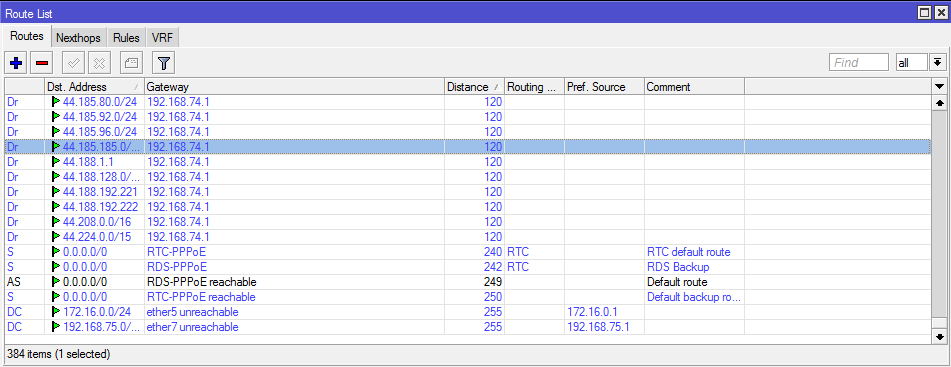
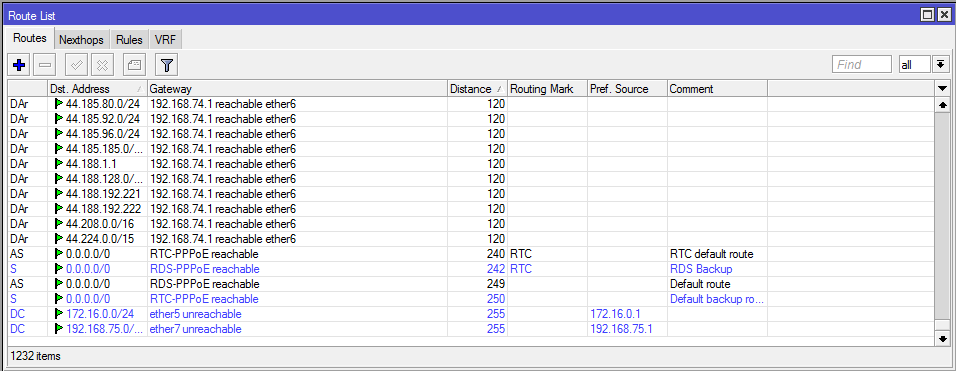
But none of the route interfaces in question are reachable.
BGP and OSPF routes work OK. The same goes for routes without routing marks.
FYI: RIP messages come from ether6 form 192.168.74.1 in passive mode.
In the pictures: 6.13 working as expected (backup routes should be inactive), 6.14 with marked routes and RIP routes inactive.
https://www.youtube.com/watch?v=7VY0esGdt74
after upgrade from 6.13 to 6.15 it booted up , but after couple minutes playing with metarouter it crashed and not came up after that. found in such state when came back at home. after holding reset button it booted up , but if i restarted from web, it crashed again. downgraded , upgraded again with packages from web by putting it to ftp home folder , and problem solved. device is up again .
Hi Normis
SSTP does not work at all on 6.15. (It also didn’t work on 6.14?)
Do both devices have to be on 6.15 to work? If i downgrade to 5.26, it works fine. Upgrade to 6.15 it breaks, its also enabled under PPP. Dont understand…
SSTP client does work for me from 6.15 to server 6.15, 6.14 or 6.13
There was a change around 6.11 where the Use encryption settings in the profile for the sstp became a conflict and needed to be be changed.
Hello Folks!
Routing marks has been broken since RoS6.7, all our routers that uses it (and they are many and the most important ones) they still remains on RoS6.7
So you can still have v5 and pre v6.13 clients connect,
what is the setting on the server than needs to change?
SSTP works on 6.13 - 6.14 between Mikrotik devices including server and client certificate validation.
All keys are imported on these versions. Maybe reimporting the keys and certificates would help…
I could not make them work with Windows clients, but I never tried to hard.
I tried to downgrade to 6.13, but instead only restarted the router with the 6.13 npk in files.
Now in a strange manner, routing marks work on 6.14.
This becomes totally unpredictable.
LE: updated again to 6.15 - all seems OK.
Hey guys!
Did anyone noticed this behavior:
Upgrade x86 from 6.5 to 6.14 => system is dead; tries to boot and says only “Loading”; had to netinstall, tried to keep old configuration, but installer said “can’t keep.. couldn’t mount the drive”
Well, I thought that it was probably because of my really old configuration that began from MT version 2.9 and inherited everything through all the version upgrades. So I had to restore everything by hand in order to avoid a buggy backup file. That move had some bright sides - there was no longer “system rebooted because of kernel error” message in the log, no random hangs (but actually I removed it from the production reel long time ago, so it’s mostly idle)
Now, the funny part!
Upgrade the same x86 from 6.14 to 6.15 => situation exactly the same as the previous one, but with now it’s definitely not my buggy old configuration. It had fresh install, simple rstp-bridge configuration with no load at all. Normis, please, don’t ask for the supout file - system is not booting after the “Loading” message  Netinstall did the job again.
Now I’m really worrying about any upgrades - it is like playing Russian roulette. You never know, is it gonna brick or not? x86 or CCR is easy to restore, they are usually nearby, but when there is a small CPE in the mountains - well, tough luck!
Just in case, a disclaimer - my x86 is:
CPU Quad Core 2.4GHz
RAM 2GB
Boot drive Compact Flash 128MB
Usually it had a few KVMs with Debian, but all other drives are now disconnected since the system became unstable.
I’ve done a few upgrades to both v6.14 and v6.15 over the air. Also enabled wireless-fp package, again over the air. No problems so far.
Just to let you now, I couldn’t get the lastest 6.15 netinstall working, used the 6.13 netinstall without any problems.
Of course local firewall was off in both cases.