problem in arp entry ip and mac on cero 00:00:00:00:00:00 i put the bug fix and is the same and teh version v6.35rc and is the same
What’s new in 6.33.5 (2015-Dec-28 09:13):
*) arp - show incomplete ARP entries;
CRS125 : after installing 6.34.1 and “RESET CONFIGURATION”, device is being put into ROUTER MODE and ether1 is gateway (even not SFP).
Previous behaviour was: bridge mode (hw switch). As for switch, I think it should defaultly act as a switch, not router.
Greetings
Ideally, configuration default should be just IP on ether1, then provide Wizards (Quick Sets) for newbie.
For all people who blames MT for failing updates…test this update first on your testing gear, not on the production. Common sense, but still…
++
Or read the changelog before complaining about changes that seem like bugs (ie: arp table) 
I can fully understand your frustration, but I would recommend that you stay on the: “BUGFIX” Release chain for all hardware that are hard to physically reach for you and are in production for exactly this reason!
That was the prime reason why Mikrotik splitt up the software release-chains in 3 so that you didnt need to try out new software features on critical production equipment unless you yourself decided that you just had to have the very latest features introduced in that release! But you could still get the bigfixes without this risk.
A best practice rule of thumb: ALWAYS test EVERY software update, WHATEVER the chain on a lab router on your desk FIRST for a while before updating ANY production equipment!
About the chains:
“BUGFIX release chain” = MOST STABLE and tested ROS will only be updated with Bugfixes NO NEW FEATURES will be introduced, and therefor less likely anything will go wrong. Considered the “SAFEST” to use on production equipment(New version will only be appointed bugfix after it has proved itself Stable for a long time in current chain!)
“CURRENT release chain” = Versions introduces NEW FEATURES. Should normally be stable, but because of the introduction of new features you can never be entirely sure if all bugs are killed or if maybe some new feature interferes by accident with something else. It has been tested in the ReleaseCandidate chain. But normally you get a lot more feedback when bigger userbase starts to test and use it when it becomes Current. ONLY USE CURRENT if you HAVE TO HAVE some new feature NOW!!
“RELEASE CANDIDATE Release chain” = This is the chain if you want the CUTTING EDGE NEWEST FEATURES, but be aware that this chain is a BIG HAZARD for production equipment and should NEVER be used for it!!!
You should only use this chain if you want to test the newestt features! This is UNFINNISHED software, like every other ReleaseCandidate software, and it will be constantly changing!
I hope you manage to recover your CCR router, if it is possible for someone locally where it is placed to get to the box then sometimes a normal powercycle(Pull the plug 30 seconds) may resolve the situation if you are lucky. But ofc depends on that you have someone there that can do it for you?!
Good luck! 
Question: is any1 else having problems connecting to an 5Ghz AP with cm2 package enabled and frequency set to:“AUTO” ???
It just doesnt show up on available WiFi networks lists, and didnt even show up on scan from a QRT5.
WLAN interface on AP says it has found and activated a channel in status, but still doesnt show up on client.
If I then set a channel manually like I usuly do, f.ex. 5500 it suddenly shows up like its supposed to do.
This has happend to me on an OmnitikUPA and also AP based on 922UAGS-5HPacD both running ROS 6.34.1, but I also now just tested a 922UAGS-5HPacD that was fresh from factory and had 6.30.2 installed and showed same behavior.
Is this normal behavior, or might it be a bug? Could some1 else plz try it and see if they get same result?!
In my SoHo routers like the hAP or 951Ui-2HnD and 2Ghz WiFi it works perfectly, and clients can connect as expected.
Is it maybe just something to do with 5Ghz, or have I just been doing something wrong?!  hehehe
I have identified two config issues on our systems preventing ROS upgrades. I’ve gone through the RC releases and found the problem arose between 6.34rc36 and 6.34rc39.
Firstly, the syntax of a firewall rule changed. We have a rule that allows limited amount of pings, which was originally taken from a mikrotik wiki page I believe.
Original rule:
/ip firewall filter
add chain=input comment="Allow limited pings" limit=50/5s,2 protocol=icmp
New version added the option to select between :packet and :bit
/ip firewall filter
add chain=input comment="Allow limited pings" limit=50/5s,2:packet protocol=icmp
ROS will not upgrade if you have a limit rule like this, and it will not downgrade if you have a rule with the updated syntax.
Secondly, time zone US/Pacific-New and US/Pacific will also cause a timeout failure on upgrade. I don’t know why, I don’t see any change in syntax and both these options are still available in ROS 6.34. Setting time zone to America/Los_Angeles works fine.
/system clock
set time-zone-name=US/Pacific-New
Maybe cosmetic but I have just wasted an hour on it migrating a router and wondering why my scripts dont work.
If I specify in CLI to add a peer with enc-algorythm=aes-128 and then run print I get aes-192,aes-128 so I think its more than cosmetic. If I enter aes-128 I expect to see aes-128 when I check the result
I’m not really wanting to run an RC on a new live site. I think I’ll downgrade to 6.32.4 for this site 
Same here the other day 
I’ve noticed an issue running 6.34.1 and Winbox 3.1. If I set the email server in Winbox > Tools > Email > Server to either the fqdn or ip of my mail server then try send an email I get an error connecting entry in the logs.
“/tool e-mail print” didn’t show a server address entry. “/tool e-mail set” had an address setting option which I set to my mail servers fqdn. This updated the Winbox email server setting and I was able to send emails.
So setting "/tool e-mail set address=fqdn/ip will set Winbox > Tools > Email > Server but not vice versa.
I’ve noticed a bug in IPIP tunel export. In default compact mode. Parameter “keepalive” is always with exclamation mark.
It works fine with verbose parameter.
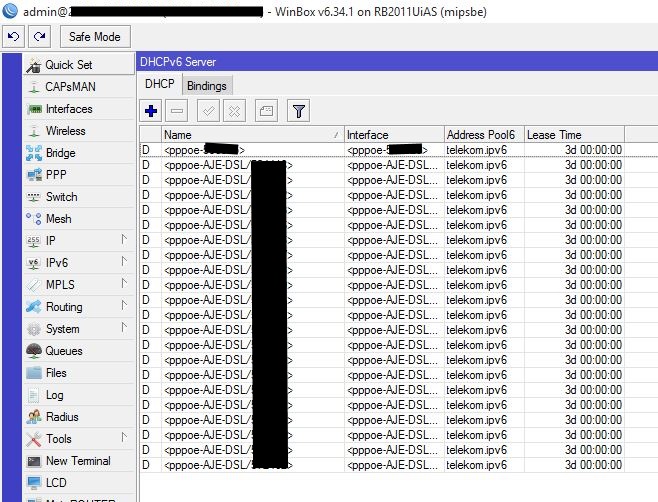
We have a problem with the DHCPv6 Server since 6.34
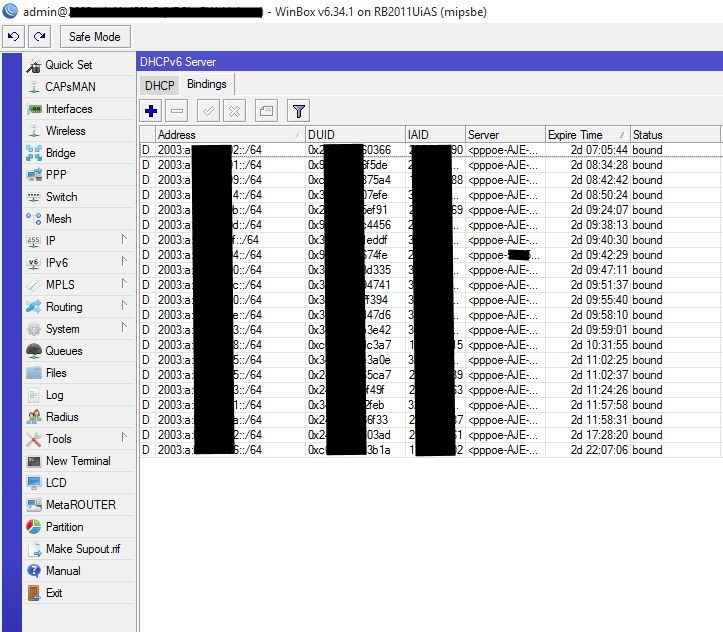
When the lease expires it not automatically binds a new subnet to the client.
When i disconnect the client and reconnect it, a new lease is given to the client.
We have the problem on 2 different Routers (RB2011 and RB3011).
DHCP-Servers:
Bindings before lease expires:

Bindings after lease has expired:
I have reply from MT: “The problem will be resolved in next RouterOS verions, starting from 6.35rc11”
Good to know - we reported it as affecting RoS 6.33.5 onwards…
Still having the following Error ( Attachement ) at Mikrotik OVPN - Server, when a non Mikrotik - Client connects.
Can anybody explain, what’s going wrong ?
I tested several ( Linux and Windows ) OVPN - Clients,
always the same except the OVPN - Client is a Mikrotik - Router itself !
Manfred
@Manfred please open a new topic for your issue. It is most probably a certificate mismatch or configuration error. Provide both client and server configurations and log output from the client. Or better off, just send requested data to support@mikrotik.com with supout.rif attached.
when 6.34.2 going to release? I am waiting for specific bugfix..
Version 6.34.2 [current] has been released:
http://forum.mikrotik.com/t/v6-34-2-current-is-released/95555/1