Yeah i got some of the wireless problem
the wireless package can not be enabled .
So i downgraded to 6.36
Net install and working again
I have also that problem on rb951
Sent from my iPhone using Tapatalk Pro
I have exactly the same problem from v 6.36.3. My routerboard is hex lite.
Did Mikrotik do something with /ip settings rp_filter?
I just had a really strange problem with the upgrade from 6.36 to 6.37
When I did the upgrade (using the Mikrotik check-for-upgrade via winbox), the Mikrotik (RB435G) did the upgrade to 6.37
however in Winbox, there was no Wireless section
In packages there were two wireless packages, one was 6.37 and the other was 6.20 - both were disabled
I could not in-install either package.
I then downgraded back to 6.36 and the Wireless selection in Winbox came back and there was only one wireless package.
I then upgraded to 6.37 again and again I had the exact same problem. Downgrading back to 6.36 again made everything correct again.
I repeated this process two more times and had the exact same problems again.
Sooo I am stuck with a Mikrotik running 6.36 than can not upgrade to 6.37 - really strange.
I am afraid to keep playing with it because this is an ip/audio link to a remote FM radio station (88.3 KWIS FM) we operate.
I am confused on where the 6.20 wireless package keeps coming from every time I upgrade to 6.37
It is not in the files I see prior to upgrade from 6.36 to 6.37
In the last few days - I upgraded hundreds of Mikrotiks from 6.36 to 6.37 and only ran into this problem on one Mikrotik this morning
Any ideas ? Anybody else experienced this ?
North Idaho Tom Jones
DHCPv6 still not working as expected.
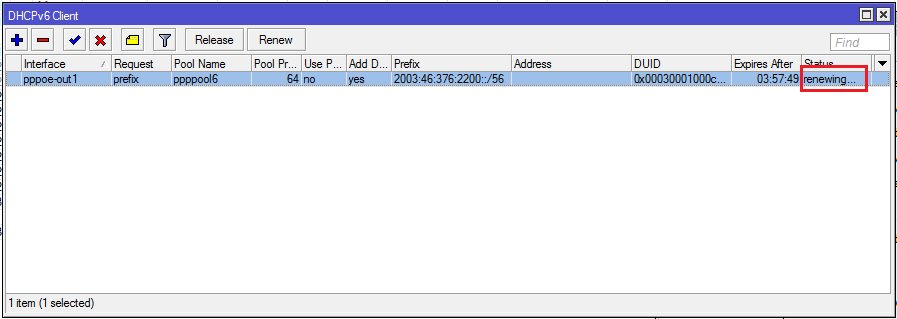
My ISP enforces all 24 hours a disconnect. IPv4 address and IPv6 prefix is dynamic, but it takes 20 minutes until a new prefix is obtained.
Last working Router OS was v 6.33.6.
More details here: http://forum.mikrotik.com/t/dhcpv6-client-broken-since-v6-34/99149/1
By the way, when can we expect a working prefix delegation according to RFC 7084?
Mikrotik and IPv6 ist still a very painful experience.
I have exactly the same issue with a 912UAG-5HPnD , after I upgrading to V6.37 from V6.36 two disabled wireless packages one is V6.19, on downgrading to 6.36 wireless is functional again and V6.19 wireless package is gone
It makes me wonder if there could be an old left over mikrotik filesystem that might be invisible or somehow not in the directory.
For me - in the past - several upgrade ago - I was running that version of ROS that had the old 6.20 wireless package. But from 6.20 to the next newer ROS, the 6.20 wireless package no longer showed up anymore.
Something strange is going on here !!! Is it a bug ? Is it a corrupt mikrotik filesystem ? Is it a new un-documented feature (another name for a bug) ???
North Idaho Tom Jones
Yeah  - I think there needs to be a tool to show and remove these phantom packages…
good evening! I have a problem for me, and really, I’m using the 6.7 version and watched the logs that apaerece the following message: autentication failed: peer didn’t Respond to CHAP challenge, then immediately my clients vain unplugging and so return to connect when I restart the ccr1036, you guys can help me ???
I suspect it is an issue when wireless and wireless-fp are both present initially. So prior to 6.33 approx.
I saw the exact same thing you did.
I haven’t been game to try this but as a suggestion on older versions upgrade to 6.34.6 Bugfix first (or 6.36.3 if available) then try 6.37 ?
I’ve reported this to MikroTik along with a supout.rif so hopefully a fix will be forthcoming [emoji3]
Sent from my iPhone using Tapatalk
Just reread your post and saw you started at 6.36 ???
Sent from my iPhone using Tapatalk
WARNING !!!
There is definitely a problem with the upgrade to 6.37 !!!
Be prepared to loose about 5 percent of your remote Mikrotik clients when you upgrade from 6.36 with wireless-rep package !
I noticed this problem today and posted the problem. Now after upgrading hundreds of remote clients a few days ago, I am starting to get customers calling me saying they are down. After going to some customers to investigate the problem, I discovered the exact same problem after the upgrade to 6.37. Where there is an older wireless package also listed. You can not enable or delete/remove/un-install either wireless package. The ONLY thing you can do is perform a downgrade to an older version of ROS.
ALSO - then after the downgrade - you then need to restore your latest backup -or- reconfigure everything to do with your wlan
North Idaho Tom Jones
Like i say before
Only netinstall helps you for 6.37
Sent from my iPhone using Tapatalk Pro
At another office i have several (>40) IP-Surveillance-Cams, most are not compatible with the new wireless-package (I did not test all…).
6.36.3 with wireless-cm2 works.
So please consider creating a bugfixes “6.36.4” !!!
so i can stay with wireless-cm2, untill the current wireless-package is stabilized.
We just released 6.38rc. Please test if wireless package issues are gone:
http://forum.mikrotik.com/t/v6-38rc-release-candidate-is-released/102037/2
No Progress with 6.38rc7 ant Intel Pro 2200BG…
10:54:46 wireless,debug wlan1: 00:12:F0:6E:XX:XX attempts to associate
10:54:46 wireless,debug wlan1: 00:12:F0:6E:XX:XX not in local ACL, by default accept
10:54:46 wireless,info 00:12:F0:6E:XX:XX@wlan1: connected
10:54:49 wireless,info 00:12:F0:6E:XX:XX@wlan1: disconnected, extensive data loss
10:54:49 wireless,debug wlan1: 00:12:F0:6E:XX:XX attempts to associate
10:54:49 wireless,debug wlan1: reject 00:12:F0:6E:XX:XX, banned (last failure - extensive data loss)
10:54:53 wireless,debug wlan1: 00:12:F0:6E:XX:XX attempts to associate
10:54:53 wireless,debug wlan1: reject 00:12:F0:6E:XX:XX, banned (last failure - extensive data loss)
10:54:56 wireless,debug wlan1: 00:12:F0:6E:XX:XX attempts to associate
10:54:56 wireless,debug wlan1: 00:12:F0:6E:XX:XX not in local ACL, by default accept
10:54:56 wireless,info 00:12:F0:6E:XX:XX@wlan1: connected
10:56:26 wireless,info 00:12:F0:6E:XX:XX@wlan1: disconnected, extensive data loss
10:56:26 wireless,debug wlan1: 00:12:F0:6E:XX:XX attempts to associate
10:56:26 wireless,debug wlan1: reject 00:12:F0:6E:XX:XX, banned (last failure - extensive data loss)
10:56:30 wireless,debug wlan1: 00:12:F0:6E:XX:XX attempts to associate
10:56:30 wireless,debug wlan1: reject 00:12:F0:6E:XX:XX, banned (last failure - extensive data loss)
10:56:32 wireless,debug wlan1_master: start background scan
10:56:33 wireless,debug wlan1: 00:12:F0:6E:XX:XX attempts to associate
10:56:33 wireless,debug wlan1: reject 00:12:F0:6E:XX:XX, banned (last failure - extensive data loss)
10:56:35 wireless,debug wlan1_master: background scan complete, must select network
10:56:35 wireless,debug wlan1_master: no network that satisfies connect-list,  by default choose with strongest signal
10:56:35 wireless,debug wlan1_master: failed to select network
10:56:35 wireless,debug wlan1_master: did not find better AP
10:56:36 wireless,debug wlan1: 00:12:F0:6E:XX:XX attempts to associate
10:56:36 wireless,debug wlan1: 00:12:F0:6E:XX:XX not in local ACL, by default accept
10:56:36 wireless,info 00:12:F0:6E:XX:XX@wlan1: connected
10:56:40 wireless,info 00:12:F0:6E:XX:XX@wlan1: disconnected, extensive data loss
10:56:40 wireless,debug wlan1: 00:12:F0:6E:XX:XX attempts to associate
10:56:40 wireless,debug wlan1: reject 00:12:F0:6E:XX:XX, banned (last failure - extensive data loss)
10:56:43 wireless,debug wlan1: 00:12:F0:6E:XX:XX attempts to associate
10:56:43 wireless,debug wlan1: reject 00:12:F0:6E:XX:XX, banned (last failure - extensive data loss)
10:56:47 wireless,debug wlan1: 00:12:F0:6E:XX:XX attempts to associate
10:56:47 wireless,debug wlan1: reject 00:12:F0:6E:XX:XX, banned (last failure - extensive data loss)
10:56:50 wireless,debug wlan1: 00:12:F0:6E:XX:XX attempts to associate
10:56:50 wireless,debug wlan1: reject 00:12:F0:6E:XX:XX, banned (last failure - extensive data loss)
10:56:53 wireless,debug wlan1: 00:12:F0:6E:XX:XX attempts to associate
10:56:53 wireless,debug wlan1: reject 00:12:F0:6E:XX:XX, banned (last failure - extensive data loss)
notToNew - I was talking about wireless package being disabled after upgrade and/or that it was not possible to disable it.
disconnected, extensive data loss
This means your signal is bad. Maybe the upgrade forced the DFS and your device is now using a different frequency?
Don’t think so. Frequency-mode is superchannel, country=no_country_set.
I had the same problem with 6.36.3 and wireless-rep package with old DFS-behaviour.
The 2 Devices have 2m distance, a newer intel wifi with the same distance works, this legacy-device does not work.
After downgrade to wireless-cm2, connecting both devices is no problem.
… you can have access to a device in a lab-enviroment, as the current production-system stays on 6.36.3 with wireless-cm2.
maybe you have better debugging-possibillities?