RouterOS version 6.42.12 has been released in public "long-term" channel!
Before an upgrade:
Remember to make backup/export files before an upgrade and save them on another storage device;
Make sure the device will not lose power during upgrade process;
Device has enough free storage space for all RouterOS packages to be downloaded.
What's new in 6.42.12 (2019-Feb-12 08:23):
MAJOR CHANGES IN v6.42.12:
!) winbox - improvements in connection handling to router with open winbox service (CVE-2019–3924);
Changes in this release:
*) ipsec - accept only valid path for "export-pub-key" parameter in "key" menu;
*) quickset - fixed "country" parameter not properly setting regulatory domain configuration;
*) smb - fixed possible buffer overflow;
*) w60g - fixed disconnection issues in PtMP setups;
*) wireless - improved antenna gain setting for devices with built in antennas;
*) wireless - show indoor/outdoor frequency limitations under "/interface wireless info country-info" command;
To upgrade, click "Check for updates" at /system package in your RouterOS configuration interface, or head to our download page: http://www.mikrotik.com/download
If you experience version related issues, then please send supout file from your router to support@mikrotik.com. File must be generated while router is not working as suspected or after some problem has appeared on device
Please keep this forum topic strictly related to this specific RouterOS release.
Why dont u make auto reboot after firmware upgrade??? Every new update also update firmware, and u put an option to auto upgrade firmware. But why do we have to reboot manually???
Usually it is indicated by “(”/system routerboard upgrade" required)" added to the specific change log entry. Automatic reboot would just pointlessly increase the total upgrade time necessary for really no benefit.
Because there is no indication otherwise. Before the firmware number changed only when some upgrade was made to it. Now it is locked with the ROS version. How can we know when to upgrade?
That was a terrible idea: destroyed any sane way we had to keep track of when we should upgrade the firmware.
I managed over 400 routerboards, almost all architecture, so how do I know if this or that routerboard got no firmware changes? U want me to watch every routerboard tiny firmware notification during update?
U wanna match firmware version with ros version is ok, u wanna make it auto upgrade is cool, just add a little tiny feature: auto reboot after firmware upgrade. So when we do package update, rebooting, firmware auto upgrade, auto reboot, then all done.
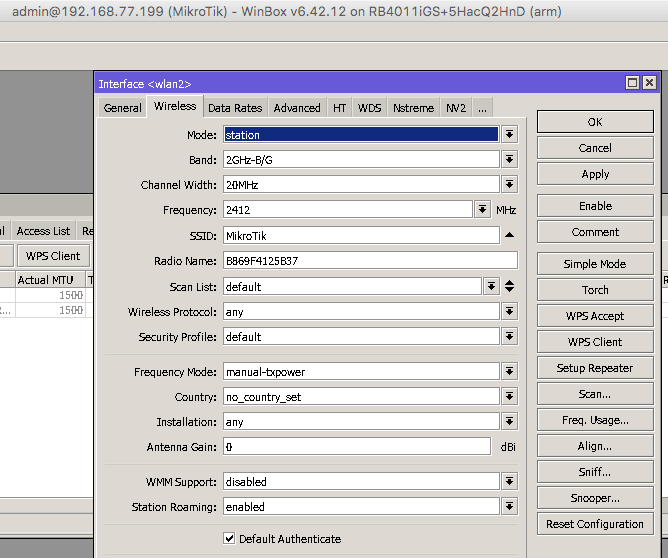
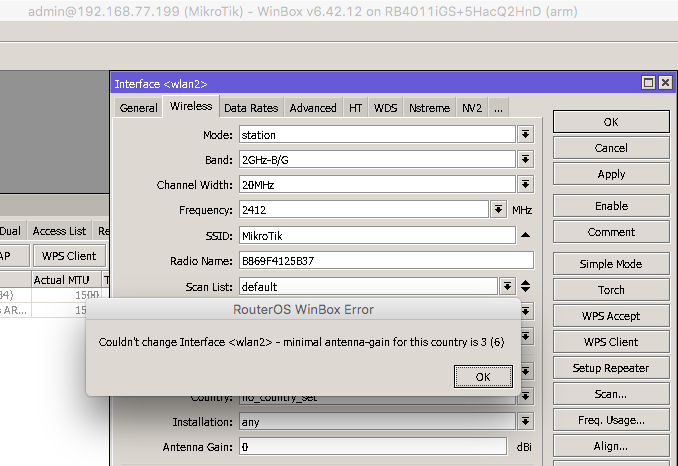
Changing to Regulatory Domain mode, selecting a country, leaving the value at zero and clicking on ‘Apply’ generates a pop up error message. I’ve not been able to make it show me “3” by default.
Plus… Since when is the antenna gain dependent on the country the device is located in? Therefore why check it when selecting a country? The antenna is 3dBi (or whatever is physically installed in the RB) and always will be, regardless of where it is physically (OK - unless someone opens it up and makes some serious modifications!)
Lastly - what’s with the (6) at the end of the error message? That is suggesting that the antenna gain is 3 or it might also be 6?
This is the end Mikrotik! Regulation got u by the balls.
With antenna gain and TX limitation there is no way to use Mikrotik wireless devices anymore unless u stick to a version prior to these awful changes. Even if I would tend to see the root of these changes outside of Mikrotik the devices are crippled practically.
You should think about a way to run those devices with regulatory channels but without brakes for those who dont even have neighbors they could jam with a little bit more power while allowing reasonable range for ur devices.
It has been mentioned a thousand times by now. Chose no country, and there you have your freedom to do what ever you like in braking the regulations. Do you really believe MikroTik is to be held responsible for the regulations enforced by local Laws?