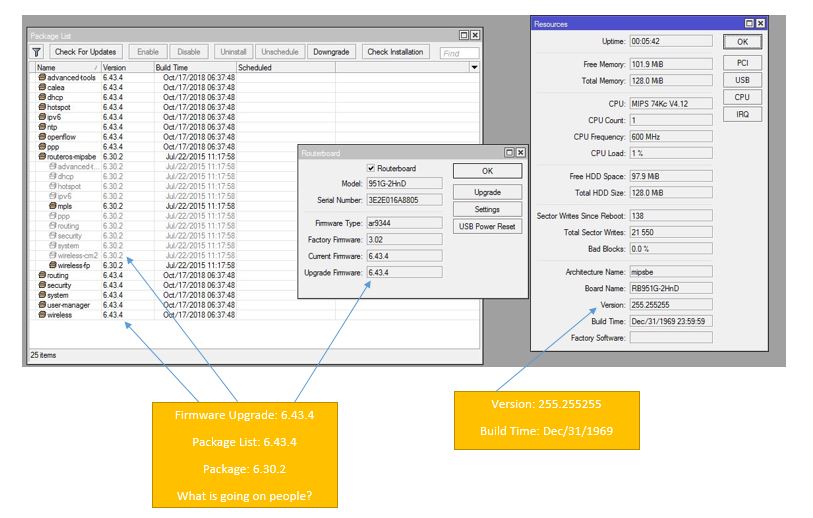
And I noticed that it wasn’t doing anything. The strange thing is that once I had torch running in a particular interface, the queue works as intended. Tried restarting router. Tried a series of experiments (same queue, but on a single VLAN) and obtained the same result. Any ideas? How do I submit a bug?
Thank you. I moved some rules and didn’t noticed that my FastTrack rule ended up above and it was FastTracking this traffic before it got to the forward rules.
Now it kind of makes sense that the Queues worked when torching since it was going through all of my traffic instead of FastTracking.
I believe it’s because src-ip is selected in ‘main’ routing table, and mangle output is after routing decision (where src-ip is being selected) but before routing adjustment (where you can select new routing table but it’s too late for changing src-ip).
yes, I remember, however this breaks the pref-src functionality, so I report it as a (design) bug. I think pref-src should actually adjust the outgoing IP in this scenario as well.
The issue is not the information itself but the choice of topic, or rather report channel, for it.
The “vX.X is released” topics are here to report issues specific to that release. As no topics or sub-forum for feature requests has been open, I believe support@mikrotik.com is the right channel to ask for them.
Sometimes after reboot, my Ltap Mini looses password and let me login without any.
Rebooting again often fixes the problem.
For security considerations this is extremely… Any ideas?
Have not seen this on any other MT router, and have several 100 in the field.
Some problem but with 960GSP just regular restart by watchdog every 4 days in old version 6.42.xx have uptime 100day and more, support give me generic answer netinstall to last version and if happens again send again supout.rif.
Also have PowerBox Pro for now only one watchdog restart after update to 6.43.
It is easy to do netinstall for router in your room but in the tower, for now I look this as a new feature automatically router restart nice or automatic cache cleaner nice new feature.
I bought two brand new hEX routers, both came with RouterOS 6.40.4. Upgraded from System → Packages with default configuration still in place. After the upgrade, I could not log back in (it said “wrong username or password”), also WinBox neighbour discovery was not working. But internet traffic was working fine, so I know the router booted and was running succesfully, but I could not access it. Reboot did not help, had to manually reset the device using the reset button. After resetting, I was able to log back in again and the router was succesfully updated. Confirmed this issue with two brand new hEX routers, serial numbers show “…/806/r3” so revision 3???
 Politicians appeared to be slower than tech guys.