msatter - We already recieved such problem report and will fix it as soon as possible.
nickdwhite - We will look into this. In order to resolve this faster - please send this problem report to support@mikrotik.com.
nordex - Please write to support@mikrotik.com and provide your configuraton which was used on 5.26 version. We will try to reproduce the same problem locally.
en1gm4 - Thanks for properly reporting the problem in related release topic.
Version 6.43rc4 has been released.
Before an upgrade:
- Remember to make backup/export files before an upgrade and save them on another storage device;
- Make sure the device will not lose power during upgrade process;
- Device has enough free storage space for all RouterOS packages to be downloaded.
Changes since previous rc release:
!) winbox - fixed vulnerability that allowed to gain access to an unsecured router;
*) bridge - added ingress filtering options to bridge interface (CLI only);
*) bridge - fixed dynamic VLAN table entries when using ingress filtering;
*) crs317 - fixed link flapping when inserted S+RJ10 module without any cable;
*) ipsec - added “responder” parameter for “mode-config” to allow multiple initiator configurations (CLI only);
*) ipsec - added “src-address-list” parameter for “mode-config” that generates dynamic “src-nat” rule (CLI only);
*) ipsec - install all DNS server addresses provided by “mode-config” server;
*) winbox - fixed “/ip dhcp-server network set dns-none” parameter;
*) winbox - show “Switch” menu on hAP ac^2 devices;
*) winbox - show HT MCS tab when “5ghz-n/ac” band is used;
If you experience version related issues, then please send supout file from your router to support@mikrotik.com. File must be generated while router is not working as expected or after crash.
Note that release candidate versions are published strictly for testing purposes and should not be used on production routers.
Can you please elaborate on what this does?
They do on 6.43rc. IF-MIB::ifSpeed shows the PHY rate. Before 6.43 it showed 10 Mbps.
Responder=yes/no configures whether a specific mode-config entry will act as a initiator or a responder. Previously only the default “request-only” entry acted as an initiator. Since the newly added “src-address-list” parameter works for initiator only and may be different between multiple mode-config clients, it may be necessary for a user to add multiple mode-config initiator configurations.
No System Health data for hAP ac2 and firmware 6.43rc4
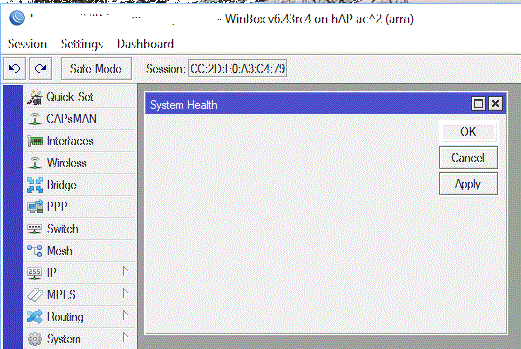
mozerd - This device does not have any hardware monitoring sensors on it.
bad news, I’d rather pay more for a product with better features. My choice today is hAP AC.
You can see available sensors for each product at our products page:
https://mikrotik.com/product/RB962UiGS-5HacT2HnT
Details
PCB temperature monitor Yes
Voltage Monitor Yes
https://mikrotik.com/product/hap_ac2
No such monitors listed.
Next RC release will have possible fix for this
Version 6.43rc5 has been released.
Before an upgrade:
- Remember to make backup/export files before an upgrade and save them on another storage device;
- Make sure the device will not lose power during upgrade process;
- Device has enough free storage space for all RouterOS packages to be downloaded.
Changes since previous rc release:
*) ipsec - fixed policies becoming invalid if added after a disabled policy;
*) led - added “dark-mode” functionality for hAP ac and hAP ac^2 devices;
*) lte - allow to execute concurrent internal AT commands;
*) lte - improved r11e-LTE and r11e-LTE-US dialling process;
*) lte - improved reading of SMS message after entering running state;
*) ssh - disconnect all active connections when router gets rebooted or turned off;
*) tr069-client: - fixed setting of “DeviceInfo.ProvisioningCode” parameter;
*) wireless - fixed packet processing when “static-algo-0=40bit-wep” is being used (introduced in v6.42);
*) wireless - improved wireless throughput on hAP ac^2 and cAP ac;
If you experience version related issues, then please send supout file from your router to support@mikrotik.com. File must be generated while router is not working as expected or after crash.
Note that release candidate versions are published strictly for testing purposes and should not be used on production routers.
Please note that this rc release includes potential fix for wireless performance problems on RouterBOARD hAP ac^2 and cAP ac.
Please upgrade and test. Report results back to support@mikrotik.com if you still experience problems even after an upgrade.
“wireless - improved wireless throughput on hAP ac^2 and cAP ac”
Many thanks for the support of the hap ac^2  . My hap ac^2 updating and rebooting correctly.
Waiting for this
*) wireless - improved wireless throughput on hAP ac^2 and cAP ac;
on stable
looks really better for cap ac
Thanks for this, and know go on at the another construction sites
- Spectral Scan
- Nv2 or 3
It is confirmed that the v6.43rc5 has been resolved the 5GHz WiFi issue on hAP ac^2. The download and upload speed can reach at least at 380Mbps for my MacBook Pro Retina 2015 and sometimes it is over 400Mbps. MikroTik Engineering Team has done a very great job this time.
However I still have problems with my 2GHz WiFi with long ping time over 100ms, I need more time to adjust the WiFi parameters in order to obtain acceptable results.
YH
If the hap-ac2 wireless fix really works it would be very nice of mikrotik to port it back to v6.42 (.2 maybe) asap because otherwise apart from running rc in production we will have to wait for 2 or 3 months according to current release frequency.
JF
Not to current only. It is necessary to implement the corrections into bugfix version!
I encountered a really strange problem with the address-lists. I had some trouble entering ip addresses with netmask in the past and the message was it was not a domain. I worked around it by first entering it without an netmask and add the netmask later. This occurs sometimes and I believe also in previous versions.
Now I have Mikrotik flooding my dnsserver with IP numbers because it thinks there are domain names. I have about 35.000 IP numbers in address-list so it is really bussy. 
The message is “Couldn’t add New Firewall Address-List - x.x.x.0/16 is not a valid dns name (6)”
It seems that the input of address-list is thrown out of wack and in that mode it only expects a domain name or IP address without a netmask.
Everywhere.