Glad that PPTP does not work. It is so outdated and unsecured that undoes the purpose of VPN. Stick to L2TP with IPSEC or OpenVPN.
Those are symptoms of no synchronization between the two ethernet interfaces. Check the ethernet cable, routerboard log, change the settings of the ethernet interface.
Entering a address range with a slash, gives an error when you don’t get it right, however you get an error states that the DNS is not correct and this could be more specific.
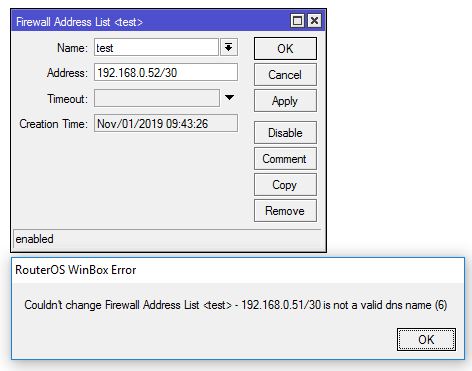
I am on beta 59 of 6.46…so I am in the wrong release of RouterOS but the described mismatch exits also in older versions.
I have nothing changed .. just updated to 6.44.6 ... and in the log i see only ETH up, ETH down ... and the raspi is not getting an IP adress from DHCP ....
richard
to Caci99
All customers use L2TP/IPsec and OVPN, but there is a Keenetic-4GII which has only PPTP!
PPTP is dependable on GRE. They have changed how GRE handles first packets ( version 6.44.3 maybe ).
If you go to that topic you will see some workarounds how to handle the GRE connections.
Thanks for the help
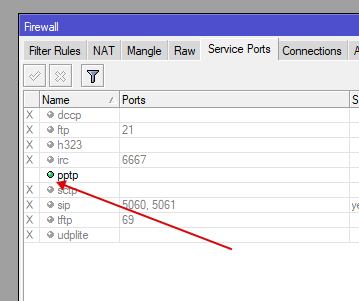
…the PPTPhelper must be enabled in ip firewall service-port…
is there a deeper loging possibility on mikrotik ? i just see eth interface down / eth interface up / down / up …
after a while the interface is up and the connection stable until next reboot from raspi
richard
there must be a problem with LtAP and 6.44.6
i have a raspberry connected to eth0 (the LtAP is powered over POE) …
everytime when i restart the raspi … i see a eth up/down/up/down … and no DHCP IP is assigned.
When i disable the eth port for 1-2 minutes … then enable the eth port … then the raspi connect end get an IP adress.
Rebooting the raspi again and i have the same problem … (cable and injector allready changed)
please help
Richard
Downgrade to previous version and see if the problems goes away. If you see no problem in previous version, then write to mikrotik support, if the problem persists then open a new topic because it is not related to this topic.
can i downgrade when routerboard firmware is allready on 6.44.6 ?
richard
Bootloader firmware is not the same as the RouterOS.
You need to downgrade the RouterOS version, not the bootloader firmware.
/system package print
Will show the RouterOS version installed and all packages installed and if they are enabled.
See also: https://wiki.mikrotik.com/wiki/Manual:RouterOS_FAQ#Downgrading
If you have more issues, please make a separate thread in the general RouterOS forum.
Here: General - MikroTik community forum
I have similar strange problem with DNS on CCR.
Resolving on clients that use CCR as a DNS server does not work in half the cases.
Problems is include DNS static records on CCR.
I’m DNATed incoming DNS requests from CCR to hEX with 6.44.6, and it’s work!
Problem is CCR specific.
Hello
Is this point from 6.45.1 stable allready implemented in longterm Version ?
*) rb4011 - fixed MAC address duplication between sfp-sfpplus1 and wlan1 interfaces (wlan1 configuration reset required)
thx for info, Richard
Woah u really live in the future. We all here still at 6.44.6 n u already at 6.44.7 lol.
Upgraded all devices here n all stable.
ARM based wifi ac got stability improvement.
SMIPS upgrade easily if only install 11 packages instead of 13. Kickin tr069 n hotspot package.
We just found that the OSPFv3 changes in 6.44.6 appear to cause problems with neighbor with Cisco switch with IPv6 (C3560 Software (C3560-IPSERVICESK9-M), Version 15.0(2)SE11, RELEASE SOFTWARE (fc3)). Downgrading to 6.44.5 resolves it. Careful if your router needs OSPFv3 neighbour with Cisco devices.
[quote=LewisH95 post_id=759244 time=1573136630 user_id=150437]
Thanks! this information is helpful. But while upgrading to v6.44.7 I got lots of errors. I don’t know what they meant. what should I do to troubleshoot?
Regards,
Lewis
[/quote]
RouterOS v6.44.7 does not exist (yet?), so that could be your issue.
If something is suggesting that there is a v6.44.7 but failing to download/install it, it might mean that the CVE fixes in this update are working as expected.
You should secure your router as it could be compromised.
If you meant you were having trouble upgrading to v6.44.6, then you need to actually show some of the errors if you want help.
You can make post them here if you think they are directly related to the v6.44.6 version, you can email support@mikrotik.com for direct support, or you can make a new thread in the general RouterOS help forum <LINK_TEXT text=“viewforum.php?f=2”>https://forum.mikrotik.com/viewforum.php?f=2</LINK_TEXT> if you just need help in general.
Don’t bother, if this “LewisH95” is not just creative spammer establishing ground, I’ll eat my hat. All his posts are either copy & paste from elsewhere, just containing keywords related to thread subject, or straight nonsense like this one.
I always knew that you were actually S. Holmes!! Your detective skills are inspiring!
Be careful and maybe think of purchasing one of these just for the case, as although I have the same opinion as you, I’ve come across one of his posts which made sense in the context of the topic. So maybe he’s actually doing his PhD on AI, and he’ll finally be giving a perfect answer to each new topic through using the aggregate wisdom of all the posts on this forum written ever since it has been incepted.