Note that in v7 they are moving away from the possibility to install only the packages you require, there is one big package for all functions in RouterOS and then additional packages are only used for niche functionality like monitoring a UPS or running the user-manager.
This reduces the expansion potential as all additional functions in the main RouterOS will consume space no matter if you are interested in those additions, and the remaining space for additional packages will shrink more and more.
(e.g. on my non-wireless routers I do not install hotspot and wireless, I always omit “mpls” because I don’t use it, I omit “routing” on routers not running BGP/OSPF, etc. that will no longer be possible on v7)
I can understand that having separate packages for things like “ppp”, “security” and “dhcp” is becoming a dependency nightmare, so it is reasonable to move those in the main package. Same for IPv6. But “mpls”, “routing”, “wireless” etc certainly could have been left as separate packages.
Many other devices only have the bootloader in a 2-4MB SPI Flash, then loads the system from SD or eMMC.
When using DoH in 6.47.1 and 6.47, the dns caching is broken as the cache used will keep accumulate until it reach the max cache size set. Flush cache is not working either.
http://forum.mikrotik.com/t/doh-corrupting-dns-cache-dns-cache-full-with-invalid-data/140740/1

What about partitioning? 
I’m having an issue on v6.47.1 at two seperate locations (identical behavior at both) with the same setup/hardware.
This issue was not present in v6.47 (also confirmed after downgrading one of the locations that the issue did disappear when going back to v6.47) and I believe it to be specifically related to this line in the change log of this release:
*) switch - fixed MAC address learning on switch-cpu port for Atheros8316, Atheros8227 and Atheros7240 switch chips;
I have a bridge set up for an ip-camera network on both devices with a VLAN interface assigned to an ethernet port on each side to connect them. (see config code below)
- A PoE Switch is attached to Ether6 on the 2011UAS-2HnD.
- The NVR is attached to Ether 7 on the 2011UAS-2HnD.
- A Vlan(300) interface is attached to ether10 which is connected to a wAP 2nD r2.(the wAP has more than one network on it, which is why i’m using a VLAN interface here)
- A (raspberry pi) display that views the RTSP feed of several cameras is connected to a wlan interface that is bridged to VLAN300 on the wAP.
Since the device upgraded to v6.47.1 there is some kind of arp/switching issue happening where if any device connected to the wAP is accessing a host on this network, no devices connected to the LAN side on the 2011UAS-2HnD are able to communicate with those hosts anymore. After I turn off the wireless interface and allow a few minutes to pass, the devices become accessible on the LAN again.
When this happens I can see that the MAC Entries on Switch/Host in Winbox change from “ether6” to “Switch 2 CPU”.
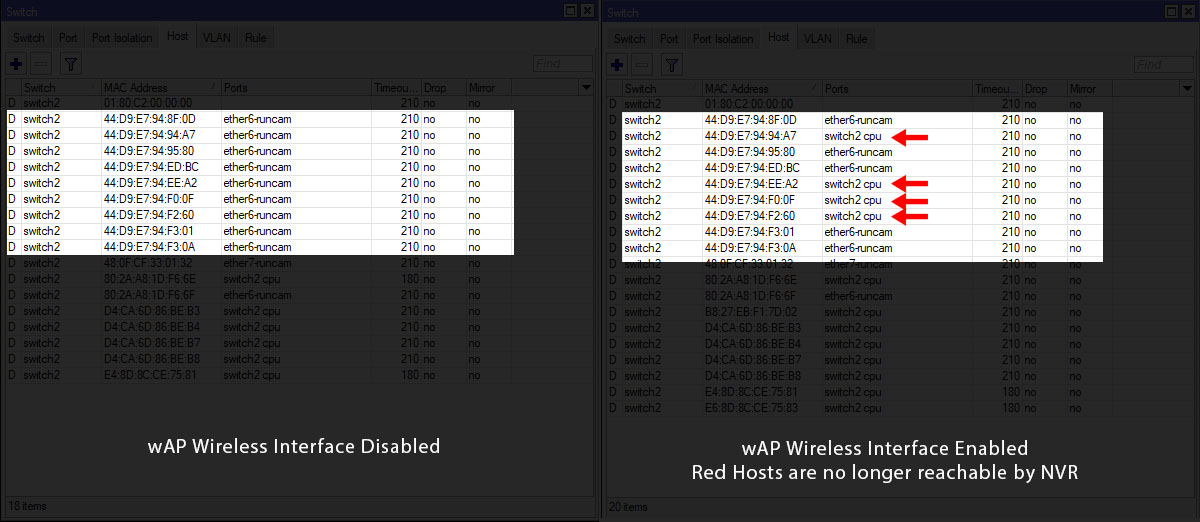
Relevant Config Info:
# model = 2011UAS-2HnD

/interface bridge
add name=bridge-cameras

/interface vlan
add interface=ether10-wap name=vlan300-cameras vlan-id=300

/interface bridge port
add bridge=bridge-cameras interface=vlan300-cameras
add bridge=bridge-cameras interface=ether6
add bridge=bridge-cameras interface=ether7
------

# model = RouterBOARD wAP 2nD r2

/interface bridge
add fast-forward=no name=bridge-cameras

/interface vlan
add interface=ether1 name=vlan300-cameras vlan-id=300

/interface bridge port
add bridge=bridge-cameras interface=wlan300-cameras
add bridge=bridge-cameras interface=vlan300-cameras
Is my assumption correct that you are using multiple bridges? One dedicated to the cameras?
If so, you can get rid of that. A single bridge is sufficient, all you have to do is filter VLAN id’s.
Have a look at this topic (I learned a lot of this topic: http://forum.mikrotik.com/t/using-routeros-to-vlan-your-network/126489/1)
Hi All,
My router issue described in this post http://forum.mikrotik.com/t/v6-47-stable-is-released/140100/212 isn’t resolved with upgrade to 6.47.1, still had to rollback to 6.46.6 to get SFP ONU work again.
I have made fresh rif and log it via ticket SUP-22021
BTW: Mikrotik has setup Jira service desk so if anyone with such an issue is concerned you can drop Me you email and I will add you as a requester to this issue.
Thanks baks, I’ll DM you my e-mail address.
I guess I stay on 6.46 on my device for now, I need the SFP interface to work.
Partioning? We don’t need no stinkin’ partitioning 
Frankly I find partitioning too much hassle to use on local devices, backups are just fine …
And RBs dont need partitioning, you do so choose your gear wisely
Partitioning is the best option to test something (e.g. ROS v7). Rollback involves a mere change of active partition and a reboot.
Partitioning has saved me when there was a problem with an update forgetting to remove the old files, causing the flash to fill up and making it impossible to upgrade, then MikroTik released a quick-and-dirty small package that would have to be installed on the system and would clean it up.
But unfortunately the package had a bug and it made the system unbootable.
With partitioning, the bootloader detects that the system fails to boot, then automatically toggles the active partition and reboots, and it rebooted the copy that I made before downloading the package and that still worked. So I could wait for the re-release of the fix package.
Without that, it would have been going through a difficult procedure to gain access to the site, and a 2x40km drive. While the network was down.
CCR-7G-1C-1S + PC when writing to SD flash, the SPI process loads one core at 100% for a long time. I tried to change SD flash, it did not help.
I have a problem with a hAP ac^2 on 6.47. It won’t update to 6.47.1 from either the check update option (which sees 6.47.1) nor by manually adding the firmware file from the website into files and trying to reboot.
In both cases, the router comes back up as normal but for some reason wipes all DHCP lease allocations? It remains on version 6.47.
What does the log say after the reboot?
Updated 4 devices to 6.47.1, local DNS records still doesn’t resolving if DoH server is used. We was waiting DoH for so long but why you ruined other part of DNS…
I have same issue with manual upgrade (upload specific packages). But it was succeeded on 2nd attempt.
Very cosmetic issue, but - for quite few releases, the scaling of UI is not correct. Each time I log-in to a router, I have to go to menu and press Zoom-in, to have a correct size.
That problem is not related to the RouterOS version, but to the Winbox version. Please try upgrading Winbox and discuss in Winbox version topic.
Good! Patches.
Put stable 6.47.1 on my hap-ac and hap-ac2 last weekend.
But now the roaming is terrible… Ehm, where did the antenna-gain field go, or what are the workarounds?
Am I now stuck with maximum gain? That’s would be kind of sad actually.
hi,
Why do they call this STABLE, it should be BETA at best.
6.47.1 on a Hap AC-lite and a 951-2hnd have both created a bridge problem where the router cannot be pinged or accessed from the same subnet via IP even when used as a basic bridged access point.
It produces two “neighbour” entries on other routers with differing mac addresses.
The only way to clear it is to log in via MAC telnet and disable fast forward on the bridge and disable hardware offload on the port you are trying to access it from.
The two ghost neighbour issue shows up on many routers running this release too, one shows the device name the other does not.
Seems the new Bridge implementation is rather broken, it has also nuked using Vlans for Active backup too, no amount of use of vlan filtering fixes it either.
ho hum..
Bill