Uncaught TypeError: map.setDefaultConf is not a function
at Object.container.map.createPane (master-min-d4f93cc8bdee.js:1190)
at updateContent (master-min-d4f93cc8bdee.js:1200)
at generateContent (master-min-d4f93cc8bdee.js:1204)
at openContent (master-min-d4f93cc8bdee.js:1205)
at HTMLAnchorElement.b.onclick (master-min-d4f93cc8bdee.js:1137)
Curiously, all of the above work fine when selected from the “Add New…” dropdown on the “Interfaces/Interface” tab - in this case “VLAN” opens:
Did you do any reboots with 6.48 before this upgrade?
The reboot failures with various models (RB3011 and CRS9x) is issue related to the first 6.48 release.
I have not yet tested if fresh install of 6.48.1 reboot bricks these devices - and if so - what percentage of them. 6.48 reboot bricked ~50% of the devices I tested.
Hi @Cray
no, i don’t dare to make reboots. It is in production, and that was my mistake to rush on 6.48
i wanted PPP->Remote IPv6 prefix/IPv6 Routes features to finaly replace old scripts and without thinking pushed Upgrade button
what an idiot
From this point, my rock solid 3011 started to flap ports, and instead of rebooting i played with enable/disable to make them back to life
but now, 6.48.1 seem to solve this problem, only strange thing was upgrade path
48 → 49b11 → 48.1 was worked
could not go straight from 48 to 48.1
so i hope my nightmare is over
i will not push the Upgrade button until next year.
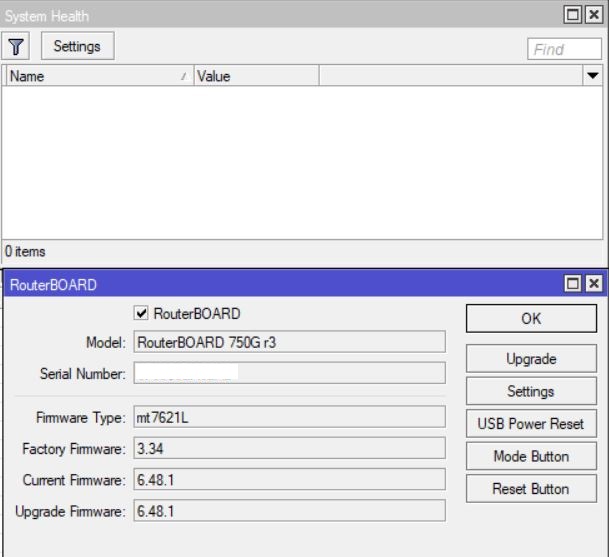
after upgrade winbox system health show temp and voltage but after i upgrade system >>routerboard>>upgrade and reboot the system health blank again like previous version
Two RB3011 units severely effected by 6.48 and updating to 6.48.1 did not fix, had to roll back to 6.47.8.
One RB3011 became unstable with port flapping but was kind of working long enough to be useful.
Another RB3011 rebooting with the kernel message, port flapping, and ports 6-10 were non operational. Impossible to downgrade - in the end I had to hook up to the console and Netinstall
This is first time i’ve had such a bad upgrade experience and I updated looking to get a fix for the issue with wireless clients not getting DHCP replies. It seems that MT never tested this release on RB3011, or did not test it properly. This is a very worrying development especially as this branch is supposed to be “stable”. Today this cost me the whole day sorting one unit out as it ran the network for a very busy office.
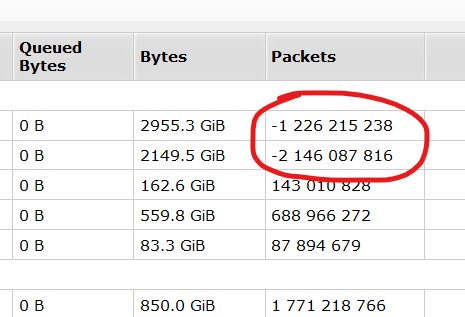
Adding to the info I posted on the 6.48 thread and posting here again, as there’s no fix related to that on 6.48.1 and also 6.49rc. Queue packets are really overflowing on the 32 bit signed integer limit, screenshot was taken with 6.48 on a RB1100AHx2. Not easy to reproduce, for sure, by the amount of packets required. On this RB, it took about 40 days to reach that 2,14 billion packet mark on the queue trees.
.
When you have a router like that in production, you should partition it so you can always go back to a stable situation without problem.
Of course enabling partitioning in a device in production is a risk as well, it will require at least one reboot and it may further disturb the device, so it is best done BEFORE you put it in production.
But at least, when you have clicked upgrade and it was a mistake, you can go back (when you have done a partition 0->1 copy before you clicked upgrade).
You should not trust it, alt least not from public internet.
Some time ago thousands of router was hacked trough bug in software using WinBox port!!!
From internet, you should use VPN.
I VPN is not an option at all, then follow this:
Use another port than default. Do NOT use 8291.
Use port knocking. This prevents someone from seeing open ports.
Use a long and good password.
Use access list to prevent any random internet from accessing your router.
Log everything. (See my signature for example.)
Upgrade firmware to latest stable release
++++
Why do not use Splunk to monitor your MikroTik Router(s)? Look at this page in how to set it up.
it is my ? fault to not partition RB in advance ?
or it is MKT fault that release “stable” release with missing features, port flapping, kernel failure etc etc …
no, it is not !!! my fault
if i install from “beta” branch, then it is my fault
if i install from “stable” branch …
but, as in past, we never could agreed that MKT is doing wrong things
so, this time will be the same
according to your writing it is user fault to not thinkink in advance: what if MKT release faulty SW? do i have 3 pcs of RB3011 for backup sitting in closet for any case ? it is full moon today ?
Completely irrelevant! It is your own responsibility to ensure that you can operate your equipment at sufficient availability for your network.
That includes being responsible for backups, rollback possibilities, spare hardware in case it breaks, and also if software is suitable for your purpose.
You cannot shift that responsibility to someone else, and certainly not to a supplier.
[/quote]
Completely irrelevant! It is your own responsibility to ensure that you can operate your equipment at sufficient availability for your network.
That includes being responsible for backups, rollback possibilities, spare hardware in case it breaks, and also if software is suitable for your purpose.
You cannot shift that responsibility to someone else, and certainly not to a supplier.
[/quote]
my native language is not English, but i know well what word “stable” mean
but maybe i am wrong, who know
now, would you be so kind to explain what “stable” mean in your world ? port flapping ? kernel faults ?
and, no, i don’t want any other answer
straight one, meaning of word stable is …