Mine works fine with:
https://dns.nextdns.io/dns-query
and Verify Certificate selected.
Tried to upgrade to 6.49.x on my CRS112-8P-4S. Two SFP-RJ45 adapters stopped to work (“no link”) that were previously worked great for almost 4 years.
Reverting back to 6.48.6 solved the issue. 
SFP info: marked as “juniper networks”:
Vendor Name Methode Elec.
Vendor Part Number SP7041-M1-JN
Since v6.48 all the releases seem to have some incompatibility/bug in IKEv2 with Windows10 that causes all connections to fail after about 7h40 after establishing.
With this release the problem remains and had to downgrade to v6.47.10
Happening with all the IKEv2 users each in his own location/home network/PC.
On access/authentication EAP/RADIUS the server returns “Session-Timeout = 36000” that should grant 10h of session …
The reason given for the connection drop is “IPsec-SA expired before finishing rekey:”, that don’t happen on v6.47
The full debug log from the drop moment is documented at: https://www.dropbox.com/s/d6k25fgwgrsq6wr/syslog-ros6.49.2-ikev2-drop-7h40m.txt?dl=0
regards!
Running perfectly stable on a RB941-2ND as a Home AP, holding a PPPoE connection, serving DHCP and wirelessly connecting a IoT network.
I upgrade a sites hEXS to 6.49.2 from 6.49.1 and haven’t been able to make an L2TP/IPSec tunnel since. I then tried to upgrade to 7.1.1 and didn’t have any luck either. I then tried Netinstall to do a fresh install of 7.1.1 and still had the issue. I then tried Netinstall with 6.49.2 and still can’t remedy the issue. I have combed the logs from IPSec and it looks like the hEXS isn’t checking the full IPSec config. This config has worked for 4 years no without any issues until these updates. I need to restore this issue asap as it is a primary site. I did try rolling back to several older configs that were known good and untouched by the update with no luck. I have tried contacted Mikrotik Support and got no where.
It appears to be an issue with the 6.49.2 through 7.1.1 firmware specially on the hEX S (MMIPS) platform. It doesn’t appear to be checking the config even after I apply the changes; even after disabling and reenabling. I have attached a screenshot of the hEX S and RB4011 config. The RB4011 is a known good and working config used on multiple sites and the hEX S matches but doesn’t work. One note worth thing is the hEX S appears to be having trouble with the MODP group. I tried disabling it and then using 1024 which is what the log was suggesting but that didn’t work.
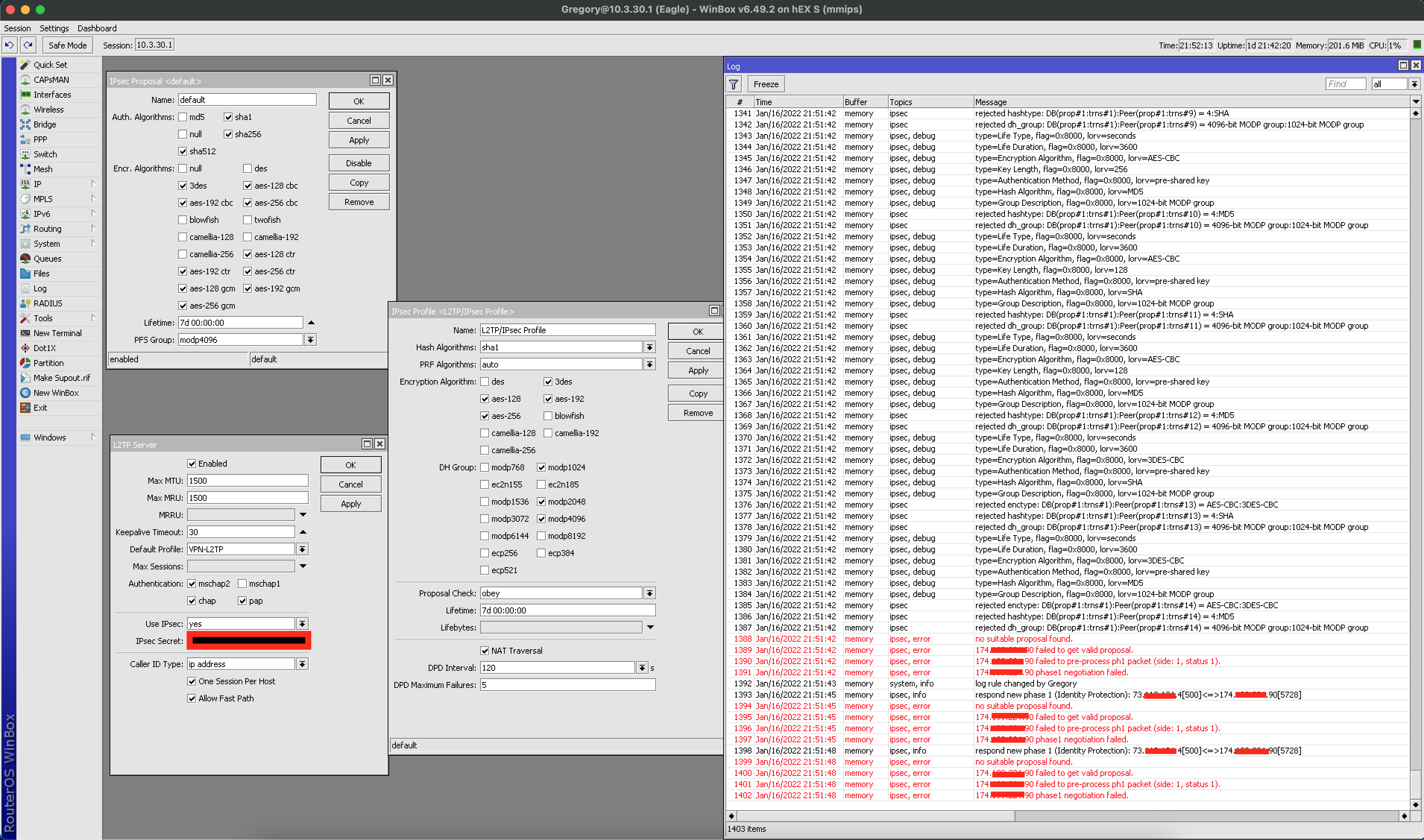
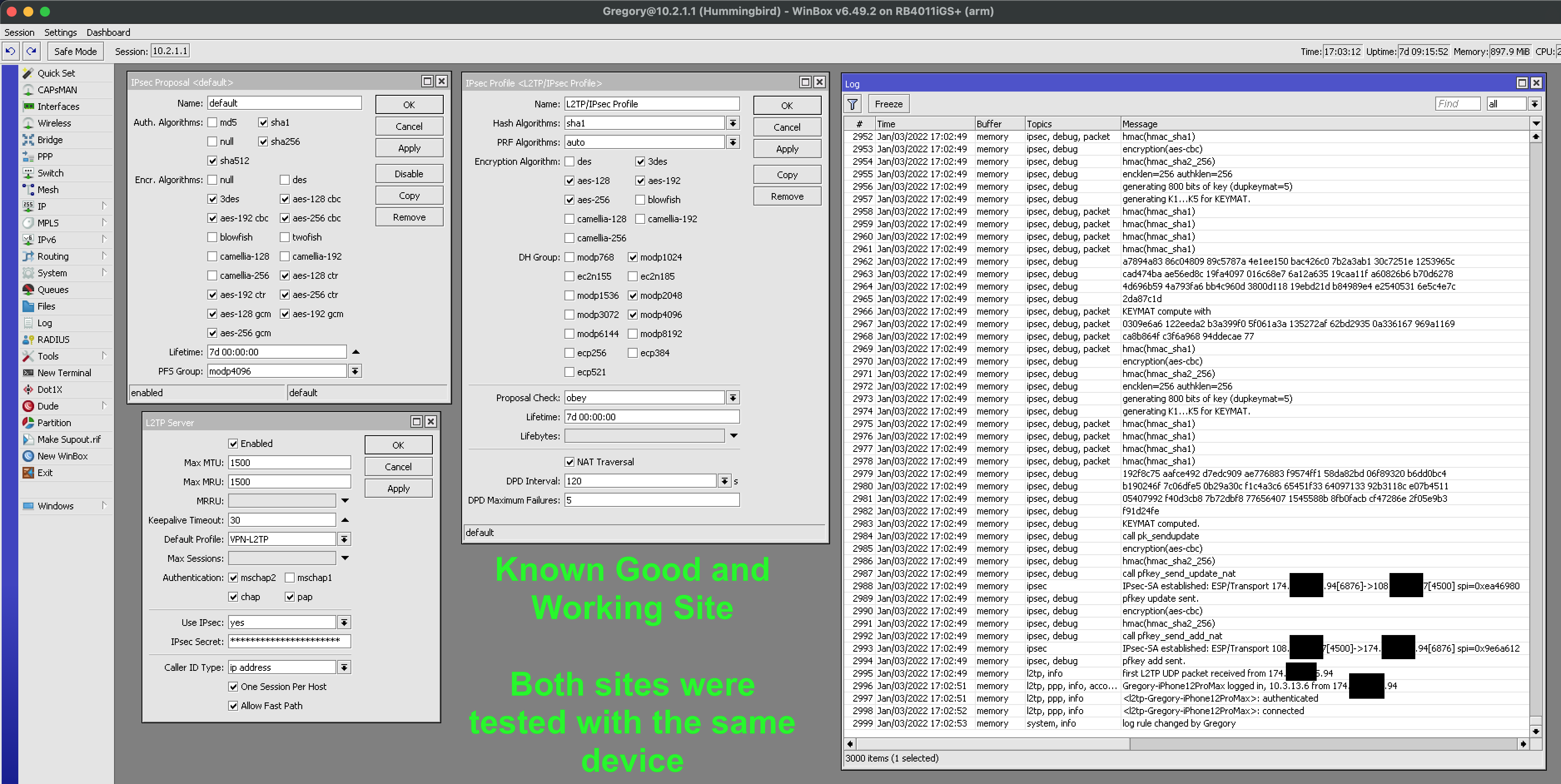
@Beachbum: Look closely, the non-working one doesn’t have modp4096, which is also what you can see not matching in the log.
Unfortunately, that was remnants from me trying to disable and enable different options trying to get it to try different options. Enabling that has no change as it appears to be stuck on 1024 vs 4096.
The IPv6 bug where addresses disappear on reboot (http://forum.mikrotik.com/t/ipv6-ula-address-lost-on-reboot/154386/7) is still here.
[quote=DmitryD post_id=906066 time=1642368781 user_id=196416]
RB3011UiAS - After update to RouterOS 6.49.2 I can’t update to 7.1.1 version.
System - Packages - Check for update show only 6.49.2 on ALL update channels
Please, help me update to 7.1.1 version!
[/quote]Same here. 7.1.1 is shown as “testing” and “upgrade”, but none of those work, when I try and tell it to download, it stalls and it isn’t at my end of the line..
[attachment=0]9b204744-9d7d-4abd-8e9f-c5799eeac4da.tmp_cr.png[/attachment]
@juit I ran into this on several of my devices. You have to remove all extra packages in order to upgrade. So if you had the UPS or User Manager, you have to uninstall then you can upgrade, and then reinstall the available ones in 7.1.1.
Only problem is: I never installed any extra packages. This is how the RouterBoard came. The only thing I’ve done is upgrade firmware and update packages every once in a while..
The Traffic Flow feature sends unidentified reports. This is probably due to this change in 6.49.1:
*) traffic-flow - added systematic count-based packet sampling support;
Since version 6.49.1 (but I upgraded to 6.49.2 to verify that it is still the case) the Traffic Flow feature (IPFIX mode) sends reports with template ID 260, but it never sends a description of this template!
The IDs 258 (IPv4 traffic) and 259 (IPv6 traffic) templates are sent correctly.
Good morning,
I have a rb3011 with ros6.46.8 and a configuration with dual wan in load balancing,
I would like to upgrade to 6.49.2 to take advantage of wireguard and DoH .
Someone who has tried can confirm or not the success?
Version 6.49.2 does not provide Wireguard.
@eworm tnx, i could continue to use l2tp , do you know if there are any problems also for DoH ?
There are some issues with DoH, you should read about it on the forum. But upgrading your RouterOS is advisable anyway.
@pe1chl ,
I’ve read several posts on the forum about DoH; but with ros version 6.49.2 it’s not clear to me if in case of doh block the router continues to work with unencrypted dns.
I also read that someone has chosen the longterm version 6.48.6 preferring it to the stable version.
I’m gripped by doubts and worried because it would be appropriate to update my router for a security issue, but especially because I would not want to have the router blocked for several hours not having a second backup.
I run 6.49.2 on several routers without issue, but I do not use DoH anywhere. I have no need for it.
Other things appear to work fine on this version. I also run 7.x versions on some routers but they have a lot more issues, so even though they support wireguard I would be careful when upgrading to that.
ok, I’ll ask again in a few posts on the DoH if anyone still had problems and then I think I’ll update (hoping not to use netinstall and revert to the previous version)
When you have a 3011 you should partition it in two partitions and copy part0 to part1 before you upgrade and then you can always make part1 active and reboot when the upgrade is causing problems.
You should do the same thing before you attempt to upgrade to v7.x.