So what big deal with the naming? Are you going to explain what the problem is and CONTRIBUTE or are you going to be annoyed and chatty on the forums?
Time to be annoyed has long passed. Nothing you can do about that.
So what big deal with the naming? Are you going to explain what the problem is and CONTRIBUTE or are you going to be annoyed and chatty on the forums?
Time to be annoyed has long passed. Nothing you can do about that.
We are using vlans, bonding and vlans on bonding with no issues.
Are you sure your config is right?
the config works until rc13…
seems to be not so wrong…
and also works on >100 other MT boxes
please make a new topic and post “this config” that works only up to rc13. we will see what is so special about it.
sent it to support this morning !!
including supout
Hello, i am using Vlans with RB1100AHx2 since 6.0rc11. And after upgrade from rc13 to rc14, Vlan’s still working. 
So i can’t confirm this bug
please clarify what SNMP bug do you mean? did you contact support and report it?
RB433UAH uptime 19h crash web-proxy (NAT forwarding off internet work)
For me also works fine. No any issues with vlans for now.
Hi Mikrotik staff,
I understand you are all very busy working on RouterOS. But can someone please look at Ticket#2013050266000072
It is regarding an issue with BGP pre-pends on RouterOS 6.
I also have Ticket#2013043066000404 open which may be related.
Thanks.
I confirm this issue on this same RouterBoard, plus forwarding on non-vilan ports losts many of packets (input is OK). Downgrade to 6RC13 and everything works great.
Best Regards,
GaR
Seems like some of the problems around vrf are partly introduced in rc14. I cannot use it due to unstable router (hanging, not showing anny error in log etc. It also had a strange, not possible to start terminal from winbox. (wrong user password) teleneted from the link in, and it was ok. Something wired are back.
Also not yet fied the vrf bug route-distinguisher
Here there should be 0.0.0.0:0
/ip route vrf
add export-route-targets=0.0.0.0:0 import-route-targets=0.0.0.0:0
route-distinguisher=“(unknown)” routing-mark=vrf.internet
I have also had some troble mac-telnet from later releases of v6 and 5.xx to clients in nv2 mode. Is this a common problem? switching from nv2 to 802.11 solve the problem.
Also im missing good old preamble mode, ack-timeout etc make the setup of bad links easier.
I found the solution to the VLAN problem on RB1100AHx2!
Upgrading an RB1100AHx2 with VLANs from rc13 to this rc14 the router was inaccesible, only connecting directly to the ether13 i can access by MAC in winbox and solve the problem changing the L2 MTU from 1598 to 1700 of the ether3 where are all the VLANs 
Best regards!
No, I not contact support. I speak english very bad. Если говорят в саппорте по русски, то тогда смогу
описать проблему им очень подробно.
I have softrouter on server hardware PC. When I use 6.0rc11 graphics fine. When I upgrade to 6.0rc13:
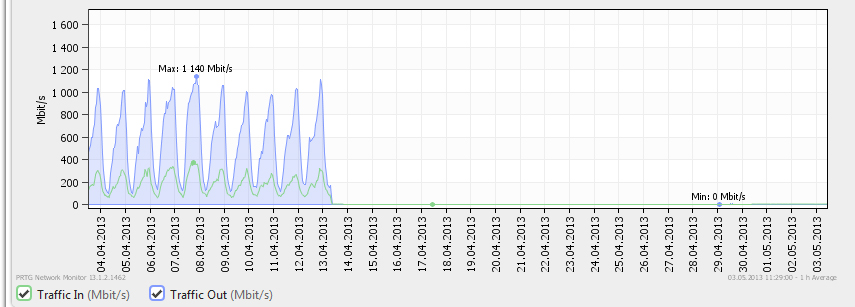
You can write in Russian. Some of our support enginers will be able to understand it. Please send full description so we can test.
CCR in bridge is fail. When it will be fixed?
“bridge is fail” is not enough to understand your problem and fix it. please describe in more detail and send it to support.
insert 2 interface to bridge and let the traffic flow around 200Mbit. CCR is rebooted or totaly shutdown in time. half cores is running on 100%.
it says that a lot of people. You never tried it? CCR is totally unstable.
Not unstable… depends what your doing… high throughput yes, it seems.
is unstable in bridge, dot. Throughput is 200Mbit.