Somehow, ARP pings don’t seem to work… Tested on 7.1.1, hAP ac2, tested both VLAN as well as normal bridge interface. Another router with v6 (and almost same config) works without issue.
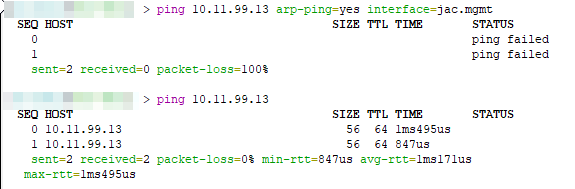
Can anyone confirm? (just to be clear, interface is correct. If the interface was wrong, it would simply timeout but notice the status - “ping failed”)
Confirmed with CHR 7.1.1, same “ping failed” for ARP pings.
Yes, also confirmed by Mikrotik in SUP-69080 (“ARP ping fails (v7)”).
So ive updated my CCR1009-8G-1S-1S+ it worked until I updated the routerboard firmware.
Now its in a bootloop.
I had v7RC4 running on it as a test and it was working fine.]
A fresh netinstall fixed it. But it does not make me very eager to use this thing in production
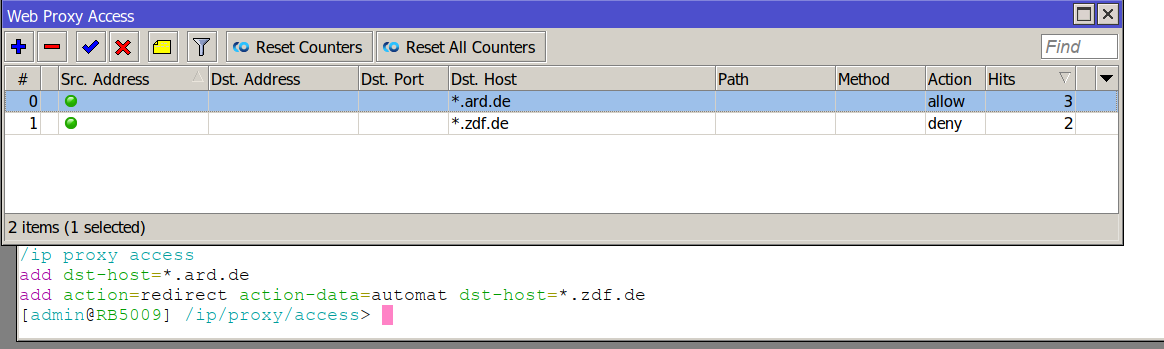
Something weird in proxy access rules. Winbox 3.32 and Console config show different.
RB5009/ROS7.1.1 here
[quote=fmk post_id=910244 time=1643814234 user_id=112672]
I got Kernel panic/reboot on CCR1036-12G-4S after upraded to v7.1.1, so back to v6 where I had over 1 year of uptime..
Too bad because I liked bgp on v7, so I’m waiting for the next Stable.
[/quote]
Same situation. Kernel failure \ reboot. CCR1016-12G ROS v7.1.1\v7.2rc3. Running OSPF\LDP\MPLS (no BGP enable)
Router crashed after 1-2 min when i have enabled any VPLS connection. When i disable VPLS links - router works well =</r>
ROS7.1.1 causes CCR1009-7G-1C-1S+ to crash with one ovpn session!
Any suggestions?
- try 7.2rc3
- when not fixed, install 6.49.2
Hi, thanx but 6.49.2 has no ovpn-udp, like all 6.x
That is true, but 7.x is not in a state with usable OpenVPN. So for now, the only way to have OpenVPN is to run it on a separate device (server).
v7.1.1 RB5009 Link SFP+ <—> any device with SFP (SFP+) packet loss 35-50%, regardless of the load. Tested on two RB5009.
v6.49.2 CRS328 Link SFP+ <—> any device with SFP (SFP+) packet loss 0%, regardless of the load.
hi all,
i did the OSPF lab with 3 hap-mini routers with ros v7.1.1 today.
what i found are :
- on /ip route table, no more pref-source that ussualy came from the ip addresses added on /ip address. so, what is the pref-source for ?
- export not working, wait almost forever and the result is nothing
- Make supout.rif stop at 85%
is it the bug for hap-mini only or for v7.1.1 or hap-mini too small for v7.1.1 ?
EDITED: i try to add the mpls config on it and end-up with error
[admin@MikroTik] > /ip/address/print
Columns: ADDRESS, NETWORK, INTERFACE
# ADDRESS         NETWORK      INTERFACE
0 172.16.1.2/32   172.16.1.2   loopback
1 10.1.1.2/30     10.1.1.0     ether1
2 192.168.2.1/29  192.168.2.0  ether2
3 10.1.2.1/30     10.1.2.0     ether3
[admin@MikroTik] > /mpls/ldp/add lsr-id=172.16.1.2
action timed out - try again, if error continues contact MikroTik support and send a supout file (13)
P
pref-source is the source address that the router uses when making outbound connections to an address in that range.
when you have a number of routers that are interconnected using link subnets, it may be a good idea to have “the main router address” (e.g. the router address on the LAN) as the pref-source everywhere.
one of our RB1100AHx2 having boot-loop after upgrade to v7.1.1 with error message kernel failure.
unfortunatelly the ether13 port has been maffunction and no chance to do netinstall.
how to get the working firmware file for RB1100AHx2 ? AFAIK the file with extention .fwf
tia
Download NPK file, open it with 7z … fwf files are in /etc directory. Make sure you select file with name exactly matching firmware-type shown by /systen/routerboard/print.
Copy file to CCR and it should be shown as available for upgrading routerboot.
Edit: just hit me: with device in boot-loop the above procedure will not work. I hope there’s option to upgrade routerboot via serial port …
Users should learn to partition their device prior to upgrading, when they have a router like RB1100AHx2 where that is a possibility.
vlan inside eoiptunnel inside openvpn. When adding to bridge eoip couses system reboot  Works fine in 6.xx…x86
I just ordered a RB4011iGS+5HacQ2HnD-IN. Can someone tell me that it will be ever possible to use the new WifiWave2 without deactivating the 2.4 GHz radio (legacy driver in parallel)? This would be really sad if not possible. Maybe it is on the roadmap? Thanks in advance.
Updated from last v6 release, i can’t ping in routing table in Tools ping this option is removed ?
I am not sure if its a 7.1.0 or a 7.1.1 issue, I remember it showing in 6.49.x but I am not seeing any client/station association, disassociation and signal strength logging at all from either of my CAP’s or the CAPsMAN controller, ive checked the logging, I am seeing log entries from all devices, e.g. winbox login, logging changes ete, no station information at all.
I have a PC that is dropping in and out and I cant see what reason it is disassociating for anywhere in the logs.
Anyone else seeing the same problem?
I am logging to a syslog destination, firewall, winbox login messages - everything else is appearing in the logs except for CAPsMAN related (dis)associations
Kind Regards,
Jim.