Why did you upgrade it? The issue you describe is known, and there should be no reason to upgrade a CCR router to 7.1.1 unless maybe you want higher
performance BGP and are working in an experimental setting. Certainly not on a customer site!
I haven’t had issues with 7.1.1 on any other my client sites so I decided to give it a try. would you be kind enough to tell me where this problem is known so I can read about it please?
E.g. message #281 in this topic, but also other places where issues with SIP are discussed. it is likely related to DSCP. I have issues with DSCP i.c.w. PPPoE as well.
Hello guys,
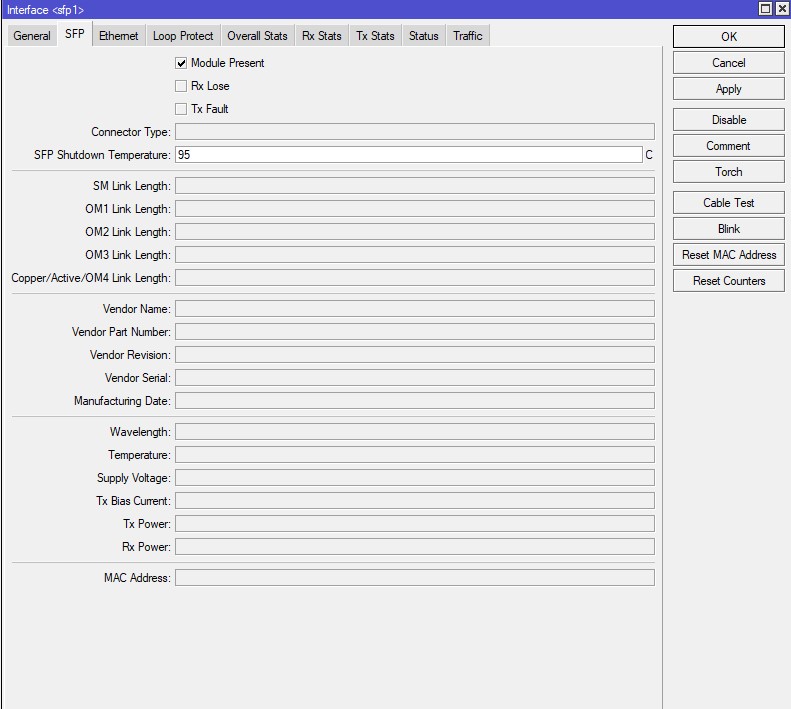
Recently I’ve found that all of the information for the SFP interface is missing on v7.1.1. At the moment there is no information listed at all, something that was present in v6.x.x. Currently using Hex S and S-85DLC05DI module. Anyone having the same problem on v7?
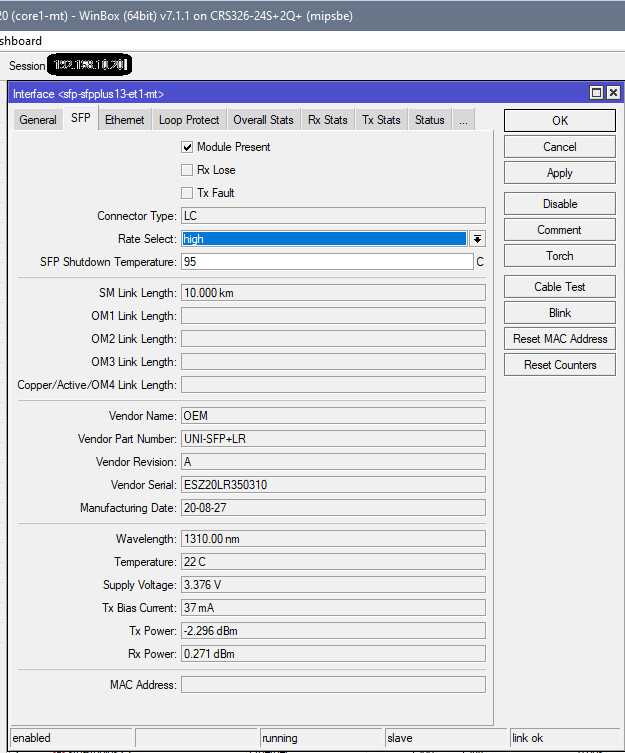
It´s not a general bug in V7.1.1, because in my ARM and MIBSBE devices all SFP+ interfaces reports correctly.
Unfortunatly I have no MMIPS device running with SFP modules to verify.
Hi Guys, I noticed that the OpenVPN in UDP sessions remain active even if I am disconnected.
Check if possible.
Thank you
Valerio
Ciao Ragazzi, ho notato che la OpenVPN in UDP, le sessioni rimangono attive anche se mi sono scollegato.
Se possibile verificare.
Grazie
Valerio
It seems to be working for you. Interesting enough it was working on v6.x.x without any problems. I’ve tested it now with another SFP module and it seems to not be from it. With both modules the problems remains. Don’t have a SM module to test but I’d say that this is most likely coming from the v7 and as you mentioned it isn’t a general thing for all SFP modules and architectures. The connection is working fine but no information. I’m using OM2 cable.
The number of problems I’ve solved by NetInstalling , or NetInstalling and THEN factory resetting and importing my config is staggering. I don’t care if the file system check says the install is good, there’s some NVRAM corruption going on that can’t be measured/detected, but NetInstall fixes the issue 99% of the time, and factory reset after a NetInstall and upgrading the bootloader solves the rest of the problems. If that SOP (standard operating procedure) doesn’t fix it, and a downgrade with NetInstall doesn’t fix it, I just replace the whole device. If I can’t get a board to NetInstall, but other ones do, I replace the equipment. Something is wrong with the bootloader. It will act up in the future.
Before you deploy any Tik in an operational environment, I think you should NetInstall it, upgrade the bootloader, and factory reset it. Straight out of the box, even. I’ve gotten “new” things from suppliers that were obvious returns once I logged in.
NetInstall has a history of being flaky, but I think I’ve found a solution. Use a cheap USB to ethernet adapter with a Realtek chipset. Now, NetInstall works every time. There’s some issue with Windows 10+ and integrated Intel NICs. It works until it doesn’t, and then it never works again. Plug in the USB adapter, now it works every time. Go figure. Didn’t have these problems with Windows 7, but we obviously can’t keep that around for NetInstall.
So if I “fix” a problem with NetInstall, and it happens again, and I fix it a second time with NetInstall, I replace the board, because I suspect bad NVRAM. That’s cheaper than the labor to chase the bug down. This solves almost all of my problems to date.
I read most of these threads, and I think every one of us should be NetInstalling and importing your existing config afterwards when trying out these new releases, before you post, just to take that variable out of the equation. I’d put money on that being a reason Mikrotik can’t reproduce a lot of these problems in the lab. I bet they NetInstall all the time to start with a clean slate, and you guys haven’t reformatted that NVRAM…ever, and still expect it to all just “work”.
A quick update on the problem with the missing information from the SFP module on my Hex S. I’ve tried some things in order to resolve the problem but nothing seems to be working, tried even the v7.2 but without any success. Few minutes ago I downgraded back to 6.42.2 and surprise everything on the SFP worked as expected. Now I’m more than convinced that this is a problem with v7 on Hex S or MMIPS in general.
Hello everyone
I encountered another strange event after upgrading to router OS to 7.1 ,7.1.1 or 7+.
On site-to-site ipsec tunnels ( with 3des + sha1 ) and CISCO routers I noticed an error in the cisco log “%CRYPTO-4-RECVD_PKT_MAC_ERR:
decrypt:” , from what I found 3DES encryption presents some divergence in version 7.1 for this case, when rolling back to 6.49, everything works again
[quote=ziotoner post_id=903204 time=1641427721 user_id=195950]
Router hexS, upgrade from 6.49.2 to 7.1.1
Connection WAN PPPoE over VLAN
After the update, SIP connections to external servers are no longer working.
Before mikrotik I had the same problem with same connection but a different gateway, registration of SIP clients was impossible.
After downgrade to version 6.49.2 everything works again.
Stefano
[/quote]
I’m experiencing the same issues
We are all experiencing the same issues. No need to keep reporting that.
hello all,
i manage to make a small lab for OSPF within ros v7.1.1 while read the documentation on https://help.mikrotik.com/docs/pages/viewpage.action?pageId=328218
the above doc said :
Notes
OSPF protocol supports two types of metrics:
type1 - OSPF metric is the sum of the internal OSPF cost and the external route cost
type2 - OSPF metric is equal only to the external route cost.
question: how to set the ospf metric as type1 or type2 for the interface under ros v7.1.1 ?
thank you
Before the upgrade, the RB4011iGS’s (I’ve got three of them) were working perfectly stable. Now they are completely rubbish.
RX-Package drops though they are not loaded at all. And render completely broken after a couple of days. Only a reboot helps.
Support is informed, but no answer by now.
Consider not upgrading to ROS 7 if you are using a RB4011iGS …
I have been running my RB4011 on 7.1.1 for more than a month without issue. Now I have upgraded to 7.2rc3 (7.2rc1 was rubbish here).
The RX drops appear to be related to reading the device temperature. You may have SNMP monitoring that regularly reads the temperature.
It appears that during each temperature reading there is some chance of RX drops (maybe it disables interrupts for too long).
I have experienced the same behavior on the RB1100AHx4 on RouterOS v6 with temperature readings via SNMP queries.
Consider not upgrading to ROS 7 if you are using a RB4011iGS …
It depends.
For serious routing and working IPv6 support, RB4011 better stays on 6.49.2
For more home/small office/lab oriented setups (some VLAN/bridging, some queues for VOIP, some firewalling, outgoing srcNAT, no IPv6) RB4011 works well with ROS 7.1.1 and brings nice features like bridge VLAN filter hw offloading, cake/fq_codel queues and Wireguard
In my case it has happened twice now, but not right after the upgrade.
Just at two random times in the last month about half of my dhcp leases got lost, different ones each time (hAP ac^2) (model: RBD52G-5HacD2HnD)
Is there anything on this?
Did you reboot at that time? There is lots of mention about random pieces of configuration going missing at a reboot in 7.1 and 7.1.1
Hopefully it is now fixed in 7.2rc3 but I have not verified it yet.
Hmmm, both times could have been after a reboot. It reboots every morning at 4:30 am..
I will disable that for now