Finally, RB5009 switch chip is simply not able to handle dst-address related ARP traffic, while CRS317 has more advanced switch features, and so properly handles it.
Thank you for the explanation MikroTik support !
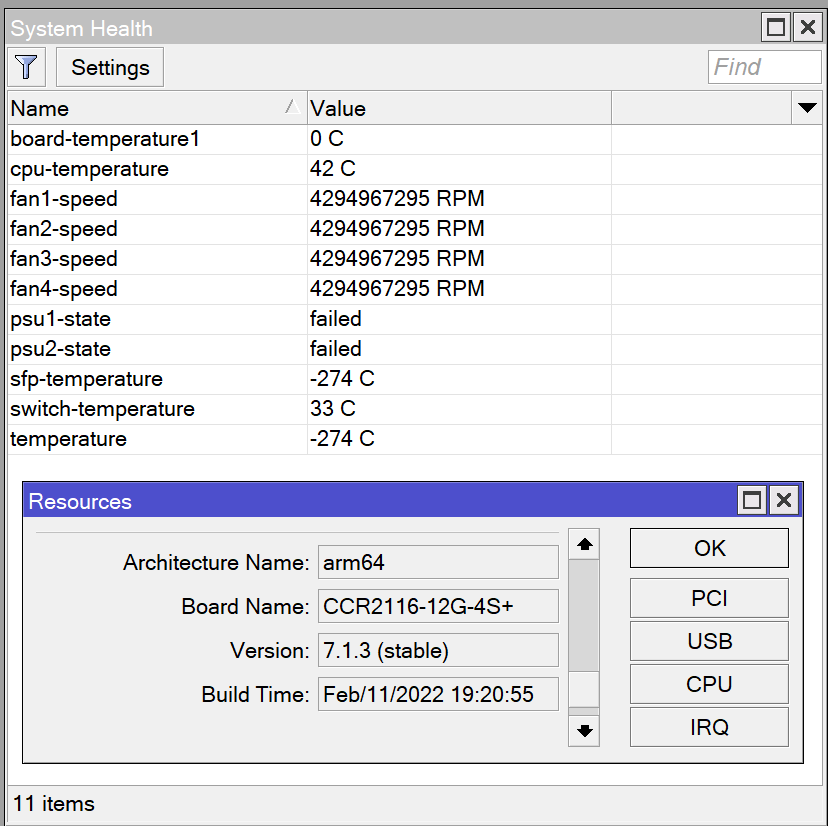
I have a “PSU Fail” error in my CCR2116-12G-4S+ following this, the fans turn on and off and the system health show wrong reading. I have to restart the CCR to fix it. I wonder if the problem it hardware or firmware related. It happen sporadically and on all 7.x versions. Anyone can help with this?
Installing v.7.1.3 in Hap ac2 and keeping other end (750Gr3) in v.6.4X broke my IPSEC IKEv2 too. Gre-tunnel interface didn’t go up despite established connection
Reverted to v.7.1.2 all was good. Upgraded other end too to v.7.1.2 everything working good with Ipsec over gre tunnel IKE v2 and authentication with certificates.
SITE - TO - SITE - Wireguard (Mikrotik)
Tried Wireguard in both ends with v.7.1.2 site to site doesn’t work. Not even a sinlge packet is transmitted. Followed every single guide found (even from help.mikrotik.com)
SITE - TO - ROAD WARIOR - Wireguard (Mikrotik - Android/iOS)
Tried exact same configuration (public keys etc.) with road warrior clients and it works flawlessly.
Mikrotik has a Mik-only keepalive mechanism, so try disabling that.
Disabling keep alive in Gre-Tunnel Interface was all it needed to have Gre-Tunnel up on both sides with v.7.1.2 and .v7.1.3. Though still no IP Sec connectivity. Will research more. In v6.4X had no problem with that option enabled
As of Wireguard I will try on Eve-NG a similar configuration to test and will report back.
IPv6 still breaks if you apply any Simple Queues. Makes it unusable for me. This has been the same since all 7.x releases and noted many times. Also, not as drastic but still annoying, the graphs URL from Webfig still fails under https.
Make backup first then try.
Normal backup and export show-sensitive.
Test and see.
Worst case you do clean config and restore from export, line by line.
There are some settings with different default going from various ros7 versions.
I have 2 devices where I needed to do this to get a specific function working again.
Zero change on the settings I made, only something different in some default.
mada3k - Are you sure that all of them are missing, not just a part of them? Please write to support@mikrotik.com and send supout file from your router. leosedf, PSz, mcskiller, avaz - Please send supout file from your router to support@mikrotik.com. sebasGST - Simple definition from Wikipedia - “A microsecond is an SI unit of time equal to one millionth (0.000001 or 10^−6 or 1⁄1,000,000) of a second. Its symbol is μs, sometimes simplified to us when Unicode is not available. A microsecond is equal to 1000 nanoseconds or 1⁄1,000 of a millisecond.”. No, it is not possible to change this behavior. borr, elbob2002, akarpas, edupre, qatar2022, smyrosnik, smyrosnik - We will look into this. Patrinus - Please send supout file from your router to support@mikrotik.com. We have fixed a similar problem with UPnP. However, it was fixed after this build was created. BrateloSlava - Yes, it is not possible to disable these few helpers as explained in the error message. ksteink - In 99% of cases like this, the problem is communication between computer and router, not the GUI itself. Is it possible that there is a packet loss un this connection? Cray - In general, IPsec is working just fine in this version. If you still experience this problem, then please provide supout file to support@mikrotik.com from both endpoints of this IPsec connection. Make sure that files are generated after the connection was lost without any apparent reason. AshuGite - It seems that we have managed to resolve this problem. The fix should be included in all of the upcoming releases. starfotr - Please provide actual examples to support@mikrotik.com. Provide supout file and detailed description of what is missing after an upgrade. We have not received any complaints like this from anyone else. benlg - What is the actual issue here? dakkonsoulblade - Does this device have a serial port? Tporlapt - This will be fixed in the upcoming releases. stevekwok - Yes, it is. Why do you think that a downgrade is necessary before an upgrade?
elbob2002, qatar2022 - Please send supout.rif files to support@mikrotik.com from your devices and shortly describe your setup, specify connected devices.
I get all 30 min (lifetime in proposal) the above ipsec rekey error, killing ike2 connection.
Apart from that, 3 devices within the addr-list (16 NordVPN-local.8 192.168.8.0/24) work great.
# mar/01/2022 12:09:29 by RouterOS 7.1.3
# model = CCR1016-12G