What happened? How to upgrade to v7.1?
(this attempt done through Check For Updates from Channel: upgrade)
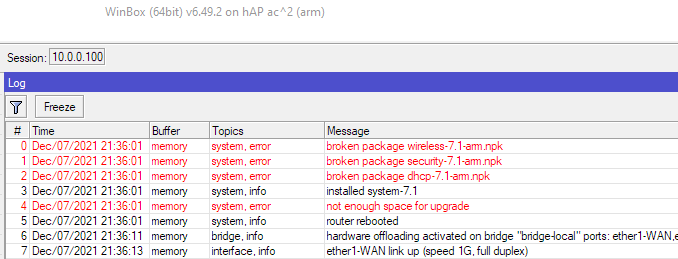
Didn’t you read any of posts in this thread? The only way of installing ROSv7 on de-bundled ROSv6 hAP ac2 is netinstall.
Well, easier way of thinking about it is: “target-scope must be lower on each level of recursion”
How are you testing the IPv6 speed in 7.1? The test method may have something to do with it.
News letter has a typo - OSFP at one point - looks like its just as QA’d as ROSv7 
I’ll be waiting a fair few releases before even considering this. Its not even up to feature parity with v6 correct?
Four different speed tests. speedtest.net, fast.com, my ISPs own speedtest server, and one at AWS. I have Gbit fibre. With IPv4 it goes at 920Mbit/s on both 6.49.2 and 7.1. With IPv6 it goes at 420Mbit/s on 6.49.2. Upgrade to 7.1 and it drops to 200Mbit/s on all four different speedtests. Downgrade it back to 6.49.2 and it’s back up to 420Mbit/s again.
Same. IPv6 is broken on hAP ac. Earlier I asked about v7 IPv6 forwarding speed. Guess it’s 0 Mbit/s for hAP ac.
IPv6 works on v6. On v7 IPv6 DHCPv6, RA works, but LAN→WAN forwarding fails. I can even ping from the internet to LAN - ICMPv6 is delivered to LAN, but the reply doesn’t seem to get forwarded even with an ACCEPT IPv6 on top of FORWARD chain (sniffer shows it on LAN bridge, but not on WAN).
Also, the neighbor discovery list shows all entries stale/noarp, with only sometimes displaying reachable.
check your routes…
I’m sick of reposting this link everywhere
http://forum.mikrotik.com/t/v7-1rc1-development-is-released/151250/1
Same here with RB4011. I had to restore to factory defaults via console and revert to 6.49
Serious question. How to upgrade the flash storage on hAP ac2?
If I want to install a wifiwave2 14MB package to a 16 MB storage size …
Is it possible that Mikrotik will provide a path where we can have RouterOS v7 with wifiwave2? Or is there a way to desolder stock flash chip and solder a larger - perhaps 32MB flash chip?
Seriously.
Seems like development channel is deleted? it says file not found. Moved over to “testing” channel.
Any idea about container package availability? Just ordered a RB5009 to play with, its cpu power will mostly sit idle without docker 
Unable to upgrade from 6.49.2. Stops at “Calculating Download Size” on a RB1100AHx4… Have removed Dude, still no luck…
Unfortunately this is expected. Route caching no longer exists in v7 and in v6 it gave an artificial boost (usually double or even more) to the actual real world bandwidth that you could get, for speed tests and bulk downloads. So on RouterOS v6 you are getting a speedtest result of 420Mbps, but the actual real world traffic with normal traffic patterns would probably drop it down to below 200Mbps capacity, because unlike speed tests and big file downloads, normal real world traffic patterns are mostly cache miss events, decreasing performance.
So the good news is that for real world traffic patterns, it is probably faster than your router on RouterOS v6. The bad news is that because v6 gives that artificial boost to the speed test results, you cannot compare this, and v6 appears to be much faster than v7 because of the speedtest results.
This is not “fixable” as it is not a problem, and you should not expect additional v7 releases to make a big difference here in terms of performance. IPv6 fasttrack would of course make a big improvement, but that is unrelated to route caching.
Thanks. That solves it.
If you use PPPoE and DHCPv6 uncheck ‘Add Default Gateway’ on the latter, or set route distance >1
After your comment I checked my routes:
[admin@router] /routing/route> print detail where afi=ip6 dst-address=::/0
Flags: X - disabled, F - filtered, U - unreachable, A - active;
c - connect, s - static, r - rip, b - bgp, o - ospf, d - dhcp, v - vpn, m - modem, a - ldp-address, l - ldp-mapping, y - copy;
H - hw-offloaded; + - ecmp, B - blackhole
 Av + afi=ip6 contribution=active dst-address=::/0 routing-table=main pref-src="" gateway=pppoe
       immediate-gw=pppoe distance=1 scope=30 target-scope=10 belongs-to="VPN route"
       debug.fwp-ptr=0x202423C0

 Ad + afi=ip6 contribution=active dst-address=::/0 routing-table=main pref-src=""
       gateway=fe80::ae4e:91ff:fe66:ecc9%pppoe immediate-gw=pppoe distance=1 scope=30 target-scope=10
       vrf-interface=pppoe belongs-to="DHCP route"
       debug.fwp-ptr=0x20242360
Somehow both PPPoE and DHCPv6 add a route. Note:
- If you disable IPv6 on PPPoE profile (configure explicit no, because default implies yes) DHCPv6 doesn’t work anymore either. Is that a bug or a feature?
- Why is this marked ECMP? Why doesn’t it work?
- You can fix it by disabling Add Default Route on DHCPv6 or set DHCPv6 default route distance to >1.
What the hell..
[hr]
As for IPv6 routing speed: my download speed on hAP ac degraded from 36.8 MB/s (v6) to 20.6 MB/s (v7) on a HTTP 1gb.bin speedtest.
Interesting. Do you have more details on how/why this works?
EDIT: perhaps this: Tuning Linux IPv4 route cache? Also mentions it was dropped in Linux v3.6+
Route caching was a feature in the Linux kernel that was taken out about 10 years ago. It created a “cache” of routes based on source and destination hashes to improve performance. However, the large number of port scanners that started to appear caused the cache to fill up with garbage src-destination pairs, making performance even worse than if it didn’t exist. So route caching was removed from the Linux kernel because of this. In RouterOS v6 it makes speedtests faster for one system, or a big file download for one system faster, but with real world traffic for a bunch of clients to a bunch of different destinations is much slower on RouterOS v6 because it has to look in the cache first, and the cache actually slows things down in this case. So RouterOS v7 is actually faster in general, it just appears to be slower because of what route caching does with a speed test. A better way of comparing v6 and v7 performance would be to set up a bunch of systems behind the router and have a bunch of users going to many websites to try to create as much traffic as possible, but that is too much work for most people.
In other words, in situations where the CPU becomes a bottleneck, in RouterOS v6 the speedtest results could show you about double what your router could actually do. In RouterOS v7 it should show what it can actually do.
More details from @raimondsp can be found here: http://forum.mikrotik.com/t/ccr2004-high-cpu-usage-ros7/152163/9
Thanks, very interesting!
I think my real-life v6 performance was closer to 20 MB/s than 36 MB/s (which supports your theory), but my gut feeling tells me traffic patterns would be the deciding factor in the end - on a home connection it seems easy to hit the cache on a single download (I’m sure it was slightly faster in practice than my benchmark), whereas if you’re an ISP serving many clients v7 would most definitely be faster.
Time to upgrade to RB5009 I guess..
Yes, that’s true - anything like a speedtest or big file download and similar bulk transfer between an IP pair will mostly hit the cache (100% or close), but usually people only download big files and do speed tests very irregularly and not very often at all, so it does not represent most users typical traffic patterns.
For more people it is going to come down to a psychological thing - it is nice and reassuring seeing big numbers on the speed tests, and going up to v7 and seeing those drop (which will happen to many people) is going to cause some disappointment, even with these explanations given.
trying to upgrade a CHR, is anyone getting this too?
@MikroTik] /system package update> download
channel: upgrade
installed-version: 6.49.2
latest-version: 7.1
status: calculating download size..
been like this for hours
capac doesnt want to upgrade from 6.48.6 so I upgraded it to 6.49.9 thinking maybe it was a step to far same result.
It loads the ARM file 12.3 Size and goes through what looks like a normal cycle process, disconnects and a minute later or so come back up??
Also, once I get it uploaded, where is the safe mode selected (where one can turn off the “feature” that allows someone to bypass the cleansing effects of netinstall).
Bootloop in starting kernel with version 6 bonding. I can send my .backup to support for review, just write to me.