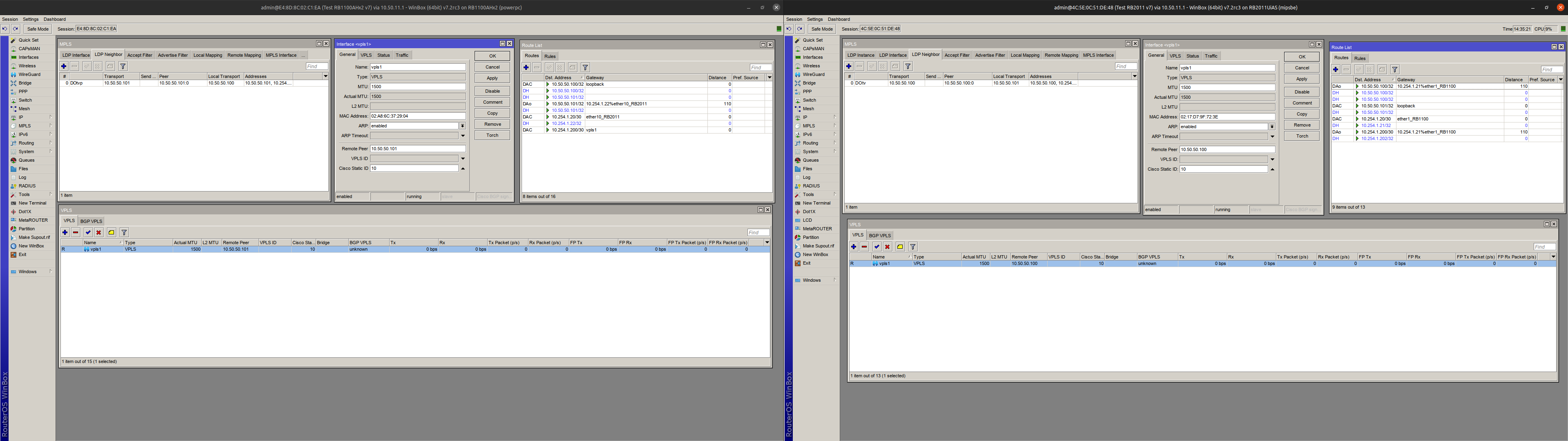
Over the last few days, I have tried to create an MPLS / VPLS tunnel between two mikrotik routers on v7.1. I tried every option I know, but was unsuccessful. (We are currently using MPLS / VPLS on v6, so I have minimal experience with it.)
Both routers have v7.1. OSPF and MPLS seem to work, loopback IPs are reachable, the VPLS tunnel is created, but no data goes through it. The MTU is also set up well everywhere, I double checked it.
The documentation seems pretty incomplete for v7.1, so if anyone has an idea to make it work, please feel free to share it with me.
These are the last configs of the two RBs used for testing. They are connected directly with ethernet.
# feb/09/2022 14:25:54 by RouterOS 7.2rc3
# model = 1100AHx2
/interface bridge
add admin-mac=32:3E:39:11:B6:18 auto-mac=no name=loopback protocol-mode=none
/interface ethernet
set [ find default-name=ether10 ] l2mtu=9498 name=ether10_RB2011
set [ find default-name=ether1 ] name=ether12
set [ find default-name=ether2 ] l2mtu=9000 name=ether13_mgmt
/interface vpls
add arp=enabled cisco-static-id=10 disabled=no mac-address=02:A8:6C:37:29:04 mtu=1500 name=vpls1 peer=10.50.50.101 pw-control-word=disabled pw-l2mtu=1508 pw-type=raw-ethernet
/interface lte apn
set [ find default=yes ] ip-type=ipv4
/interface wireless security-profiles
set [ find default=yes ] supplicant-identity=MikroTik
/port
set 0 name=serial0
set 1 name=serial1
/routing ospf instance
add name=default-v2 redistribute=connected,static router-id=10.50.50.100
/routing ospf area
add instance=default-v2 name=backbone-v2
/ip neighbor discovery-settings
set discover-interface-list=all
/ip settings
set max-neighbor-entries=8192
/ipv6 settings
set max-neighbor-entries=8192
/interface ovpn-server server
set auth=sha1,md5
/ip address
add address=10.50.50.100 interface=loopback network=10.50.50.100
add address=10.254.1.21/30 interface=ether10_RB2011 network=10.254.1.20
add address=10.254.1.202/30 interface=vpls1 network=10.254.1.200
/ip dhcp-client
add disabled=yes interface=ether13_mgmt
/ip dns
set servers=8.8.8.8
/ip service
set www-ssl certificate=root-cert disabled=no
/mpls interface
add disabled=no interface=all mpls-mtu=1600
/mpls ldp
add afi=ip disabled=no lsr-id=10.50.50.100 transport-addresses=10.50.50.100 vrf=main
/mpls ldp interface
add accept-dynamic-neighbors=yes disabled=no hello-interval=5s hold-time=15s interface=ether10_RB2011
/routing ospf interface-template
add area=backbone-v2 comment=2011 cost=10 interfaces=ether10_RB2011 networks=10.254.1.20/30 type=ptp
add area=backbone-v2 cost=10 interfaces=loopback networks=10.50.50.100/32
/system clock
set time-zone-name=Europe/Budapest
/system identity
set name="Test RB1100AHx2 v7"
/system ntp client
set enabled=yes
/system ntp client servers
add address=pool.ntp.org
/system package update
set channel=testing
/system routerboard settings
set auto-upgrade=yes
/tool romon
set enabled=yes
#
#
#
#-----------------
#
#
#
# feb/09/2022 14:23:25 by RouterOS 7.2rc3
# model = 2011UiAS
/interface bridge
add name=loopback protocol-mode=none
/interface ethernet
set [ find default-name=ether1 ] l2mtu=4074 name=ether1_RB1100
/interface vpls
add arp=enabled cisco-static-id=10 disabled=no mac-address=02:17:D7:9F:72:3E mtu=1500 name=vpls1 peer=10.50.50.100 pw-control-word=disabled pw-l2mtu=1508 pw-type=raw-ethernet
/interface lte apn
set [ find default=yes ] ip-type=ipv4
/interface wireless security-profiles
set [ find default=yes ] supplicant-identity=MikroTik
/port
set 0 name=serial0
/routing ospf instance
add name=default-v2 redistribute=connected,static router-id=10.50.50.101
/routing ospf area
add instance=default-v2 name=backbone-v2
/ip settings
set max-neighbor-entries=8192
/ipv6 settings
set disable-ipv6=yes max-neighbor-entries=8192
/interface ovpn-server server
set auth=sha1,md5
/ip address
add address=10.254.1.22/30 interface=ether1_RB1100 network=10.254.1.20
add address=10.50.50.101 interface=loopback network=10.50.50.101
/ip dns
set servers=8.8.8.8
/mpls interface
add disabled=no interface=all mpls-mtu=1600
/mpls ldp
add afi=ip disabled=no lsr-id=10.50.50.101 transport-addresses=10.50.50.101 vrf=main
/mpls ldp interface
add accept-dynamic-neighbors=yes disabled=no hello-interval=5s hold-time=15s interface=ether1_RB1100
/routing ospf interface-template
add area=backbone-v2 auth-id=1 auth-key="" cost=10 interfaces=ether1_RB1100 networks=10.254.1.20/30 priority=1 type=ptp
add area=backbone-v2 interfaces=loopback networks=10.50.50.101/32 passive
/system clock
set time-zone-name=Europe/Budapest
/system identity
set name="Test RB2011 v7"
/system ntp client
set enabled=yes
/system ntp client servers
add address=162.159.200.1
/system package update
set channel=testing
/system routerboard settings
set auto-upgrade=yes
/tool romon
set enabled=yes
The problem is the same: VPLS tunnel shows “R”, but they are not really working, there is no rx data, only tx.
I have already tested with three RBs, with the same result.
If anybody has a worcing config, please share with me, beacause I slowly rip my hair out (just kidding…I’m bald )
I was missing the input=yes in my config. Adding it improved things - instead of the VPLS tunnel not doing anything and then the devices freezing, I get exactly one ping through and then the devices freeze and have to be power cycled.
I have the same problem with 7.1.3 - VPLS is still not working correctly. Actually, sometimes it starts working after I disable/enable the VPSL in config (I can see packets sent/receive), just then after a few seconds my router gets frozen, and the only method to restart it is to power cycle the router.
In my case, I’m trying to establish VPLS between bridges on RB3011 UiAS and hAP AC2. It used to work perfectly with RouterOS v6, just I’d like to migrate to v7 due to WireGuard.
 (just kidding…I’m bald
  )
)