You may be having the “some configuration forgotten at reboot” issue that has appeared in v7 for several people.
Try to export your config (and download it), netinstall the device to 7.11 without config, and then paste the exported config again (from winbox connected to MAC address).
See if that solves your problem without downgrading. There may be a corruption in the configuration database.
It would be convenient when MikroTik would add some “rebuild configuration” feature that does this all automatically within the router.
(export config to a file, reset database, import the exported config back in)
[/quote]
Good 1st April Joke.
Sorry but I am buying products “that work” and this is Mikrotik work to provide a reliable solution, not mine.
Besides, under Linux, NetInstall 7.x is broken completely and I can only NetInstall using 6.x (I did that several times).
Mikrotik should send the responsible developer for that industrial failure on site near the North Pole to measure how unpleasant it is.
Not true.
Close to 100% success rate on Linux using both ROS6 and ROS7 installs (on a Dell D830 laptop from 2008 !!)
But you need to make sure your device also has a recent enough version of routerboot firmware or it may not fly.
I would say “stupid users” for not configuring some VPN to allow remote access to the device…
When you cannot reach the device at all, how did you manage to install an upgrade? Automatic upgrade script? In that case, just wait until the bug is fixed
I upgraded one partition of my CCR2116 office router from 7.11 to 7.11.2 and OSPF had all kinds of issues keeping adjacencies with a couple of its peers (via VLAN interfaces) and so half of the network’s routing table was missing or not installed properly. (Log was full of OSPF up/down entries). I’m wondering if it’s related to the bridge HW + filtering “fixes” that are mentioned.
maybe you should try to set every other interface “down” on your linux host (“(sudo)ip link set [IFNAME] down”) except the one which netinstall should run on and bind ip addresses on.
helped me
btw. same true on windows anyways. always has been
Tried upgrading CHR (x86_64) from 7.10 to 7.11.2 using winbox; says it downloaded and installed and then reboots, but I’m still left with the same version.
Then tried /system/packages/update/download. It says it downloaded the system packages for 7.11.2. I look in files, but I’m not seeing any package files. Status is showing packages downloaded, however. Rebooted in case the package update process has changed in such a way that I can no longer see the package files. Same result as package update from winbox.
System resources showing:
Free Memory: 865.5 MiB
Total Memory: 960.0 MiB
CPU: Intel
CPU Count: 1
CPU Frequency: 2992 MHz
CPU Load: 0%
Free HDD Space: 15.9 GiB
Total HDD Size: 15.9 GiB
Sector Writes Since Reboot: 43 120
Total Sector Writes: 43 120 (not making any sense this last two fields..it’s basically saying it’s never rebooted)
Architecture Name: x86_64
Board Name: CHR
Version: 7.10 (stable)
Build Time: Jun/15/2023 05:17:29
I’ve also included this as a bug report with supout.rif files pre and post, and liberal screenshots.
Yes, it does seem that “in-band” upgrade process downloads package files to storage area inaccessible to users.
Regarding failed upgrades … check log, when upgrading fails it usually contains something about the reason. Often it’s due to some problem with installed optional packages.
Downloads of updates are done to a folder named .download which you cannot see in winbox but you can see it when you FTP to the device.
There (using an FTP client) you can also delete whatever is in there and try again.
When in doubt about the downloading, do only “Download” (not “Download&Install”), then look in that .download folder to see if the files are there.
Then do “System->Reboot” (no other way of rebooting, e.g. not rebooting from the Hypervisor, that will not complete the install).
That appears to be exactly what the problem is. I have container, dude, gps, iot, lora and tr069-client all disabled, and for whatever reason the following are required packages?
lora
iot
After enabling both of those packages, I was able to have a successful upgrade. The following packages are still disabled:
When you do not require IoT or Lora, do not upload them to the router. It is not a good idea to have them in “disabled” state, there are bugs that cause problems with the upgrading. Just “uninstall” them instead of “disabling” (or enable them).
7.11 or 7.11.1 broke my terminal/console in my RB4011. (Both through terminal in winbox and ssh).
But after emailing with support they convinced me to try the latest development version (v7.12beta3 atm). That fixed the problem. Now let’s hope it doesn’t break other stuff.
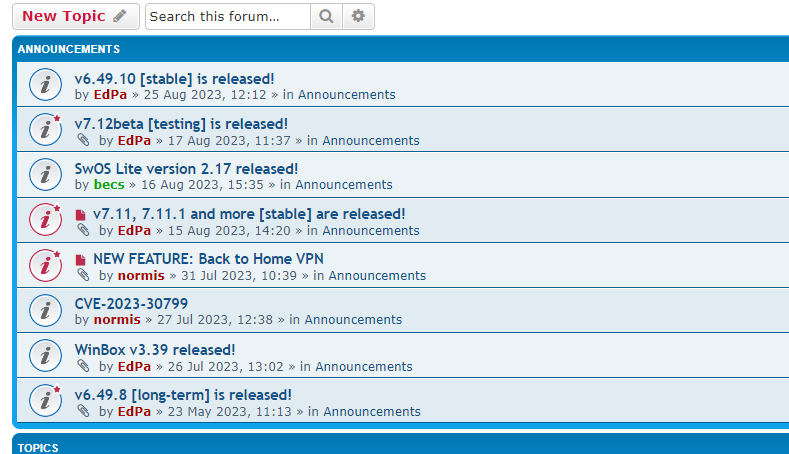
How can anoyone see that 7.11.2 is released by visiting this forum? There is one post about the release in the middle of the thread hidden away. And what does “and more” translate to?
Please change thread header. Example form eworm can be used: “v7.11.2 and older 7.11.x [stable] are released!”
Nothing to see in the forum announcements about 7.11.2
Even if “long-term” may be a relative term … just some add’l options for release channel be useful.
i.e. if “stable” upgrade had some issue, it be nice to have something to rollback to quickly (i.e. one CLI command, vs downloading+copy files/reboot/etc manually).
There is still going to be more bugs/complaints regardless – just more “release channels” makes workaround-ing them easier.



 … just some add’l options for release channel be useful.