Exactly, only few entries are for that mac address, all other entries are for 18:A7:F1:79:D1:4B, and this continued thought the night for this client.
*) bth - added “Back To Home” VPN service for ARM, ARM64, and TILE devices;
where can we see that?
oh sorry , all good
look at IP->Cloud->BTH VPN
Back To Home is here, Android and iPhone apps make it easier than winbox:
http://forum.mikrotik.com/t/new-feature-back-to-home-vpn/168434/1
Right, my bad. That MAC is in fact only connecting to cap-wifi5.
One thing I am noticing on a second look is that the delay between a connection and disconnection appears to be almost exactly 190 seconds every time. Does that perhaps correspond to DHCP leases renewal?
7.11rc1 does not include any wifiwave2 related changes since 7.11beta5, but perhaps the bridge changes break something in the VLAN handling.
Please open a support ticket regarding this.
I have DHCP lease renewal time set do 1 day. I will send supout and logs to support today.
I have an SA Query timeout error when the device switches between wifi1 and wifi2 interfaces (hAP ac3). It appeared in 7.11 beta2, it was not present in 7.10.2.
03:16:11 wireless,info F2:C3:26:B2:60:1C@wifi2 disconnected, SA Query timeout, signal strength -73
03:16:11 wireless,info F2:C3:26:B2:60:1C@wifi1 connected, signal strength -58
03:31:17 wireless,info F2:C3:26:B2:60:1C@wifi1 disconnected, SA Query timeout, signal strength -56
03:31:18 wireless,info F2:C3:26:B2:60:1C@wifi2 connected, signal strength -83
04:15:10 wireless,info F2:C3:26:B2:60:1C@wifi2 disconnected, SA Query timeout, signal strength -76
04:15:11 wireless,info F2:C3:26:B2:60:1C@wifi1 connected, signal strength -53
04:33:04 wireless,info F2:C3:26:B2:60:1C@wifi1 disconnected, SA Query timeout, signal strength -52
04:33:04 wireless,info F2:C3:26:B2:60:1C@wifi2 connected, signal strength -82
04:35:53 wireless,info F2:C3:26:B2:60:1C@wifi2 disconnected, SA Query timeout, signal strength -75
04:35:53 wireless,info F2:C3:26:B2:60:1C@wifi1 connected, signal strength -57
04:39:32 wireless,info F2:C3:26:B2:60:1C@wifi1 disconnected, SA Query timeout, signal strength -51
04:39:32 wireless,info F2:C3:26:B2:60:1C@wifi2 connected, signal strength -84
04:40:14 wireless,info F2:C3:26:B2:60:1C@wifi2 disconnected, SA Query timeout, signal strength -79
04:40:15 wireless,info F2:C3:26:B2:60:1C@wifi1 connected, signal strength -57
04:49:48 wireless,info F2:C3:26:B2:60:1C@wifi1 disconnected, SA Query timeout, signal strength -52
04:49:49 wireless,info F2:C3:26:B2:60:1C@wifi2 connected, signal strength -85
04:50:29 wireless,info F2:C3:26:B2:60:1C@wifi2 disconnected, SA Query timeout, signal strength -78
04:50:29 wireless,info F2:C3:26:B2:60:1C@wifi1 connected, signal strength -59
05:08:10 wireless,info F2:C3:26:B2:60:1C@wifi1 disconnected, SA Query timeout, signal strength -52
05:08:10 wireless,info F2:C3:26:B2:60:1C@wifi2 connected, signal strength -83
05:33:13 wireless,info F2:C3:26:B2:60:1C@wifi2 disconnected, SA Query timeout, signal strength -75
05:33:14 wireless,info F2:C3:26:B2:60:1C@wifi1 connected, signal strength -65
06:03:52 wireless,info F2:C3:26:B2:60:1C@wifi1 disconnected, SA Query timeout, signal strength -55
06:03:52 wireless,info F2:C3:26:B2:60:1C@wifi2 connected, signal strength -82
06:23:22 wireless,info F2:C3:26:B2:60:1C@wifi2 disconnected, SA Query timeout, signal strength -80
06:23:23 wireless,info F2:C3:26:B2:60:1C@wifi1 connected, signal strength -54
06:33:38 wireless,info F2:C3:26:B2:60:1C@wifi1 disconnected, SA Query timeout, signal strength -56
06:33:38 wireless,info F2:C3:26:B2:60:1C@wifi2 connected, signal strength -81
06:37:02 wireless,info F2:C3:26:B2:60:1C@wifi2 disconnected, SA Query timeout, signal strength -74
06:37:03 wireless,info F2:C3:26:B2:60:1C@wifi1 connected, signal strength -63
06:52:54 wireless,info F2:C3:26:B2:60:1C@wifi1 disconnected, SA Query timeout, signal strength -56
06:52:54 wireless,info F2:C3:26:B2:60:1C@wifi2 connected, signal strength -83
06:59:36 wireless,info F2:C3:26:B2:60:1C@wifi2 disconnected, SA Query timeout, signal strength -75
06:59:37 wireless,info F2:C3:26:B2:60:1C@wifi1 connected, signal strength -67
07:24:58 wireless,info F2:C3:26:B2:60:1C@wifi1 disconnected, SA Query timeout, signal strength -59
07:24:59 wireless,info F2:C3:26:B2:60:1C@wifi2 connected, signal strength -80
It’s an informative message and does not mean something is wrong, like explained above
This is to be expected if a client device, which supports management frame protection, attempts a new connection without properly terminating the previous one.
Previously in such situations, the old connection was unconditionally dropped.
With RouterOS 7.11, by default, the new connection attempt is only allowed if SA Query procedure for the old connection times out. This is to make it harder for malicious, yet authorized, users, to cause various problems to other users by spoofing their MAC addresses (‘MacStealer’ attack). If you like, you can alter this behaviour, by tuning the security.connect-priority parameter, see https://help.mikrotik.com/docs/display/ROS/WifiWave2#WifiWave2-SecurityProperties
Hi
v7.11 rc1 has also broken Cloudflare (1.1.1.1) DoH certificate for me - I get a CRL error in the logfile and DNS resolution remains broken until I disable DoH certificate verification.
While troubleshooting, I’d also note that I cannot import CRLs, so wondering whether CRL file validation is the bit that is broken?
Regards,
Jason
Normis, FToms, thank you for the explanation.
yes, i wrote about it above
for LetsEncrypt certificates.
If I use an IPv6 only domain name , it has only an AAAA record, without any A record, /certificate/enable-ssl-certificate dns-name=XXXX.dynv6.com failed .
If I add an IPv4 address, even not a public IP but a 192.168.x.x private IP, then certificate get success.
Yes, LE does not work currently in RouterOS on an IPv6-only network. This is not implemented yet. This particular scenario is not in any way related to the v7.11rc release.
But it real works at 7.8 and old versions.
IP Cloud is missing from Winbox (3.39) on my OVA(x86) (7.11Rc1) Router. It show up on terminal, and in Winbox on other routers lik 750Gr3. See picutre:
.
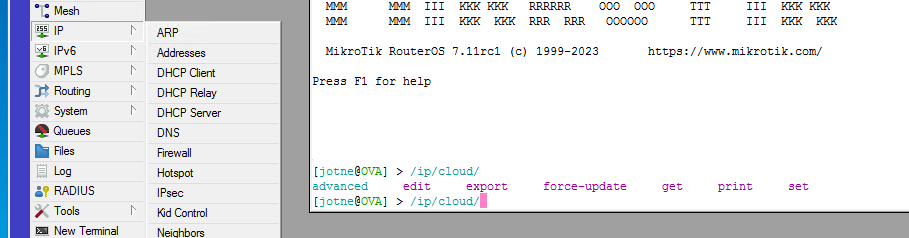
Try with a clean winbox session. It shows up here.
Winbox is just installed. You are on same x86 routerOS?
Thanks!