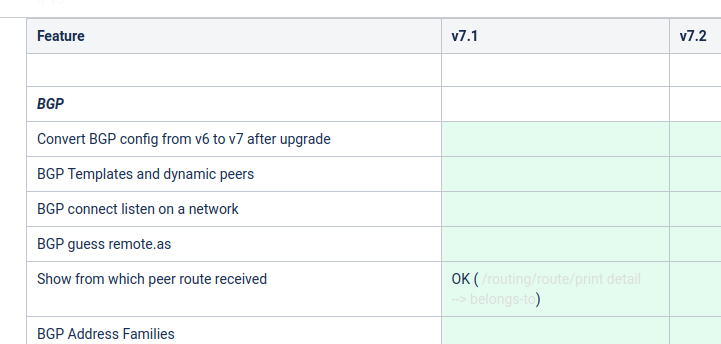
Well, at this point, IS-IS is an unfilled row on a help page. I’d call that being on the “roadmap” 
But help pages also tell me:
BFD
Features not yet supported
enabling BFD for ip route gateways
[…]
Well, at this point, IS-IS is an unfilled row on a help page. I’d call that being on the “roadmap”
But help pages also tell me:
BFD
Features not yet supported
enabling BFD for ip route gateways
[…]
What hardware was this on? These fixes in 7.11rc3 have gotten my hEXr3s working the same as the rest of my 'tik gear, at least so far as vlan-filtering, bridging, and rstp are concerned.
*) switch - fixed BPDU packet processing on MT7621, MT7531 with HW offloaded vlan-filtering;
*) switch - improved multicast packet forwarding on MT7621;
No, it is listed as “initial support” under version 7.12.
So it will start appearing (as usual with only command line support) in version 7.12beta which may appear as soon as end of this month, early next month.
And all that while BGP is not even feature complete relative to v6, and has known bugs that severely affect some people (it works kind of OK for me), and some “new features for v7” are not implemented.
I’ve tried different versions in the last days and it looks like it happens as you say. The behaviour changes from one version to another in my CRS328 too. I’m starting to think if this is not a mix of hardware and software issues, it’s not “normal” having so many problems related with SFP and different firmware versions.
Where did you read that?
And if you make sure your browser window is wide enough, and you’ll see a 7.12 column…
This is absolutely incorrect. Our changelogs do include all (without exceptions) changes in the source code that do affect already released products and features. Of course, sometimes we are working on a new feature in the background or support for a new product and that might in some way interfere and break already working configuration. Also, a lot of things on systems like RouterOS depend on timing, and by adding a code in one facility you might break something else.
Truth be told, most of the issues that are “yelled about” after an upgrade are actually caused by a reboot, changes in the network, different mood of the administrator on that particular day, etc. Forum is a great example. In most cases, when something breaks after an upgrade, there is a discussion here, but once people complain about the issue through support@mikrotik.com and we recommend downgrading software to the previous version for testing purposes - the same issue is also already there (with emphasis on “most”, not “all”).
Additionally, very, very often we solve some issues and we do post in the changelog what we did actually fix. Networking devices are complex systems that run different tools at the same time and communicate with each other within milliseconds. Quite often you might, for example, see many complaints that, let us say Wireguard is not working after an upgrade. However, the issue was actually DNS in the background and Wireguard could not resolve a remote-peer domain name. So in short - we do describe in the changelog what happens under the hood, not how it might look from the outside.
You know I respect you, but this time you were wrong.
With all the posts that have absolutely nothing to do with this topic, you see just mine that complains about how moderators don't moderate properly?
I only wrote it once.
Well, that may be the official position, but e.g. take a look on the whole DNS resolver disaster earlier this year.
There were no announced DNS changes but at some point the resolver broke down. Only after that, a lot of release note mentions of things that were fixed came with the different (beta, rc and final) releases, but the rework of the DNS resolver “that should not affect the users” never were in the release notes.
When I asked about that, the reply (I think on Jira) was “yeah we made a lot of changes in the DNS code”.
To be complete, it should include items like “dns) did a lot of rework and cleanup of the code, should not affect the users” but such items never appear AFAIK.
It seems that similar things happen with OpenVPN and wireguard, but I never use these features so I have no experience with it myself. But I WAS affected by the DNS trouble, that caused a lot of confusion and debugging here.
DNS changes are listed in the changelogs. You can re-read them here. You are referring to versions 7.4,7.5,7.6,7.7, 7.8, and others. There are plenty of changes listed in the changelog:
https://mikrotik.com/download/changelogs
So no, we did not hide anything there. Just described hundreds of code lines within a sentence. Of course in software development that can lead up to an unexpected issues. If they would be expected, then they would not be introduced.
Please, as stated in the first post on this topic and each and every other RouterOS release topic - keep this forum discussion strictly related to the version. In this vase, issues introduced v7.11.
Feel free to open a new topic for discussing MikroTik release notes and their structure.
Even if that is the case (reboot), which in my 18year experience with MikroTik, very rarely is, isn’t that a bug on its own?
It’s 2023, reboot should never be a solution to any problem. That’s not Windows 95 that needed a reboot every time you twisted your head in the wrong way… just saying…
Updated hap ax lite lte6 to rc3 and noticed that on lte1 interface Data class in not showing CA usage, rc2 was fine. Informative/cosmetic thing, CA is used as CA band is shown on load and can see proper 2CA speeds.
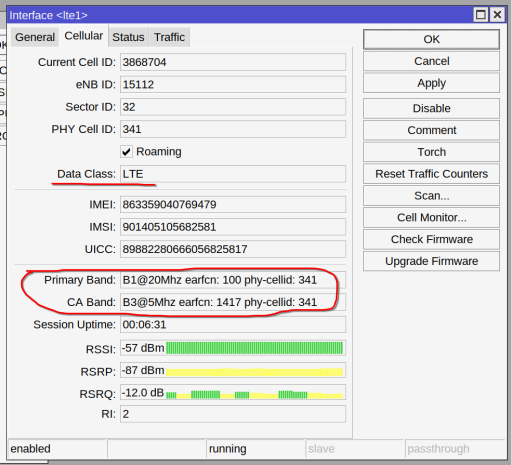
Q: was on your device also lte1 configured as WAN and all ether ports as LAN ?
Because for AX Lite ether1 was WAN so I was a bit surprised to see it was different for AX Lite LTE (but it does make sense like it is).
All LTE home WiFI devices have such default config. It must be like that out of box already. Chateau is the same.
OK, thanks for confirming.
As said, it makes perfect sense thinking about it.
It doesn’t happen often that a reboot fixes a problem, but it can happen that a reboot results in a situation that does not occur when you make a configuration step by step, which is then built in a different sequence after reboot.
Especially for those that build VPN or other tunnel interfaces that rely on other things already running, like DNS or setup of the local address of the router.
Same for me.
hAP ac3 , upgrade from ROS 7.10.2 stable, to 7.11rc3 ...
failed
"can not install lora-7.11rc3: iot-7.11rc3 is not installed, but is required"
Installed packages: (none was upgraded)
[admin@hAPac3] /system/package> print
Flags: X - DISABLED
Columns: NAME, VERSION
0 iot 7.10.2
1 dude 7.10.2
2 lora 7.10.2
3 tr069-client 7.10.2
4 container 7.10.2
5 user-manager 7.10.2
6 zerotier 7.10.2
7 routeros 7.10.2
8 rose-storage 7.10.2
9 X wifiwave2 7.10.2
Something to do with the following change?
*) lora - moved LoRa service to IoT package;
hAP ac3 , no Lora card, but interested in the MQTT service of IOT.