It is used to hide secrets 
Well, I’m guessing you need to remove the LoRa package… but sounds like a bug.
Now MQTT has been always IoT package since it came out — but you’ll be getting the new MQTT subscribe in 7.11
You might be able to force this through by also installing IoT package from extra-packages at the same time?
But yeah, stock-to-stock upgrades shouldn’t fail, this sounds like a bug to me too… I would suggest waiting for a response from MikroTik. This might actually be worth opening a support ticket for, because this is the kind of thing that might cause a lot of end-user upgrades to fail.
edit: Actually, it looks like lora was an extra-package before. It’s not unreasonable for a device with one or more extra-packages installed to require those extra-packages to be presented by a user doing a manual RouterOS upgrade. In this case, I’d suggest do the upgrade again, but give the router the IoT package along with the main RouterOS package.
Already manually removed lora-7.10.2 and iot-7.10.2 . Upgrade to 7.11rc3 done and OK. Will add the new IOT again later. This time there normally is no LoRa package, as the change log it is now part of IOT. But there is a smaller LoRa one in the 7.11rc3 extra packages ZIP file.
The update logic got confused, all of LoRa service moved to IoT package ??? or only some parts ???
Anyway BTH in 7.11rc3 works fine! Very easy to set up. Excellent feature for my short-term holiday travel.
Seems like in an upgrade bug. I read RN that going forward you use iot.npk for LoRa… but it should still handle if you already had lora.npk installed to upgrade…
I probably depends on the monitor.
On my Dell QHD monitor and Thinkpad laptop both show the green very clearly with good contrast between gray and green.
But on my old Asus (decade+ old) monitors I can barely distinguish the gray from the green boxes.
FWIW, the help docs on “Packages” and “Lora” do not reflect this…
https://help.mikrotik.com/docs/display/ROS/Packages
https://help.mikrotik.com/docs/display/ROS/General+Properties
please fix the compatibility of RB4011, RB5009 (versions 7.8 to 7.11) with sfp gpon
What is the problem and have you made a support case?
It doesn’t work.

BTH QR code looks odd in Winbox. It looks OK in WebFig.
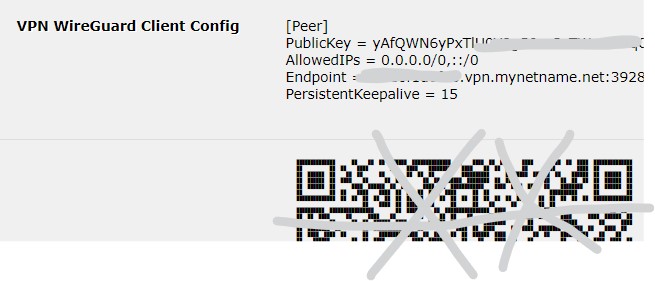
FYI …
Help docs on packages are very limited
When both npk : iot & lora are copied to files … install failed. Was is because now I used tmpfs?
When only iot copied (not tmpfs) .. OK.
Well the iot-7.11rc3 package includes LoRa (Lora comes as submenu of iot in WinBox)
The lora-7.11rc3 package brings again the same lora menu now as top menu. (is redundant? not needed)
Anyone noticed the following issue on HEX(RB750):
As soon as I update to this version all inter vlan printing stops working with Bridge hardware offloading enabled even though hosts can ping the printer. Disabling hardware offloading fixes the issue immediatly but only for a few minutes then all VLANs just stop responding.
Updated to RC because was hoping this fixes other Bridge issues with HW offloading on but seems like this just makes everyting even worse.
Best to create a separate topic with your config and explanation about network setup so others can have a look to make sure it’s not config related.
Worst case you may have to file bug report with your supout.rif to support.
rc2 and rc3 contain some fixes related to Bridge HW offloading but it’s always possible some use case is being missed.
For now I have dowgraded and all is back to normal. Will do some testing with another unit I have and see if I can replicate the issue.
I have asked this question before, and I have issued a support ticket. And I know it has been answered to be related to the client behaving erroneus. Still, it is very annoying. The issue is that my Macbook intermittently looses wifi connection, sometimes only with a few minutes of connection. I manually reconnect and it works again - but disconnects again after a while. The log says:
“9C:3E:53:70:A6:22@Nere-50 disconnected, SA Query timeout, signal strength -46”
Is this “SA Query Timeout” entirely an error by the client, or is my MT HAP-AX3 (running Capsman wifiwave2) doing something not OK here. I have seen forum items explaining why this occurs - but still… Anyone else having the noted the same? Is this something Apple is causing, or does it happen also to other clients? Or is it only my Macbook?
I had similar situation very annoying…I had teams call and suddenly my new Dell with WiFI 6 disconnected from my hap AX3 and immediately connected to the same WiFI. In log was SA Query timeout. I do not think that this is OK
What’s new in 7.11rc4 (2023-Aug-11 12:57):
*) bth - removed from 7.11 for “stable” release, the development will continue in “beta” 7.12;
*) ike1 - fixed Phase 1 when using aggressive exchange mode (introduced in v7.10);
*) poe-out - advertise LLDP power-mdi-long even if no power allocation was requested (introduced in v7.7);
*) sfp - fixed incorrect optical SFP temperature readings (introduced in v7.10);
That´s why I asked again. If maybe something is not handled correctly by Mikrotik in the RC-version, to avoid lots of complaints when rolling out stable 7.11. I have not tested if possibly the same behaviour appears on 7.10.2. I use the RC as I have wifiwave2 and I believe the RC-version is more stable still…
I like that MT is releasing so many RC version till stable. Please keep it that way and do not rush with testing.