No, probably is for this…
http://forum.mikrotik.com/t/severe-security-issue-dhcp-server-scripts-and-ppp-profile-scripts-rights-escalation/169412/1
Since updating to 7.12beta9 I’m having issues with my hAP ac3 that works as WifiWave2 CAP. After a few hours of uptime, some of the devices connected to hAP ac3 stopped having internet connectivity. This issue does not happen to devices connected to my hAP ax3 that is CAP to the same CAPsMAN.
Ticket: SUP-129410
Great work! It works* and there are docs for it, too! “on-message” script works, even UTF-8 encoding passes through okay. “#” wildcard seem to work in quick test.
*minor issues:
- In some quick test (script below), it always seems to lose the first received message. /iot/mqtt/publish side works, since I get those on another host, just the /iot/mqtt/subscribe seem lost the very first one – then fine. Adding delays etc doesn’t seem to change the “first lost” issue.
- Winbox shows the new settings, but seem if you delete at CLI, it doesn’t always get reflected in winbox. Closing windows/reopen shows any removes.
- Perhaps reasonable. But the variable “msgTopic” and “msgData” in the "on-message="are a departure in y’all naming conventions — but the docs has example, and showed camelCase – just example $topic :).
- Related, MQTT subscription message’s broker=/$msgBroker and time=/$msgTime aren’t included in “on-message” While those can be inferred… time= might be different if MQTT was queue’d someplace…
- Log topic is “script” which is normal for the “on-” scripts, but be nice it was under “mqtt” topic for filtering from /system/script etc…
- There is no “disable”, only remove – so no way to for a disconnect/reconnect.
Here was some test code that use the Eclipse’s test server, see https://test.mosquitto.org:
/iot mqtt {
    :local mytopic "mikrotik/mqtt"
    :local myhost "test.mosquitto.org"

    # clear existing message
    # /iot mqtt subscriptions recv clear

    # setup new broker
    brokers add address=$myhost name=mosquitto-test port=1883

    # add subscription with "on-message"
    subscriptions add broker=mosquitto-test topic=$mytopic on-message=":log info \"test \$msgTopic \$msgData\""
    :delay 1s

    # create 10 message with different "seq:" with UTF-8 encoded emoji.
    :for i from=1 to=10 do={
        publish topic=$mytopic broker=mosquitto-test message="{ \"seq\": $i;  \"msg\": \"\F0\9F\A7\90\"}"
        :delay 1s
    }

    # show them on screen
    subscriptions recv print

    # remove out broker (to force a disconnect since test server has timeouts)
    broker remove [find name="mosquitto-test"]
}
which shows the logged messages, except the /subscribe hook doesn’t find the first one.
09-27 19:24:54 script,info test mikrotik/mqtt { “seq”: 10; “msg”: “F09FA790”}
09-27 19:31:16 script,info test mikrotik/mqtt { “seq”: 2; “msg”: “F09FA790”}
09-27 19:31:17 script,info test mikrotik/mqtt { “seq”: 3; “msg”: “F09FA790”}
09-27 19:31:18 script,info test mikrotik/mqtt { “seq”: 4; “msg”: “F09FA790”}
09-27 19:31:19 script,info test mikrotik/mqtt { “seq”: 5; “msg”: “F09FA790”}
09-27 19:31:20 script,info test mikrotik/mqtt { “seq”: 6; “msg”: “F09FA790”}
09-27 19:31:21 script,info test mikrotik/mqtt { “seq”: 7; “msg”: “F09FA790”}
09-27 19:31:22 script,info test mikrotik/mqtt { “seq”: 8; “msg”: “F09FA790”}
09-27 19:31:23 script,info test mikrotik/mqtt { “seq”: 9; “msg”: “F09FA790”}
09-27 19:31:24 script,info test mikrotik/mqtt { “seq”: 10; “msg”: “F09FA790”}
** never notice but the non-printable ASCII gets removed in normal “print” but “print detail” has the \F0\9F\A7\90 still…
But RouterOS did send it:
> mosquitto_sub -t "#" -v
mikrotik/mqtt { "seq": 1;  "msg": "🧐"}
mikrotik/mqtt { "seq": 2;  "msg": "🧐"}
...
mikrotik/mqtt { "seq": 10;  "msg": "🧐"}
The “first” script initiation failure happens because of the “different” MQTT packet sequence. You can inspect it using the WireShark.
Basically, what happens, is that when you do “subscribe” and then “publish” immediately after, RouterOS sends:
- MQTT “connect” packet - to establish MQTT connection.
- MQTT “publish” packet - to send the message.
- And only then MQTT “subscribe” - to subscribe to the topic (which is too late, as the “publish” was already sent before the “subscription” happened).
The correct way would be, to do “subscribe”, then do a manual connect “/iot mqtt connect broker=broker_name”, and then “publish” the message. In this case, the sequence would be:
- MQTT “connect” packet is sent.
- MQTT “subscribe” packet is sent.
- And only then the “publish”.
We will look into Winbox, broker/time variables, and your other suggestions! Thank you for the feedback!
Can you please elaborate on the “There is no “disable”, only remove – so no way to for a disconnect/reconnect.”?
There are:
https://help.mikrotik.com/docs/display/ROS/MQTT#MQTT-Connect
and
https://help.mikrotik.com/docs/display/ROS/MQTT#MQTT-Disconnect
options.
Well I didn’t read the WHOLE page. ;). Adding a “/iot/mqtt/connect broker=” after subscription before publish fixed the “lost first message” problem. Thanks!
But, in my defense, using root /iot/mqtt with a broker= for CLI is kinda odd… I only looked in /iot/mqtt/broker, which is where “connected=yes” is shown – but was documented :).
It also be nice if “connected” status showed as a field in winbox in IoT>MQTT>Broker list. I guess winbox could have connect/disconnect button & show the /iot/mqtt/subscription/recv queue in a tab — but just showing if a broker is connected in winbox that be handy.
Glad to hear it worked!
We will be improving GUI to match CLI configuration options! As of this moment, most of the new MQTT features are just CLI only (for now).
I opened a support ticket [SUP-129558], but I’m going to post it here, too.
On both builds 7 and 9, when attempting to add any kind of dynamic interface (bridge, VLAN, bonds, IPIP/EOIP tunnels, etc.) from within Webfig, I get an error that the interface type is not supported.
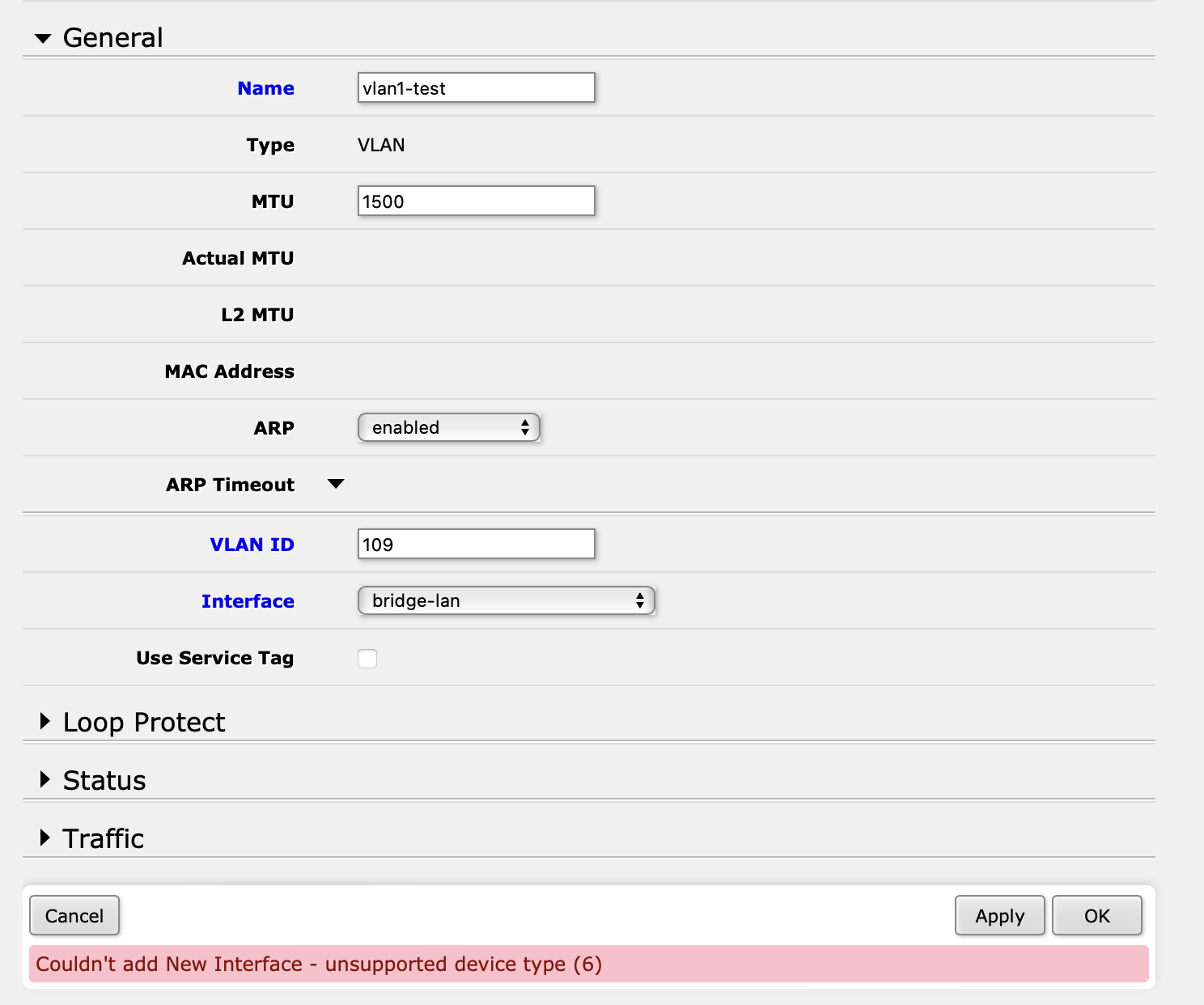
This is happening on hAP AX3 and CCR2116, with completely different base configurations.
@sirbryan hAP ac3 (ww2) also has this issue.
I can confirm it is the same on CCR2216, although the CLI command still works, so it looks like it’s some sort of web ui specific issue.
Yeah, support acknowledged it as well. I did what I needed to with the CLI, but wanted to report it here.
Just dared to install the beta (9) on a CRS309, and sad to report that Ubiquity 10GbE SFP modules are still not recognized correct (model UACC-CM-RJ45-MG, still reported as “RX Loss”, support case open for many months…).
this should be put into the wiki/help pages under “system > packages” 
Just logged in to report that after upgrading to latest 7.12b9 my SFP module refuses to work. It’s like it is not plugged in at all. All is fine after reverting back to 7.11 stable. Not sure if it has been reported before, too many occurences of “sfp” word in this thread to read it all 
                    name: sfp-sfpplus1
                  status: link-ok
                    rate: 2.5Gbps
             full-duplex: yes
         tx-flow-control: no
         rx-flow-control: no
      sfp-module-present: yes
             sfp-rx-loss: no
            sfp-tx-fault: no
                sfp-type: SFP/SFP+/SFP28
      sfp-connector-type: SC
      sfp-link-length-sm: 20km
         sfp-vendor-name: Hisense-Leox
  sfp-vendor-part-number: LXT-010S-H
     sfp-vendor-revision: 1.0
  sfp-manufacturing-date: 22-08-27
          sfp-wavelength: 1310nm
         sfp-temperature: 54C
      sfp-supply-voltage: 3.357V
     sfp-tx-bias-current: 16mA
@forteller, thanks for the feedback!
But we need more details to reproduce this issue in our labs. The sfp-sfpplus monitor actually shows that “status: link-ok”. Can you share supout.rif file when the issue is active and send it to support@mikrotik.com? If not, can you specify what device are you using, show the full output of the monitor command and printout from “/interface ethernet export”?
Please fix bug SUP-125227 and SUP-129944 (traffic from interface unknown to interface unknown) . It is not possible to use firewall due to it.
FWIW, I could not find any docs on this one…
The output comes from the 7.11 firmware and I posted it to show what SFP module I am using. My device is RB5009Upr+S+In. Using 7.12b9 there is no obvious reaction when inserting SFP module. No light, no indication in the winbox that something has been plugged in - there is no checkbox next to “Module Present” in SFP interface status.
Sorry I didn’t make it clear in the first post - I was posting that in a rush
If supout.rif file is going to provide something useful in this scenario, I need to find convenient time to break internet at home again
The supout.rif would be useful, also from the working setup with 7.11. Thanks!
Please someone can take a look to these?
SUP-110463 (http://forum.mikrotik.com/t/hap-ax3-slow-smb-transfers-with-macos-and-apple-tv/165136/1) and SUP-108546 (http://forum.mikrotik.com/t/wireguard-how-to-access-to-smb-active-on-routeros/164645/1)
Thanks
Frankly I would prefer when features like SMB or PROXY were just removed from RouterOS… get a NAS!