@diamuxin, you are correct … I did not fully comprehend the meaning of your comment “You have to delete (uninstall) the existing packages except the “routeros” package, then do the downgrade.”
Please accept my apology … and Thank You …
@diamuxin, you are correct … I did not fully comprehend the meaning of your comment “You have to delete (uninstall) the existing packages except the “routeros” package, then do the downgrade.”
Please accept my apology … and Thank You …
You are welcome.
No problem.
Exact same issue here on CRS328-4C-20S-4S+'s. Downgrading to 7.12.1 fixes it. Only an issue with 1G SFP’s.
after few hours, with the help of chatgpt i modify the backup scripts to
# FTP settings
:local ftpAddress               "192.168.0.100"
:local ftpPort                  "990"
:local ftpUser                  "****"
:local ftpPassword              "***"
:local ftpDestination           "/NAS/Mikrotik"

# System backup settings
:local systemBackupDir "/sd1-part1/"

# Router identity
:local routerOSVersion ("RouterOS_v" . [/system package get number=0 value-name=version])
:local routerBoardModel [/system routerboard get model]

# Clean special characters in model name for filenames
:local cleanedRouterModel [:tostr $routerBoardModel]

# Create backup filenames with timestamp, model, and version
:local currentTime [/system clock get time]
:set currentTime ([:pick $currentTime 0 2] . [:pick $currentTime 3 5])

:local currentDate [/system clock get date]
:set currentDate ([:pick $currentDate 7 11] . [:pick $currentDate 4 6] . [:pick $currentDate 1 3])

:local backupFilenameBackup ($cleanedRouterModel . "_" . $routerOSVersion . "_" . $currentDate . "_" . $currentTime . ".backup")
:local backupFilenameConfig ($cleanedRouterModel . "_" . $routerOSVersion . "_" . $currentDate . "_" . $currentTime . ".rsc")

# Perform system backup for .backup file
/system backup save name=($systemBackupDir . $backupFilenameBackup)

# Export show-sensitive for .rsc file
/export show-sensitive file=($systemBackupDir . $backupFilenameConfig)

# Upload .backup file to FTP
/tool fetch mode=ftp address=$ftpAddress port=$ftpPort user=$ftpUser password=$ftpPassword \
    src-path=($systemBackupDir . $backupFilenameBackup) dst-path=($ftpDestination . "/" . $backupFilenameBackup) upload=yes

# Upload .rsc file to FTP
/tool fetch mode=ftp address=$ftpAddress port=$ftpPort user=$ftpUser password=$ftpPassword \
    src-path=($systemBackupDir . $backupFilenameConfig) dst-path=($ftpDestination . "/" . $backupFilenameConfig) upload=yes
now it works perfectly, i still doesnt now which part before doesnt work with v.7.13
Is this limitation described anywhere? This is crucial information to me, as I have already upgraded hap ac2s to the 7.13, using wireless so far, and will travel soon there to switch to the wave2 package. Well, I could use vxlan tunel probably, or stay with the old wireless package, but was really looking into hassle free station bridge solution 
I tried 7.13 on RBM11g but the scripts don’t work anymore!
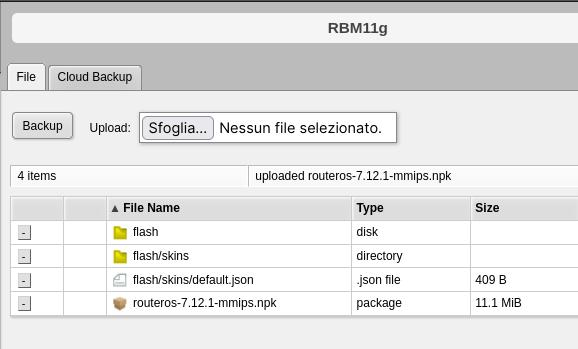
I tried uninstalling the wireless package and downgrading to 7.12.1 but it doesn’t work .
How did you guys do the downgrade?
What script?
PS Do add image to the post use Attachements when in full post mode. Link to other site may go away.
Yes, in wifi documentation, read through replacing ‘wireless’ package section. It’s last item in “lost features”.
I’m getting 1 or 2 reboots a day in my RB5009 since upgrading 7.13, no sup file creation. Though I don’t use VPLS…
It would be interesting to understand what needs to be changed in the scripts to make them work again.
scripts that include the fetch command for telegram
I’m getting 1 or 2 reboots a day in my RB5009 since upgrading 7.13, no sup file creation. Though I don’t use VPLS…
No such thing here.
Stable since update last Friday.
bonding issue on two CCR2004-16G-2S+… downgrade to 7.12.1 seems to help
Also, it is always good to realize that any conversion from “7.13 with routeros+wireless package” to “routeros+wifi_qcom_ac” will always make you lose all configuration of the wifi. There is no attempt to convert even simple configurations like “station connecting to an SSID with a WPA2-PSK password” or “AP with SSID and WPA2-PSK password” into a new configuration after this change.
Of course it would be possible to make a script for that, but it isn’t there. So be careful with remote systems or with routers that you manage via WiFi!
user policy “ftp” is enabled?
is enabled.
I get this from the logs:
fetch,info,debug Download from https://api.telegram.org/bot42558852236:AAR_pTRe0CjksgfdydhdncbvfdtY4/sendMessage to RAM FAILED: Fetch failed with status 400
In the “old” wireless, and even in “wifiwave2” there used to be “country info”, but I am unable to find it in 7.13 with “qcom-ac” drivers.
Am I missing something?
This ?
[a<some_user>@<some_router>] > interface/wifi/radio reg-info country=Belgium
number: 0
ranges: 2402-2482/20
5170-5250/23/indoor
5250-5330/23/indoor/dfs
5490-5710/30/dfs
Yes, just found it 
Reading/searching the doc’s makes miracles
Thanks!
Exciting news! :trollface:
The documentation says my Audience is compatible as well as some other my devices. Starting with audience, removing the wireless package, rebooting, uploading wifi-qcom packages, rebooting and I’m in a boot loop.
Netinstall with 7.13 and install of wifi-qcom packages on a virgin clean device result in another boot loop, the only way out is another netinstall.
Stick to the old wireless package for now…