Did you install the wifi-qcom or wifi-qcom-ac package?
It’s already written, just read.
It is obvious that the user wanted to read what he wanted, and installed the packages at random, without logic.
He didn’t even read/understand the documentation he linked…
Could you elaborate? I read the doc but I may have missed something. If you know what wouldn't it be more helpful (not only for me but for others coming) to point to the mistakes instead of being... that?
I’ve installed both, I guess that was my mistake? What’s the difference between those?
To my understanding wifi-qcom was for 2.4 interfaces while wifi-qcom-ac for 5
wifi-qcom is only for 802.11AX WiFi6 devices. Audience does not support that package.
mazay, the documentation clearly says “wifi-qcom-ac package” not wifi-qcom
here is a video too: https://www.youtube.com/watch?v=AkBIQxi-VKs
Please report the issue to MikroTik support with Supout.rif files created on v7.13 and v7.12.
https://help.mikrotik.com/servicedesk/servicedesk
And for fellow forum users please post with which version the issue is observed, e3372h’s have multiple hardawre nad firmware variants with sufixes -153; -320; -325, so users are aware of which version is affected.
Thank you for the clarification. I must say the naming is rather confusing.
The package name should have been wifi-qcom-ax to be self-explanatory. At the same time wifi-qcom-ac suggests that this is for 5G devices making me think that 2.4 gets lost.
You are correct, at the same time the package names are confusing. I’d suggest renaming it or making it bold in the docs.
Please create and send to support Supout.rif file created after a traffic flow outage has occurred.
https://help.mikrotik.com/servicedesk/servicedesk
Opened a ticket regarding bonding on CCR2004 - SUP-138086. Attached supout.rif
This is getting annoying for me, it’s the same error and reboots I had a few releases ago related with some OVPN issue.

I have not changed anything and I use Telegram in NetWatch and also on home based built scripts. After the upgrade I start getting this message:
RouterOS
12-15 22:39:30 Download from https://api.telegram.org/botxxxxxxxxxxxxxxxxxxxxxxxxxxxxxxxxxxxxxxx/sendMessage?chat_id=-yyyyyyy
instead of the text that I have pre-configured for the alert to send. I use the following command with variables to send alerts:
/tool fetch url=“https://api.telegram.org/bot$token/sendmessage?chat_id=$id&text=$Message”
As soon as I roll back everything starts working as expected.
No problem here with sending to Telegram… And also every other use of fetch is fine.
Very interesting…
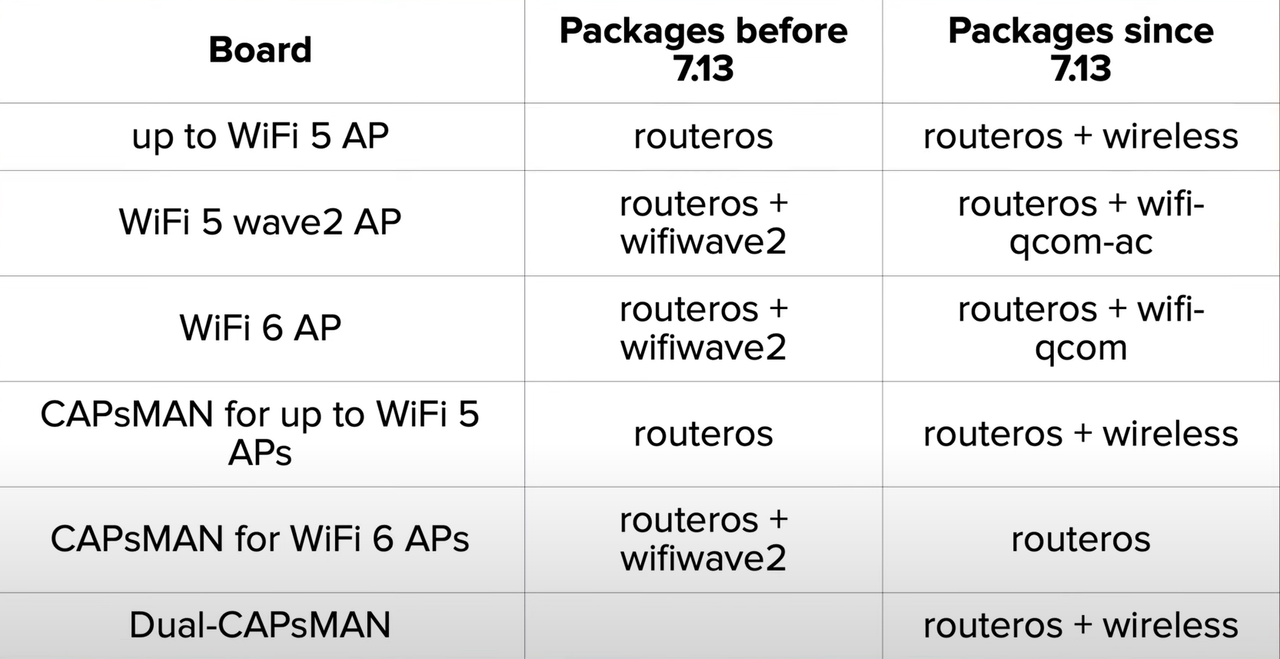
More detailed table http://forum.mikrotik.com/t/7-13-wireless-package-split-question/172049/1
My Telegram script works fine in v7.13
:global tgFunc do={
    :do {
        :local BotToken "XXXXXXXXX:XXXXXXXXXXX-XXXXXXXXXXXXXXXXXX"
        :local ChatID "XXXXXXXXX"
        :local parseMode "HTML"
        :local DisableWebPagePreview true
        :local SendText $1

        /tool fetch url="https://api.telegram.org/bot$BotToken/sendMessage\?chat_id=\
            $ChatID&parse_mode=$parseMode&text=$SendText&disable_web_page_preview=\
            $DisableWebPagePreview" keep-result=no

        :log info "=> Telegram message sent successfully"
    } on-error={
        :log info "=> Telegram message sent failed"
    }
}
BR.
Thanks for an advice. I am aware of that, mostly thinking about new wi-fi r/k/v roaming capabilities / a bit more throughput, being worth a slight hassle setting up vxlan tunnel, splitting radios with hidden SSID for the tunnel transport, etc. I still have it with my hap-ax2s, as initially ROS7 did not support station bridge. Hopefully vxlan solution would work with ac driver too.
I have several scripts like these (they serve to telegram alert temperature and voltage etc. of the LTE modem) and they no longer work:
:global temp2
:global url "https://192.168.5.2:8443/json.htm?username=mE&ghy&l&password=dGMntyhju&type=command¶m=udevice&idx=57&nvalue=0&svalue=$temp2";
/tool fetch keep-result=no url=$url mode=https
:global temp1
:set temp1 55
:global temp (:tostr(:put [/ interface lte at-chat input="at+qtemp" lte1 wait=yes as-value]));
:global tempstring ([:pick $temp 0]);
:global temp2 ([:pick $tempstring 47] . [:pick $tempstring 48]);
:if ($temp2 > $temp1) do= {/tool fetch url="https://api.telegram.org/botx:x/sendmessage?chat_id=-xxx&text=EM160 Warning!!! Temperature is $temp2 Degrees" keep-result=no}