Having package management problems manually updating a hAP ax2 from 7.11.2 → 7.13
Device has routeros-7.11.2 and wifiwave2-7.11.2 packages installed presently. I dropped routeros-7.13-arm64.npk and wifi-qcom-7.13-arm64.npk onto the device and rebooted, and it came back up still on 7.11.2 with the following error log:
missing package wifiwave2
Do I need to manually update to 7.12 before updating to 7.13?
I want to try wifi package outdoor on LHG5 ac. I already try on indoor devices I missing two feature to try outdoor.
First possibility to scan complete list of frequencies not just selected country, because outdoor has lots of devices and some of then, some is maybe wrong word here lots of then not comply country regulation or have licenses and want to avoid that frequencies. Sometime they are were close or overlapping some or allowed frequencies.
Second is possible to select some kind of licensed mode or superchannel mode to can select custom frequencies other manufactured allowed that.
If anyone have idea how can to do that ? Thanks.
When upgrading by using “check-for-updates”, all versions earlier than 7.12 will display 7.12 as the latest available version. Upgrade from v7.12 to v7.13 or later versions must be done through 7.12 in order to convert wireless packages automatically. Fresh installation with Netinstall or manual package installation works in the same manner as always.
That reads to me as manual package installation should just work without any special attention.
If manual installation needs to be stepped to 7.12 before stepping beyond that’s fine, but the release notes should indicate as such.
After upgrading my hAP ax^3 to ROS 7.13 everything works fine, but the front WPS button which previously was solid blue, now blinks in red.
Created a ticket (SUP-137799).
Tried LHG52 with new drivers and it goes up to 600 Mbps, but that was between LHG52 and a mobile phone. I must buy something to try station bridge mode.
Thanks for checking.
Kinda strange since I have WPS completely disabled and as far as I know, this LED can be controlled only via : system leds settings set all-leds-off=immediate
several CRS125-24G-1S-2HnD upgraded to 7.13 without incident. I’m not confident on doing this on the one that runs capsman yet.
map mini upgraded fine to 7.13 which was nice considering how small it is.
RB5009UG+S+ seemed to upgrade fine to 7.13
Hex PoE (RB960PGS) upgraded fine to 7.13
Bad:
cap ac ( RBcAPGi-5acD2nD) had zerotier installed and so did not have enough space to upgrade to 7.13, so rebooted itself back to 7.12.1. I didn’t need zerotier here so removed the package, tried again and the upgrade went fine.
hap ac2 just failed completely. I had to netinstall it and put the configuration back, it’s still running 7.12.1 as not sure that upgrading again will not do the same thing. (I see others were successful so maybe it is my configuration that’s causing the issue.)
A question. I have config collector configured to run export on each router I own, but that does not retain the user credentials or certificates so does not provide a full configuration. What’s the correct way to pull the COMPLETE config of a router, and then to restore the COMPLETE config back from one that has for example the default configuration setup? I may have missed this so please point me at the docs and also in the notes you provide at the top of the posts about new releases provide links to the docs.
ideally I’d like a way to restore using netinstall providing the required ROS version and config, or
have a way to restore the config and boot back to it in a simple operation.
Netinstall (I run on linux so could only use the netinstall-cli) looks good but only works (I think) if you have the netinstall-cli configured on the same layer 2 network where the router is running. At least in my network that’s not possible. So having documentation on how to use netinstall if possible (with some helper functionality / firewall port forwarding etc) would be good and allow me to use this from any router when the netinstall-cli is in a different network. That would avoid me unplugging the “broken router” and moving it somehwere where I can do the netinstall and then putting it back in its intended location.
What is stable as been answered many times here in the forum.
Upgrading a production system just as it has released is just asking for trouble. Wait at leas a week and read all forum threads about it.
You should not upgrade remote system without have a 100% equal system (hardware/software) local to test on. If that goes ok, you may test remote system.
So 100% your fault if some goes wrong.
PS this is the same for Cisco and other brand as well.
I’d tend to agree about running any new “stable” version: If this is for production usage don’t try it where you care about failure scenarios.
I work in a large database environment where generally people are very conservative, but I have a setup where I often do test new versions and run bleeding edge even in production. I tend to do testing/evaluation of new versions where I can handle the failure and revert or workaround the problem easily. That’s good for the vendor as I can provide upstream feedback about issues they have not seen and wait for or get a custom fix if that’s needed. Doing this on more important systems could cause more pain so is often best done later. In the meantime you’re getting familiar with the new functionality/features/performance.
That does not mean of course that you won’t find bugs. All vendors try to test and avoid causing their customers issues but in the end they don’t have the resources to test OUR setups so things will slip through.
What’s most important is having an easy way back and that includes having a “good backup” and a “good restore procedure”. And like any any of these things you MUST test the “restore procedure”. If it doesn’t work the backup is not worth anything … I know my amateur/home setup is not as good in this respect as it could be hence the comment for how to do it better earlier, but for people running this as a business even on routers backups/restores are critical.
Updated
3x hap ac²
1x RB4011+RM
all coming from ROS 6.49.10 long-term via 7.12.1 to 7.13 successfully. I replaced the wireless package with wifi-qcom-ac on all hap ac²s afterwards.
1x hap ax² update was also fine, but it obviously was on ROS 7 already.
Finally made the move to ROS 7 everywhere, so I can now enjoy all the shiny new features, and so far it’s looking great. Had to disable multicast package on RB4011 before being able to upgrade to ROS 7, but apart from some unused default objects popping up in OSPF configuration, the automated config migration was fine.
Wifi experience was great as soon as I figured out the security connect-priority=0/1 option and managed to work around the VLAN limitation.
Now I’m just hoping that VLAN tagging will find its way back into wifi-qcom-ac driver to restore the flexibility it provides.
No issues upgrading for me among CRS328, RB5009, cAP ac, wAP ac, cAP ax, hAP ax²/ax³ - CAPsMAN works like a charm now in a homgeneous fashion.
A couple things I noticed though:
It’s not possible to set 2 GHz band to ax AND n, so in a mixed (ac and ax) setup, you either need to allow all bands or define separate channels.
You need to provide all upgrade packages for download if CAPsMAN automatic upgrade is supposed to work. Otherwise not even the base package gets upgraded.
With CAPsMAN on 7.13 and CAP on 7.12.1, it wasn’t possible to set 2472 MHz as a channel frequency (error). After bringing CAP to 7.13 the error disappeared.
All in all: Nice work, MikroTik! I’m happy and ready for Xmas. Enjoy the holidays!
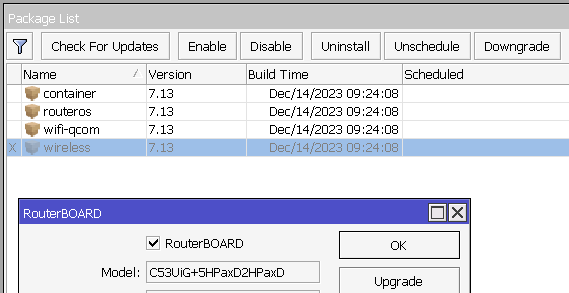
Updated cAP ac, Hap ac, and hap AX^3 (C53UiG+5HPaxD2HPaxD)
Seems to be working fine apart from hap AX^3
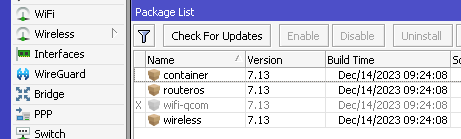
Upgraded it to 7.13 then installed container package, after that tried to install wireless package ( to have capsman).
After reboot wireless is in disabled state, when i try to enable it wifi_qcom package gets disabled not sure why.
Afrer enabling wireless and reboot, WiFi is not accessible and i have both WiFi and Wireless :
Hap ac2 got a cyclic reboot after upgrading from 7.12 to 7.13. The device boots up and after 30-40 sec goes into reboot. Supout file does not allow downloading the reboot occurs before downloading.
I have not found anything in the logs. At the moment of availability I reset the config. After manual settings works.
Installed packages routeros and wireless. Dude not install
 lots of then not comply country regulation or have licenses and want to avoid that frequencies. Sometime they are were close or overlapping some or allowed frequencies.
 )
)